What to Ask Before Adding a New Skill to a Production Agent
Adding a new skill to a production agent should feel less like installing a handy shortcut and more like approving a small operational dependency. A skill can change what the agent reads, what tools it invokes, what evidence it trusts, and what actions it can take on behalf of a team. That is useful only when the boundary is clear.
The right question is not “is this skill interesting?” It is “what changes once this skill is available to the agent, and how will we know if that change is safe?” Use the preflight below before adding a skill that touches customer data, production systems, code repositories, finance workflows, support queues, or regulated documents.
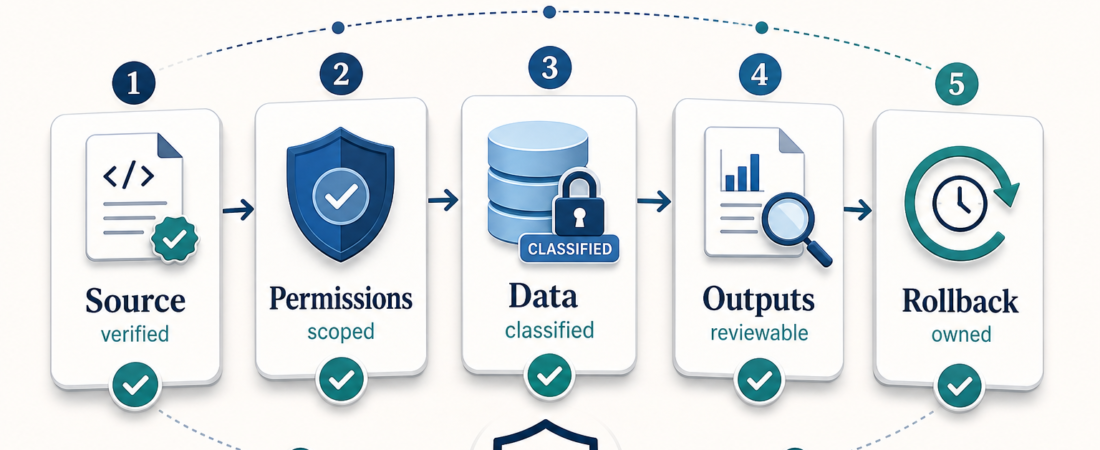
| Preflight area | Question to answer | Evidence to keep |
|---|---|---|
| Source | Can we verify where the skill comes from? | Canonical repo, docs, package, maintainer signal |
| Permissions | What can the agent do after activation? | Tool list, scopes, write paths, approval gates |
| Data | What private or sensitive data can flow through it? | Input classes, storage behavior, retention notes |
| Outputs | What does the skill produce, and how is it checked? | Sample artifacts, tests, logs, review packet |
| Rollback | How do we disable it if behavior is wrong? | Owner, remove path, fallback workflow |
In Short
- Approve production skills by capability change, not by popularity or novelty.
- Check source alignment, permissions, data exposure, output quality, rollback, and human review before install.
- Favor skills that produce evidence: logs, diffs, screenshots, traces, reports, or review packets.
- Use guardrail, approval, and verification skills around risky workflows instead of trusting one skill to police itself.
Who this is for
This guide is for operators, engineering leads, platform teams, security reviewers, and product owners who are moving agent workflows from experiments into repeatable use. It applies whether your agent is reviewing pull requests, triaging tickets, querying product data, preparing document packets, or running release checks.
It is especially useful if your team already has a working agent and now wants to add a new skill from the ASE skill catalog. At that point, the risk is usually not “the agent can do nothing.” The risk is that the agent can do one more thing than your operating model expects.
Decision path
Start with provenance. Find the canonical source, official docs, package registry entry, or maintainer page. A skill page with a clear source is easier to review than one that only has a polished description. If the source is missing, stale, or points to a different project than the skill claims, do not promote it to production until that gap is resolved.
Next, map permissions. Write down the tools, APIs, directories, repositories, or systems the skill expects to touch. Treat read-only access as meaningful access. A database skill can expose sensitive product behavior; a browser skill can view private accounts; a GitHub skill can shape code review even if it does not merge.
Then inspect data flow. Ask what the skill can read, whether it sends data to external services, whether logs contain sensitive values, and whether outputs are stored. If it touches secrets, customer records, credentials, health data, legal documents, financial records, or unpublished product data, the review bar should rise.
After that, test the outputs. A production-ready skill should produce artifacts a human or another system can inspect. For UI work, that might be screenshots and traces from Playwright CLI browser checks. For risky command execution, it might be blocked-action logs from Agent Guardrails. For security review, it might be findings from Agent Audit or prompt-injection tests from garak.
Finally, decide the approval and rollback path before the skill is installed. Who owns the skill? What event requires human approval? How do you disable it? What workflow does the team use while it is disabled? These questions sound dull until the first production incident. Then they are the difference between a quick pause and a long cleanup.
Recommended ASE skills
| Need | ASE skill | Why it helps |
|---|---|---|
| Human approval | HumanLayer approval checkpoints | Routes risky coding-agent work through explicit review before action. |
| Command guardrails | Agent Guardrails | Blocks destructive infrastructure, database, Kubernetes, cloud, and Git commands. |
| Policy coverage | Agent Governance Toolkit | Checks whether risky actions have policy and guardrail coverage before rollout. |
| Prompt-injection review | Prompt Hardener | Reviews prompt, tool, and architecture layers for injection risk. |
| Runtime filtering | LLM Guard | Filters prompts and model outputs for injection, secrets, toxicity, and policy risks. |
| Browser evidence | Playwright MCP server | Collects browser and API evidence for workflows that depend on web state. |
For wider context, pair the checklist with evidence-packet planning and the reminder that some problems should not start with a new skill. For external security framing, OWASP’s Top 10 for LLM Applications is useful when reviewing prompt injection, sensitive information disclosure, insecure output handling, and excessive agency.
What to watch
Watch for skills that require broad credentials before proving value. The safest first version is usually read-only, scoped narrowly, and run against non-production data or a shadow workflow. If a skill needs write access immediately, ask why the task cannot start with draft outputs or human-approved actions.
Watch for impressive summaries with no source trail. Production agents should not only sound confident; they should show what they inspected. Prefer skills that return structured evidence, cite files or records, preserve logs, and make review easier.
Watch for hidden coupling. A skill that calls a CLI, browser, cloud API, local script, and model endpoint may be legitimate, but each dependency adds failure modes. Capture the dependency list and owner in the approval note.
FAQ
Should every new skill go through security review?
Every production skill should get a review proportional to its access. A local formatting helper does not need the same review as a skill that can query customer data or run infrastructure commands, but both should have a named owner and a rollback path.
Is a popular skill safe to install?
Popularity is a signal, not a decision. It can justify taking a closer look, but source alignment, permissions, data flow, and test evidence matter more for production adoption.
What is the safest way to pilot a skill?
Start read-only, narrow the scope, run against sample or shadow data, require human approval for writes, and keep the first outputs reviewable. Promote only after the skill produces useful evidence repeatedly.
When should we reject a skill?
Reject or defer it when the source cannot be verified, permissions are broader than the job requires, sensitive data handling is unclear, outputs cannot be checked, or nobody owns rollback.