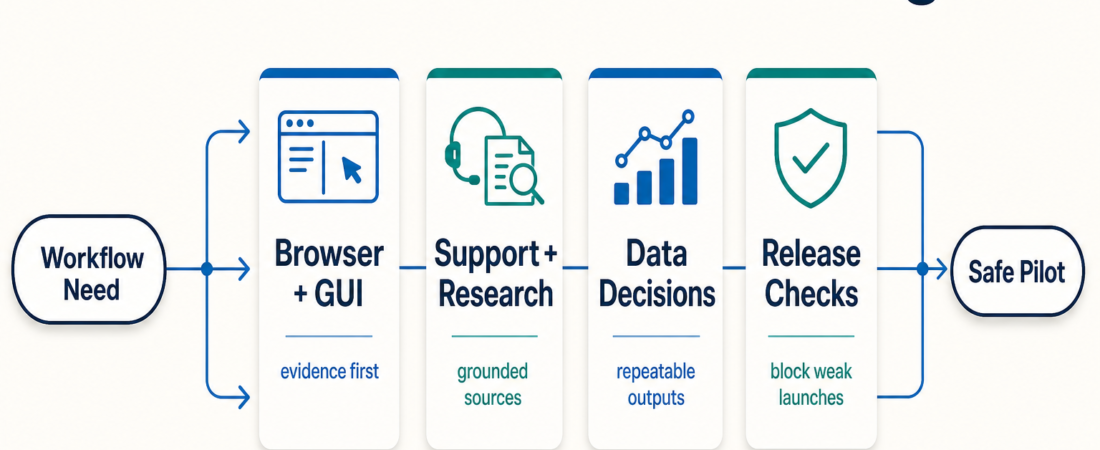
What Changed on ASE This Week: Practical Skills Worth Trying First
In Short
- This week’s practical ASE story is skill routing: browser tasks, grounded support and research, and operator-friendly data work each need a different first skill.
- Recent skill spotlights covered Nanobrowser, OmniParser, DocsGPT, and the data decision path across PandasAI, DuckDB, and Metabase.
- The newest catalog additions also point toward practical operator workflows: GUI agents, project memory, RAG infrastructure, retrieval evaluation, and agent release checks.
- The safest way to use the update is to pick one workflow gap, test one skill on a narrow task, and keep a human review checkpoint before production use.
| Route | Try first | Watch before widening access |
|---|---|---|
| Browser and GUI work | Nanobrowser for local browser tasks; OmniParser when selectors are not enough. | Ambiguous screens, login state, destructive clicks, and evidence capture. |
| Support and research | DocsGPT, Kotaemon, Khoj, or Basic Memory depending on source shape. | Stale documents, missing citations, private data boundaries, and escalation rules. |
| Data and analytics | PandasAI for CSV questions, DuckDB for local SQL, Metabase for shared dashboards. | Read-only scope, data freshness, repeatability, and governance. |
| Agent release checks | RagaAI Catalyst, Future AGI, Prompt Flow, or similar evaluation skills. | Trace quality, regression datasets, guardrails, and human sign-off. |
This week’s ASE update is less about a single new feature and more about a better starting point for operators. The catalog has enough skills now that “what is new?” is not the most useful question. The better question is, “Which skill should I try first for the workflow I actually run?”
That is the thread running through the latest posts and additions. Browser automation is splitting into deterministic selectors, local browser agents, and vision-based GUI parsing. Support and research workflows are separating document-grounded assistants from open-ended research agents. Data work is separating quick spreadsheet exploration from repeatable local SQL and shared business intelligence. Release readiness is moving toward traces, simulations, and reviewable evidence instead of one-off confidence.
For a marketplace like AgentSkillExchange, that is healthy. Operators should not have to read every skill page to find the first safe pilot. They should be able to browse skills, scan categories, check industry collections, and quickly narrow the choice to one or two practical candidates.
Who this is for
This weekly update is for operators, builders, and small teams using ASE to choose skills for real work: browser QA, client workflow checks, support knowledge lookup, research packets, product analytics, finance ops, or agent release review. It is also useful if you maintain an internal agent stack and need a simple rule for when to add a new capability.
If you want a broad catalog tour, start with the browse page. If you already know the business area, start with Industry Skills. If you are comparing adoption signals, read the recent post on Skill of the Day, Featured Skills, and Trust Signals before treating stars or recentness as proof of fit.
Starter workflow
A practical weekly skill review can be short. Pick one job, route it to a category, choose one skill, and run a small test with evidence. That is more useful than installing five new skills because they appeared recently.
- Write down the job in plain language: “check a client checkout flow,” “answer support questions from internal docs,” “inspect CSV exports,” or “evaluate an agent release.”
- Choose the route: browser automation, document-grounded assistance, data analysis, retrieval infrastructure, release evaluation, or project memory.
- Open one to three ASE skill pages and check source, setup, permissions, and output shape. A good first skill should produce reviewable artifacts: logs, cited answers, SQL, traces, screenshots, or a checklist.
- Run the smallest useful pilot. Use read-only data, a staging account, a copied document set, or a non-destructive browser task.
- Keep it only if it improves evidence quality or reduces repeat manual work. Drop it if it mainly creates another place to supervise.
Recommended ASE skills
| Skill | Good first use | Why it matters this week |
|---|---|---|
| UI-TARS Desktop | Explore computer-use workflows that need a multimodal view of desktop or browser state. | It gives the browser and GUI route a broader local-operator option beyond web-only automation. |
| Nanobrowser | Run a bounded local browser task where the operator controls credentials and model keys. | This week’s spotlight made the browser route more concrete for agency QA and lead research. |
| OmniParser | Parse screenshots into UI elements when selectors are brittle, unavailable, or misleading. | It clarifies where vision helps and where deterministic checks should still come first. |
| DocsGPT | Build a private assistant over support docs, course material, internal research, or policy documents. | It is a good default when the job is grounded answers, not open-ended browsing. |
| pgvector | Store embeddings near application data for RAG, memory, recommendations, or semantic search. | It is practical for teams that already trust Postgres and want less retrieval infrastructure sprawl. |
| FlagEmbedding | Evaluate embedding and reranking choices before committing to a retrieval stack. | It keeps RAG work from becoming a vibes-only model pick. |
| RagaAI Catalyst | Instrument agent runs, collect traces, and inspect regressions before deployment. | It points toward a stronger release discipline for agent workflows. |
| Basic Memory | Give MCP-capable clients a local Markdown knowledge graph for reusable project context. | It is a low-friction way to preserve context without turning every project into a full database build. |
Browser automation: route by evidence quality
Browser work is no longer one bucket. A deterministic browser test is still the right first move when selectors, URLs, and expected states are stable. ASE already has strong options such as Playwright MCP and Stagehand for teams that want a mix of browser control and code-level repeatability.
Nanobrowser and OmniParser are useful in different places. Nanobrowser fits local multi-step web tasks where the operator wants to control browser state and LLM keys. OmniParser fits visual interpretation: screenshots, controls, and GUI elements that a selector-only workflow may not understand. That does not make vision the default. It makes vision a second route when the normal route cannot collect enough evidence.
The operator checkpoint is simple: before allowing a browser skill to act on anything valuable, ask what artifact it can return. Screenshots, traces, clicked element descriptions, network evidence, and a clear blocked state matter more than a confident final sentence.
Support and research: start with source hygiene
DocsGPT is the clearest practical pick this week for document-grounded assistants. It fits support knowledge bases, internal documentation, course material, and research notes where the useful output is a cited answer. It should not be treated as a generic replacement for support judgment. The value is faster lookup plus source context that a human can verify.
The same route includes other recent catalog additions. Kotaemon is a self-hosted document QA option. Khoj fits scheduled research and private knowledge workflows. Basic Memory is useful when the corpus is project notes and the operator wants local-first continuity.
The main risk is stale or messy source material. A grounded assistant is only as useful as its document set, permissions, and citation behavior. Before piloting one, remove obsolete docs, decide what should never be indexed, and write down when the assistant must escalate instead of answering.
Data work: pick the interface that matches the decision
Yesterday’s comparison across PandasAI, DuckDB, and Metabase is the data route in miniature. Use PandasAI when a person has a CSV or spreadsheet and wants fast conversational exploration. Use DuckDB when the work needs repeatable local SQL over files such as CSV, Parquet, or JSON. Use Metabase when the question should become a shared dashboard, alert, or business review surface.
That distinction matters because “ask the data” can mean three very different operating modes. A finance operator checking a vendor export may need a quick PandasAI pass. A data analyst investigating product events may need DuckDB queries that can be saved and reviewed. A support or product lead tracking a metric every week probably needs Metabase or another governed BI surface.
Do not skip the access boundary. Read-only data, copied extracts, explicit retention rules, and repeatable query output are the minimum bar before bringing agents near product or finance data. The recent guide on choosing a read-only database skill is still the right companion piece here.
What to watch
- Recent does not mean ready. New skills are worth testing first only when they match a narrow workflow and return evidence you can inspect.
- Do not mix source signals with workflow fit. GitHub stars, packages, and docs help after you confirm the skill is for the job you actually need.
- Keep browser actions reversible. Use staging accounts, copied data, and explicit human confirmation before destructive clicks.
- Treat RAG as an information-quality workflow. Retrieval skills need corpus hygiene, citation checks, and stale-document handling.
- Make release checks blockable. Evaluation skills are useful only if their traces, simulations, or guardrails can stop a launch when evidence is weak.
FAQ
What is the fastest way to use this week’s update?
Pick one job from your current workflow and route it to one skill family: browser, support/research, data, memory, retrieval, or release evaluation. Test one skill on a narrow task and keep the output reviewable.
Should I install every newly added ASE skill?
No. Treat recent skills as a shortlist, not a to-do list. Install only the ones that solve a current workflow problem and can run within your permission boundaries.
Which skill should a small team try first?
For most small teams, start with a low-risk workflow: document-grounded answers with DocsGPT, local CSV analysis with PandasAI or DuckDB, or browser QA with Playwright MCP or Nanobrowser in a staging context.
How should I compare two skills that look similar?
Compare source, setup cost, data access, output artifact, repeatability, and failure behavior. A skill that returns inspectable evidence is usually a better first pilot than one that only produces a polished summary.