How to Choose a Read-Only Database Skill Before Letting Agents Query Product Data
In Short
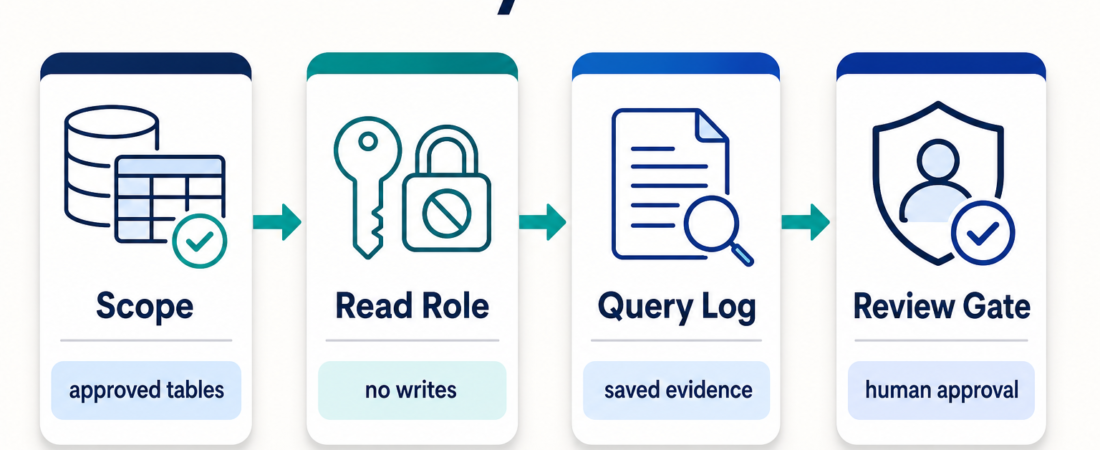
A read-only database skill is not safe just because it cannot write rows. Product data can still expose customer behavior, private fields, pricing signals, and launch evidence. Choose the skill by the workflow you want, then constrain the database role, tables, query budget, and review path before connecting an agent. For most teams, the right first setup is a narrow analytics replica, a read-only role, saved query logs, and a human review gate before conclusions become product decisions.
| Boundary | Operator question | Acceptable answer |
|---|---|---|
| Scope | Which data can the agent see? | Approved tables, views, and columns only |
| Permission | Can it change state? | Read-only role, no DDL, no writes |
| Evidence | Can you inspect what it ran? | Saved SQL, timestamps, row counts, and result notes |
| Review | Who checks conclusions before action? | Product, data, or ops owner signs off |
Who this is for
This guide is for product managers, growth operators, founders, and data-adjacent engineers who want an agent to answer practical questions from product data: which onboarding step drops users, whether a rollout changed activation, why a dashboard moved, or what customer segment needs follow-up. It is also for teams browsing ASE skills and deciding whether a database connector belongs in a daily workflow.
The goal is not to make the agent a database administrator. The safer starting point is narrower: let it inspect approved analytics data, produce evidence, and hand a reviewable note to the human who owns the decision.
Decision path
Start with the question, not the connector. If the question is exploratory and local, a file-backed or embedded analytics skill such as DuckDB SQL Analytics Agent may be enough. If the question needs governed product metrics, a dashboard-oriented skill such as Metabase Open Source Business Intelligence and Embedded Analytics may keep the workflow closer to existing reports. If the agent needs live PostgreSQL context, compare Postgres MCP Pro, Postgres MCP Pro Server for Database Analysis and Tuning, and the PostgreSQL MCP Server against the permission model you can enforce.
When the workflow spans product analytics and rollout evidence, connect the database choice to the broader Product Analytics & Growth Ops collection. For example, PostHog Product Analytics and Feature Flags SDK may answer event and rollout questions better than raw SQL. For teams that need preapproved database operations rather than open-ended SQL, MCP Toolbox is worth considering because it encourages named operations over ad hoc database access.
Recommended ASE skills
| Skill | Best first use | Boundary to verify |
|---|---|---|
| Postgres MCP Pro | Live PostgreSQL analysis and tuning questions | Read role, schema scope, query timeout |
| PostgreSQL MCP Server | General MCP access to Postgres context | No write-capable credentials in agent config |
| MCP Toolbox | Approved database operations exposed as tools | Named operations, not arbitrary SQL |
| DuckDB SQL Analytics Agent | Local analysis over exports, CSVs, and parquet | Freshness and export handling |
| Metabase | Dashboard-backed product questions | Report definitions and dashboard permissions |
| PostHog | Event, funnel, and rollout evidence | Event taxonomy and privacy scope |
Starter workflow
First, create a database role that can only read the views the workflow needs. Prefer views over raw production tables when possible, especially if the raw tables contain emails, tokens, billing fields, support notes, or private account metadata. Do not give the agent your personal admin credential and rely on prompts to behave.
A good first view is boring on purpose. It may include anonymized account IDs, event names, timestamps, plan tier, country, feature flag exposure, and coarse lifecycle state. It should usually exclude free-text notes, raw email addresses, access tokens, payment details, and anything the operator does not need for the question at hand. If the agent needs to join across tables, define that join in a view or documented query pattern instead of letting every session rediscover the warehouse from scratch.
Second, define the question format. A useful product-data prompt should ask for the SQL or tool call, the tables inspected, the time window, row counts, assumptions, and a short conclusion. If the result will influence a launch, pair it with the launch evidence model in Feature Flags, Analytics, and Smoke Tests.
The prompt should also require the agent to say when the data cannot answer the question. That sentence matters. Product datasets often lack intent, cause, or qualitative context. A query can show that activation dropped after a change, but it cannot prove why users behaved differently unless the workflow also checks release notes, support tickets, session replay, experiment setup, or customer interviews. The right database skill makes uncertainty visible instead of smoothing it away.
Third, keep a query log. This can be as simple as a saved Markdown note with SQL blocks, result summaries, and links to the dashboard or issue where the decision was made. The point is accountability: another person should be able to reconstruct how the agent reached its answer.
Fourth, review before action. Read-only access prevents direct writes, but it does not prevent bad interpretation. A confident summary from the wrong table can still send a team in the wrong direction. Treat the agent output as an evidence packet, not a verdict.
Finally, choose the smallest repeatable workflow before widening access. A weekly activation review, a rollout anomaly check, or a support-to-product trend note is easier to govern than an open-ended instruction to “analyze product data.” Once the narrow workflow is useful, expand by adding one approved view, one saved query pattern, or one review owner at a time. This keeps the access model understandable as the team gains trust in the process.
What to watch
- Credential drift: a read-only plan fails if someone later swaps in a broader credential for convenience.
- Hidden sensitive fields: product tables often contain more personal or commercial data than their names suggest.
- Expensive queries: read-only does not mean harmless if queries can lock resources or scan huge tables during peak traffic.
- Metric ambiguity: activation, churn, usage, and revenue fields often need business definitions outside the database.
The external references worth keeping close are the PostgreSQL GRANT documentation for role design and the Model Context Protocol documentation for understanding how MCP servers expose capabilities to clients.
The practical test is simple: if the agent’s answer would be pasted into a launch review, renewal discussion, pricing meeting, or roadmap decision, the source trail should be strong enough for someone else to challenge it. That means the workflow should preserve the original question, the scoped data source, the generated SQL or named tool call, the result sample, and the human decision made afterward. Without that trail, read-only database access becomes another form of unreviewed automation.
FAQ
Is read-only database access safe enough for production data?
It is safer than write access, but it is not enough by itself. You still need scoped tables or views, query limits, logging, and a review path for conclusions.
Should agents query the primary production database?
Usually no. Start with analytics replicas, warehouses, read replicas, exports, or dashboard layers. Use primary production access only when there is a clear operational reason and strict limits.
When should I choose a dashboard skill instead of SQL access?
Choose a dashboard skill when the team already trusts the metric definitions and wants explanations around existing reports. Choose SQL access when the task requires source-level investigation and the access boundaries are clear.
What should block rollout?
Block the workflow if credentials are too broad, sensitive columns are exposed without need, queries are not logged, or no human owner is responsible for reviewing the result.