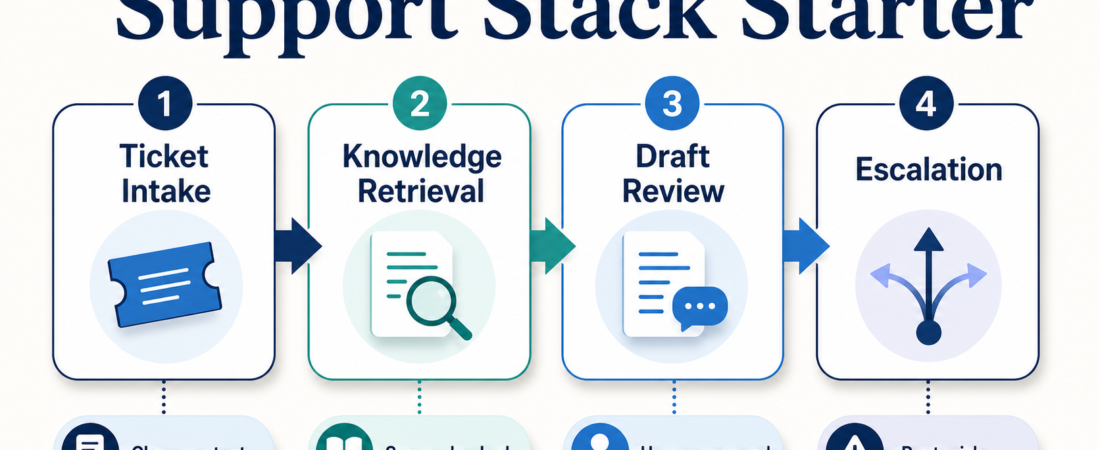
A Starter Stack for Support Teams With Too Many Docs and Too Many Tickets
Support teams rarely fail because they lack one more chatbot. They struggle because tickets, help-center articles, product notes, account context, and past conversations sit in different places. When an agent sees only the ticket, it guesses. When it sees every system without boundaries, it can overreach.
A useful support stack starts smaller: retrieve the right source material, inspect the ticket thread, draft a reply with citations or reasoning, and keep a person in the approval loop. The goal is not instant autonomous support. It is faster triage, cleaner drafts, and fewer cases where an agent answers from memory instead of evidence.
| Layer | Operator question | Best handoff |
|---|---|---|
| Ticket intake | What is the customer asking, and what changed? | Clean summary, urgency, missing fields |
| Knowledge retrieval | Which docs or prior cases support the answer? | Source-backed notes, not a freeform answer |
| Draft response | What should the agent propose? | Reviewed draft with citations and caveats |
| Escalation | When should a human or specialist take over? | Clear routing reason and evidence packet |
In Short
For support teams with too many docs and too many tickets, start with a bounded stack: ticket inspection, document-grounded retrieval, reply drafting, and escalation. Do not begin with full automation. Begin with better context assembly and reviewed drafts.
On ASE, a practical starting set is DocsGPT for document-grounded enterprise assistants, a helpdesk connector such as Zendesk ticket and Help Center workflows or Freshdesk ticket workflows, and a conversation-history skill such as Help Scout conversation search. Add broader document search only after the source set is clean.
Who this is for
This guide is for support leads, customer success operators, founders, and internal-tool builders who already have a helpdesk and a knowledge base but still see agents produce shallow or stale replies. It fits teams using Zendesk, Freshdesk, Help Scout, Chatwoot, or a similar ticketing system, especially when support knowledge is spread across product docs, help-center articles, runbooks, and old tickets.
It is also for teams that want agent assistance without turning support into an uncontrolled auto-reply system. If refunds, account changes, regulated claims, privacy requests, security incidents, or angry customers are common in the queue, the first version should assist agents and human reviewers. It should not close tickets on its own.
Starter workflow
1. Normalize the ticket before asking for an answer. Start by stripping quoted history, signatures, and duplicated email content so the agent sees the current customer problem. For email-heavy queues, Strip quoted email history and signatures can keep summaries focused on the new reply. The first output should be a short case brief: customer ask, product area, urgency, known account facts, and missing information.
2. Inspect the helpdesk system with narrow permissions. If Zendesk is the system of record, use Connect MCP agents to Zendesk ticket and Help Center workflows to keep the agent close to ticket state and help-center material. For Freshdesk teams, Let MCP agents inspect and update Freshdesk tickets safely is the better starting point. Keep write actions off or review-gated until the team has seen enough examples.
3. Ground the answer in documents, not memory. A customer-facing answer should cite the policy, doc, previous case, or product note that supports it. DocsGPT is useful when the team needs a document-grounded assistant over internal or customer-facing knowledge. If the source corpus grows beyond a simple docs set, Morphik document search layers can support broader retrieval workflows.
4. Draft, then review. The agent draft should include the proposed reply, the sources used, assumptions, and anything it could not verify. For Help Scout teams, Search Help Scout conversations and thread context before drafting support replies is valuable because prior conversation context often changes the right tone and next step.
5. Escalate by rule, not vibe. Create explicit escalation triggers: billing disputes, security issues, account deletion, legal language, health or financial claims, repeated failed replies, VIP accounts, and requests that conflict with policy. A support stack is working when it makes escalation faster and better evidenced, not when it hides edge cases behind confident wording.
Recommended ASE skills
| Skill | Use it for | Start with |
|---|---|---|
| DocsGPT for document-grounded enterprise assistants | Answering from internal docs and knowledge bases | Read-only retrieval with source notes |
| Zendesk ticket and Help Center workflows | Inspecting Zendesk tickets and support articles | Ticket summaries before updates |
| Freshdesk ticket workflows | Freshdesk ticket context and controlled updates | Review-gated draft actions |
| Help Scout conversation search | Finding prior thread context before drafting | Conversation summaries with caveats |
| Claude Code support ticket triage | Routing tickets and producing reviewed response drafts | Triage labels and draft packets |
| Morphik document search layers | Searching larger document sets behind support workflows | Retrieval with source links |
For open-source helpdesk teams, Chatwoot omnichannel support may also belong in the evaluation set. Treat it as a system choice first and an agent workflow choice second.
What to watch
Stale docs create confident wrong answers. If the knowledge base is out of date, an agent will make the stale answer easier to send. Assign ownership for article freshness before expanding automation.
Write access changes the risk profile. Reading tickets, summarizing, and drafting are low-friction starting points. Updating customer records, issuing credits, changing subscriptions, or closing tickets should require policy checks and human approval.
Conversation history can leak sensitive context. A prior thread may contain private account data, internal notes, or unrelated customer information. Keep retrieval scoped to the current customer and ticket family.
Measure the boring outcomes. Track handle time, reopen rate, escalation quality, source coverage, and reviewer edits. If reviewers rewrite every draft, the stack is not ready for broader rollout.
FAQ
Should a support agent auto-send replies?
Usually not at first. Start with reviewed drafts and only consider auto-send for narrow, low-risk cases with strong policy coverage and rollback paths.
Is DocsGPT enough by itself?
No. DocsGPT can ground answers in documents, but support work also needs ticket context, account state, prior conversation history, and escalation rules.
Which helpdesk connector should I choose?
Choose the connector for the system your team already uses. Zendesk, Freshdesk, Help Scout, and Chatwoot workflows differ enough that the system of record should drive the first integration.
What is the first safe pilot?
Pick one queue, one product area, and one output: a ticket summary plus a source-backed draft. Review every draft for two weeks before expanding scope.