How to Compare Two Skills That Claim to Do the Same Job
Two agent skills can sound identical from a search result. Both may promise browser automation, document parsing, database access, issue triage, or release checks. The useful question is not which one has the bigger claim. It is which one gives your agent the clearest, safest path from a real task to a reviewable result.
Use this comparison method when you are choosing between similar skills on ASE, especially when the skill will touch source code, customer data, production systems, or documents that need careful handling.
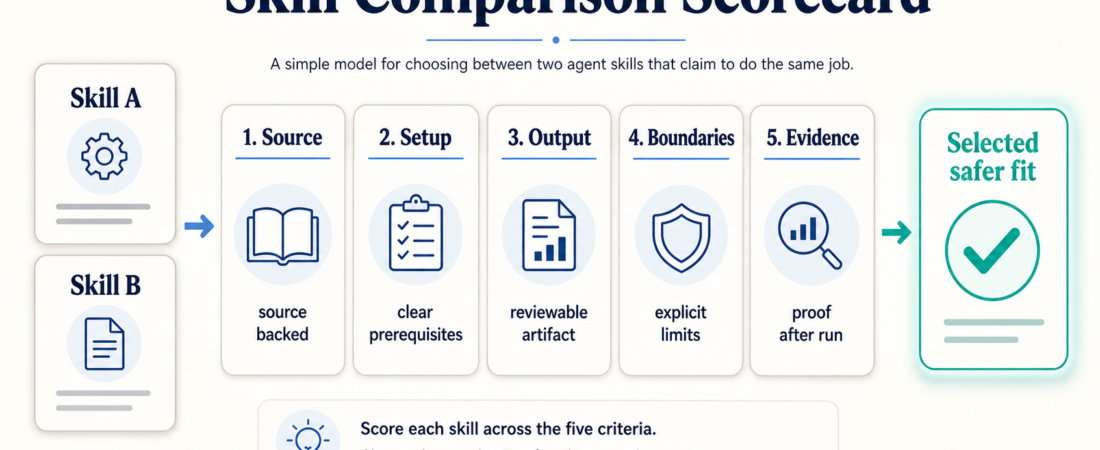
| Check | What to compare | Better signal |
|---|---|---|
| Source | Repo, docs, package, maintainer | Direct source link with current activity |
| Setup | Install path, auth, local services | Clear prerequisites and bounded permissions |
| Output | What the agent returns or changes | Artifacts you can inspect, test, or reverse |
| Boundary | What the skill refuses to do | Explicit limits, escalation, and gotchas |
| Verification | Evidence after the run | Logs, screenshots, tests, links, or diff summary |
In Short
When two skills claim to do the same job, compare them by evidence, not by description alone. Start with the source. Then check setup cost, output shape, permission boundaries, and verification artifacts. A strong skill is easier to inspect, safer to run, and clearer about what it does not cover.
For example, several browser automation skills may help an agent operate a web page, but Microsoft Playwright MCP, Auto Browser, and Nanobrowser are not interchangeable. They differ in runtime assumptions, supervision model, security posture, and how easy it is to capture evidence from a run.
Who this is for
This guide is for operators, team leads, and builders who browse ASE with a job in mind: test a product flow, summarize documents, query a data source, triage issues, or ship a release check. It matters most when the skill can read private material, execute commands, open authenticated sessions, or change files.
Decision path
1. Compare source alignment first. Open the ASE skill page and look for the upstream source. A source-backed page lets you inspect the repo, package, or documentation behind the skill. For GitHub-backed tools, check releases, issues, and recent commits. For package-backed tools, use registry pages such as npm’s package metadata when relevant.
A skill with fewer stars but a precise, current source can be a better choice than a popular-sounding skill with vague provenance. ASE’s trust model is intentionally simple: source-backed and security-reviewed signals matter more than decorative badges. The related post on source alignment as a ranking signal explains why this is a quality input, not a vanity metric.
2. Check the setup surface. Ask what has to exist before the skill can work: a browser extension, local MCP server, API key, project checkout, database URL, or cloud account. A good setup section states prerequisites and bounded permissions.
3. Compare the output, not just the action. Two document skills might both say they extract content. One may produce Markdown, another structured JSON, another searchable chunks. In document work, compare Zerox, LlamaCloud Services, and Microsoft MarkItDown by the artifact your reviewer needs, not by the broad phrase “document parsing.”
4. Look for boundaries and gotchas. Strong skills say when not to use them. They name auth risks, destructive operations, stale docs, unsupported formats, rate limits, and escalation points. If a skill claims to automate a sensitive area but never describes failure modes, treat that as missing information.
5. Prefer skills that leave evidence. For browser QA, screenshots, traces, and failing selectors are useful. For database work, read-only queries and saved SQL are useful. For code changes, diffs, tests, and links to issues are useful. A skill that only says “done” is harder to trust than one that returns something a human can inspect.
Recommended ASE skills
Use these examples as comparison anchors, not universal winners. For browser and product checks, compare Microsoft Playwright MCP with Playwright CLI for coding agents when you need repeatable tests and evidence. Add Nanobrowser to the comparison when the job is broader local browser operation.
For document intake, compare Zerox, LlamaCloud Services, and MarkItDown by input type, output format, hosting model, and review packet fit.
For data analysis, compare DuckDB SQL Analytics Agent with PandasAI for CSV and spreadsheet analysis. One may fit SQL-first analytics better; the other may fit conversational exploration over tabular files. For issue work, compare Turn GitHub Issues into Fix PRs with GitHub issue triage before letting an agent move from classification into code changes.
What to watch
Do not overfit to popularity. Stars, downloads, and familiar names are useful hints, but they are not substitutes for fit. The best skill for a team is often the one with the clearest source, smallest permission footprint, and most inspectable output.
Be careful with duplicate-looking skills from the same upstream project. One may expose a CLI, another an MCP server, another a narrower operator checklist. If the distinction is unclear, browse the source and choose the one with the least ambiguity.
Also watch for skills that make a broad production promise without a rollback path. Any skill that deploys, writes to a database, sends messages, labels customer tickets, or files public issues should make human review and recovery obvious.
FAQ
Should I always choose a security-reviewed skill?
Prefer it when the task has meaningful risk. For harmless exploration, a listed skill may be fine if the source is clear and the setup is contained. For private data, production systems, browsers, databases, or code changes, security-reviewed status should carry real weight.
What if two skills use the same upstream project?
Compare the wrapper, not just the project. Look at the trigger description, prerequisites, commands exposed to the agent, gotchas, and expected output. The safer skill is usually the one that narrows the job and explains its boundaries.
How many skills should I install for one job?
Start with one primary skill and one verification path. Installing several overlapping skills can make activation less predictable. Add another only when it covers a distinct gap: a different input type, a stronger evidence artifact, or a safer runtime boundary.
What is the fastest comparison rule?
If you only have two minutes, ask: which skill has the clearer source, the smaller setup surface, and the more reviewable output? That short test catches most bad choices before they become operational problems.