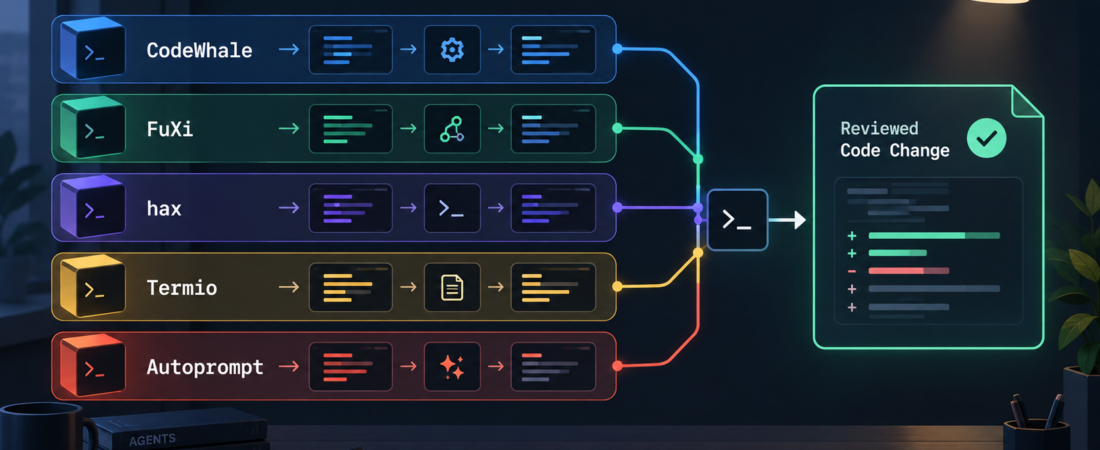
CodeWhale, FuXi, hax, Termio, or Autoprompt: Picking a Terminal Agent Stack
Terminal coding agents are easiest to compare when you stop asking which one is best and start asking what role the tool should play in the operator loop. Some teams want a single local agent that can edit files, run tests, and respect approvals. Others need provider routing, low-resource sessions, project-scoped session control, or a coordinator that turns one goal into a reviewed sequence of agent tasks.
This guide uses the queue topic’s five tools as the comparison set: CodeWhale, FuXi, hax, Termio, and Autoprompt. The goal is not a leaderboard. It is a practical decision path for operators choosing a terminal agent stack that can stay inspectable under real repository work.
| Need | Start with | Operator check |
|---|---|---|
| One terminal coding lane | CodeWhale | Approvals, tests, and file diffs stay visible |
| Provider choice | FuXi | Model routing does not hide cost or quality tradeoffs |
| Small local footprint | hax | Transcripts and shell commands remain easy to review |
| Multiple project sessions | Termio | Session ownership and handoff state are explicit |
| Coordination loop | Autoprompt | Planning, delegation, review, and verification are bounded |
In Short
Pick CodeWhale when you want the main terminal coding agent to own repository edits, test repair, approval-gated commands, MCP tools, skills, and hooks in one local lane. The CodeWhale source is the starting point for checking its current capabilities and setup path.
Pick FuXi when the important question is provider routing: which model should run a task, what the session costs, and how the operator switches between hosted and local options. Use the FuXi site and its linked materials as the source of record. Pick hax when the environment is constrained or the team wants a lightweight terminal-native layer; the hax site is the official starting point. Pick Termio when the problem is session control across project-scoped CLI agents; its session-control docs describe the intended workflow. Pick Autoprompt when the task needs a coordination loop across coding agents; use the Autoprompt source to inspect the supported pattern.
Who this is for
This is for operators who already use coding agents in a terminal and are trying to make the setup less ad hoc. It fits small engineering teams, AI agency delivery teams, internal platform groups, and solo builders who need local control over files, commands, context, and review evidence.
It is also for teams that have outgrown a single chat window. Once multiple agents, model providers, local machines, or long-running sessions enter the workflow, the hard problem becomes coordination. A useful terminal stack should make it clear who owns the change, which commands ran, what evidence passed, and where a human approved or rejected the result.
Decision path
Start with the work shape. If the task is one repository, one operator, and a normal edit-test-review loop, start with Run CodeWhale terminal coding agent workflows. It is the direct choice when the operator wants a local terminal coding agent to edit files, run checks, and keep approval-gated operations visible.
If the team cares more about model choice than about session fan-out, look at Run provider-agnostic terminal coding sessions with FuXi. That route fits teams testing different providers or balancing cost, latency, and capability. The decision checkpoint is whether model switching is explicit enough that reviewers can understand why a specific agent produced a specific change.
If the machine or workflow is intentionally small, choose Run resource-constrained terminal coding sessions with hax. This is the better first test when the operator wants low overhead, shell-visible commands, and transcripts that are easy to inspect after the run.
If the problem is not the agent itself but the number of sessions, use Coordinate project-scoped CLI agent sessions with Termio. Termio belongs where an operator needs to list, watch, spawn, send to, read, and close sibling coding-agent sessions without losing project scope.
If the recurring problem is planning and handoff, add Run Autoprompt coordination loops across coding agents. Autoprompt is the coordination fit when the operator wants a goal broken into planned, delegated, reviewed, and verified work across supported agent runtimes.
Recommended ASE skills
Use the required queue skills as the stack. CodeWhale is the main terminal coding lane. FuXi is the provider-routing lane. hax is the low-overhead lane. Termio is the session-control lane. Autoprompt is the coordination lane. Those roles can be combined, but avoid starting with all five at once. Add a second tool only when the first one exposes a clear operational gap.
The most stable order for evaluation is CodeWhale or hax first, depending on local constraints; FuXi second if provider choice matters; Termio third if multiple sessions become hard to track; Autoprompt last when the team has enough repeat work to justify a coordination loop. That order keeps the operator close to the change before adding orchestration.
What to watch
Watch for overlapping authority. Two tools should not both believe they own the same files, the same terminal, or the same approval step. Watch for hidden model switching. Provider routing is useful only when reviewers can see what changed and why. Watch for session sprawl. Multiple terminals feel productive until no one can reconstruct which agent made which decision.
Also watch the verification boundary. A terminal agent stack should end with concrete evidence: tests run, diffs reviewed, commands visible, and a human handoff point. If the stack only produces more agent messages, it has not reduced operational risk.
FAQ
Should a team pick only one terminal coding agent?
Start with one primary lane. Add a second tool when the need is specific: provider routing, constrained local runs, session control, or coordination. A stack should explain responsibilities, not duplicate them.
Where does Termio fit if another tool already edits code?
Termio fits around sessions. Use it when the operator needs to manage project-scoped CLI agent sessions, inspect state, and send controlled input across runs. It does not need to replace the coding agent that edits files.
When is Autoprompt worth adding?
Add Autoprompt when the team repeats multi-step coding work often enough that planning, delegation, review, and verification should become a reusable loop. For one-off edits, a direct terminal coding agent is usually easier to inspect.