The Agent Skill Stack for Customer Support Teams That Care About Quality
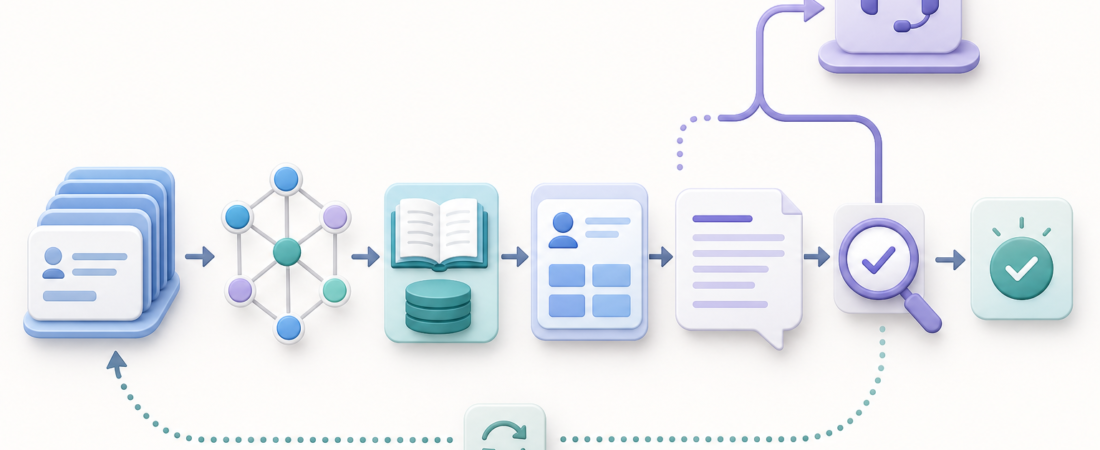
Customer support teams do not need a magic inbox that answers everything. They need a stack that makes the repetitive parts faster while making the risky parts easier to review. The difference matters. A low-quality support agent tries to jump from an angry ticket to a polished answer in one move. A useful support workflow slows down just enough to gather context, check the knowledge base, enrich the customer record, draft a response, and route anything sensitive to a human with the right evidence attached.
| Layer | Job | Quality control |
|---|---|---|
| Intake | Classify tickets and pull conversation context | Keep urgency, account state, and channel visible |
| Grounding | Search help articles, docs, and CRM records | Cite the source used for every recommendation |
| Review | Draft, score, and escalate when confidence drops | Never hide uncertainty from the support owner |
Start with the queue, not the reply
The first layer is ticket intake. This is where many automation projects go wrong because they optimize for response generation before they understand the queue. A support inbox usually contains billing questions, bug reports, account-access problems, feature requests, implementation confusion, angry churn risk, and a long tail of messages that do not fit cleanly into any saved view. Treating all of that as one prompt is how teams end up with confident but brittle drafts.
A better workflow classifies the ticket before it drafts. It should identify the channel, customer tier, product area, sentiment, urgency, known incident status, language, and whether the customer is asking for a decision the support team is allowed to make. Tools like Zammad Open Source Helpdesk Ticketing System, Chatwoot Open Source Customer Engagement Omnichannel Support, and Triage Support Tickets and Draft Customer Replies with Claude Code Support Skills fit here because they keep the workflow close to real helpdesk objects instead of treating the ticket as free-floating text.
The output of this layer should be boring and structured: a short ticket summary, a category, a priority recommendation, missing information, and a proposed owner or queue. If the agent cannot classify the ticket cleanly, that is useful too. The right answer may be to mark it as ambiguous and ask a human to choose the next step.
Pull the full conversation before drafting
Support quality often depends on history. A customer who writes “this is still broken” is not giving the agent enough information in the latest message. The agent needs prior replies, account notes, open bugs, refunds, plan limits, and any commitments the team has already made. Without that history, even a well-written answer can be wrong.
This is where conversation lookup skills earn their place. Search Help Scout Conversations and Thread Context Before Drafting Support Replies is a good example of the shape: retrieve the relevant thread first, then decide what can be said. Email-heavy teams can add Gmail Thread Summarizer Action Extractor to compress long customer conversations into action items, promises, dates, and unresolved questions.
The key is to preserve evidence. A summary that says “customer has billing issue” is too thin. A useful context packet says the customer upgraded on May 6, saw duplicate charges on May 8, was promised a refund by Jamie on May 9, and attached a screenshot of the invoice mismatch. That packet gives the support owner something reviewable. It also prevents the agent from inventing a generic apology that ignores the actual history.
Ground every answer in the knowledge base
Once the ticket is classified and the thread is summarized, the next step is knowledge retrieval. Support teams usually have at least three knowledge sources: public help articles, internal runbooks, and scattered operational notes. The agent should search them before it drafts, and it should expose which sources were used.
For teams with a maintained internal wiki, Outline Knowledge Base Wiki and AFFiNE Knowledge Base Collaborative Workspace Platform can sit in this layer. Smaller teams may use note-based systems such as nb CLI Note Taking Bookmarking Knowledge Base. The specific tool matters less than the contract: the agent retrieves source material, quotes or cites the relevant parts internally, and refuses to pretend a policy exists when it cannot find one.
That last point is the quality bar. Support automation should reduce “I think” answers. If the agent cannot find the cancellation policy, migration step, integration limit, or known-issue note, the draft should say that the support owner needs to verify it. A blank citation is not a nuisance. It is an early warning that the workflow lacks grounding.
Add CRM context carefully
Customer context helps, but it can also make support automation sloppy. A CRM record can tell the agent whether the account is active, which plan they use, who owns the relationship, and whether there is a pending renewal or open escalation. It should not become a license to over-personalize or make commitments the support team cannot keep.
Skills such as Twenty Open Source CRM Salesforce Alternative, HubSpot CRM Contact Enrichment Pipeline, and Normalize vCard Contact Exports Into Structured Contact Records are useful when they enrich the support packet with stable facts. They are less useful if they push the agent toward sales-style language in a technical support reply.
The practical pattern is to keep CRM data in a separate section of the context packet. The draft can use account tier, product plan, owner, and known constraints. It should not expose private internal notes to the customer, and it should flag any instruction that affects billing, refunds, contract terms, legal language, or account status. Those are escalation triggers, not copywriting prompts.
Draft in parts, then review against a rubric
Reply drafting should be late in the workflow. By the time the agent writes, it should already know the ticket type, customer history, relevant help article, CRM facts, missing information, and escalation risk. That context makes the draft narrower and easier to check.
A good generated reply has a predictable shape: acknowledge the issue, state what was checked, give the next step, ask for only the missing information that matters, and avoid unsupported promises. For a bug report, the answer might include reproduction details and a status note. For an account question, it may include a secure handoff path. For a knowledge-base question, it may link to the article and summarize the exact step the customer missed.
The review step is where quality teams get leverage. Score the draft for source grounding, policy compliance, tone, completeness, customer-specific context, and escalation triggers. If the score is low, the agent should not try to polish its way out of uncertainty. It should send the ticket to a human with a concise reason: missing policy source, billing authority needed, possible outage, angry enterprise customer, security-sensitive request, or unclear account ownership.
Keep escalation paths explicit
Support teams that care about quality do not measure automation only by deflection. They measure whether the right tickets move faster to the right people. Escalation is not a failure mode. It is part of the product.
That means every workflow should define hard stops. The agent should escalate when a customer asks for legal, financial, medical, security, or account-control decisions; when the customer references a prior commitment that is not in the record; when the knowledge base conflicts with the CRM; when there is possible abuse or fraud; or when sentiment suggests churn risk. The agent can still help by preparing the packet: summary, timeline, customer ask, relevant links, likely category, and suggested next owner.
This is where support automation becomes operationally useful. The team is not asking an agent to “handle support.” It is asking the stack to remove search work, reduce missed context, standardize first drafts, and make human review faster. That is a much more durable promise.
A practical support stack
For a small team, start with four layers. First, connect the helpdesk and classify incoming tickets. Second, retrieve thread history and summarize what has already happened. Third, search the knowledge base and attach source evidence. Fourth, draft a reply and score it against a review rubric before a human sends it.
For a larger team, add CRM enrichment, incident-status checks, multilingual handling, analytics on escalation reasons, and periodic knowledge-base gap reports. If agents keep failing to answer the same question because the policy is missing, that is not a model problem. It is a documentation problem surfaced by automation.
The strongest customer support AI workflow is not the one that sounds most human. It is the one that makes the support owner more informed at the moment of judgment. It shows what it knows, shows where it found it, names what it does not know, and moves risky work to people instead of hiding it inside fluent prose.
That is the standard worth building toward: faster support without lower standards, more automation without less accountability, and a stack that improves quality because every answer has a trail.