Xero MCP, Google Sheets, and Invoice Intake: A Starter Finance Ops Stack
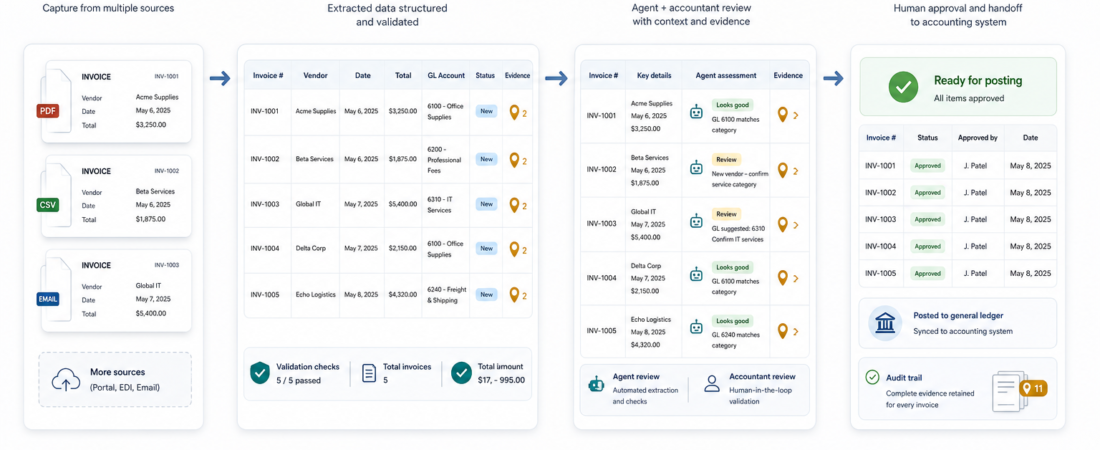
Finance ops teams do not need an autonomous accounting agent to get value from agent skills. A safer first workflow is narrower: collect vendor documents, extract the fields that matter, stage the result in a spreadsheet, compare it against accounting records, and hand a review packet to a human before anything changes in Xero, QuickBooks, Stripe, or a bank account.
| Stage | Agent job | Human gate |
|---|---|---|
| Invoice intake | Extract vendor, amount, due date, tax, PO, and source file | Confirm the document is valid and complete |
| Spreadsheet staging | Write rows to a controlled Google Sheet or workbook with formulas intact | Review exceptions, duplicates, and missing fields |
| Accounting lookup | Compare staged rows with Xero, QuickBooks, or Stripe records | Approve corrections or create follow-up tasks |
| Reconciliation handoff | Prepare a source-backed variance report | Decide what to post, pay, or escalate |
In Short
A practical finance ops agent stack starts with document handling and ends with a reviewable reconciliation packet. Use invoice extraction to turn PDFs into structured records, Google Sheets or spreadsheet tooling to stage review, and accounting-system connectors such as Xero MCP, QuickBooks, or Stripe reporting tools to compare records. Keep the agent out of money movement, vendor approval, and final accounting judgment until your controls are mature.
This is the finance version of a pattern that shows up across the Finance & Filings workflow: agents are useful when they make evidence easier to collect, inspect, and route. They are risky when they quietly turn extracted text into irreversible action.
Who This Is For
This stack fits small finance teams, founder-led operations teams, agencies handling vendor bills, and internal ops groups that still rely on inboxes, shared drives, and spreadsheets before accounting review. It is especially useful when the same lightweight process repeats every week: invoices arrive, someone checks amounts and due dates, rows get copied into a spreadsheet, and exceptions are handled in chat or email.
It is not a replacement for an accountant, controller, approval workflow, or payment system. It should not decide whether an expense is valid, whether a vendor should be paid, how to classify a transaction for tax purposes, or how to interpret financial statements. The agent’s job is preparation: gather records, preserve source links, highlight mismatches, and reduce manual copying.
Starter Workflow
Start with a read-heavy flow. Let the agent see documents and approved reference data, then make it produce a packet that a person reviews. That shape keeps the workflow useful even before you have full accounting-system write permissions in place.
1. Collect and normalize invoice documents
The first skill in the chain should handle document intake. For vendor PDFs, use Extract invoice fields from vendor PDFs into structured records as the core pattern. The useful output is not just a summary. It is a structured record with vendor name, invoice number, invoice date, due date, currency, line items when available, tax, total, and the original source file.
If your invoices include scans, low-quality PDFs, or mixed attachments, add a parsing layer before field extraction. Options on ASE include Paperless-ngx Document OCR and Archive Management System, OCRmyPDF Searchable PDF OCR Pipeline, Docling Document Conversion and Extraction Toolkit, and pdfplumber Python PDF Text and Table Extraction Library. Pick based on document quality and review needs. A clean text PDF can often skip OCR. A scanned packet should not.
2. Stage extracted fields in Google Sheets
Spreadsheets are still the most practical staging layer for many finance teams because they are visible, familiar, and easy to audit. A Google Sheet can hold extracted invoice rows, exception columns, reviewer notes, and status values without granting the agent accounting write access. For Google-native teams, the Google Workspace MCP Server for Gmail Calendar and Drive and Google Workspace CLI (gws) are useful places to start, alongside the official Google Sheets API documentation.
If your review workbook is local or formula-heavy, use Create, repair, and recalculate spreadsheet workbooks without breaking formulas. This matters because a broken formula can be worse than a missing row. Finance workflows need predictable spreadsheet behavior: stable columns, preserved formulas, controlled tabs, and clear exception states.
3. Compare staged rows with accounting records
Once invoice records are staged, the agent can compare them against accounting and revenue-system data. For Xero-based teams, use the Xero developer documentation and your approved Xero MCP or connector to keep access scoped to the records needed for lookup. The important design choice is permission level: start with read access and explicit review before creating bills, changing contacts, or updating payment status.
ASE also has adjacent accounting and revenue skills that show the same reconciliation pattern. QuickBooks Online Invoice Reconciliation Agent is the closest accounting-system example. Stripe-heavy teams can pair invoice review with Stripe Revenue Reconciliation Agent and Stripe Reporting Agent. The goal is not to force every team into one ledger. The goal is to make each source of truth comparable through a shared review format.
4. Produce a reconciliation packet
The final output should be a packet, not a claim. A good packet includes the staged invoice row, source document link, accounting-system match status, exact variance, missing data, duplicate candidates, and a recommended next human action. Example statuses might be: ready for review, missing PO, amount mismatch, possible duplicate, vendor not found, tax needs review, or already paid.
This makes the workflow useful even when the agent is uncertain. Instead of hiding uncertainty inside prose, the packet turns uncertainty into a queue. That is the right default for finance ops.
Recommended ASE Skills
| Need | Skill | Use it for |
|---|---|---|
| Invoice intake | Extract invoice fields from vendor PDFs | Structured invoice records with source-backed fields |
| Document OCR | OCRmyPDF | Turning scanned PDFs into searchable documents before extraction |
| Spreadsheet staging | Google Workspace MCP Server | Working with Drive and Workspace context around finance files |
| Workbook safety | Spreadsheet workbook repair | Preserving formulas and recalculation behavior during review |
| Accounting comparison | QuickBooks invoice reconciliation | Comparing staged invoice records with accounting data |
| Revenue checks | Stripe revenue reconciliation | Reviewing payment and revenue variances before finance handoff |
What To Watch
Permissions should match the workflow stage. Read-only access is enough for many first deployments. If a connector can create bills, update vendors, or mark invoices as paid, keep those actions behind human approval.
Extraction confidence is not approval. Even clean invoice extraction can miss vendor-specific details, tax handling, purchase-order rules, or duplicate context. Treat extracted fields as proposed rows, not accepted accounting entries.
Spreadsheets need schema discipline. Decide the columns before the agent writes anything: source URL, vendor, invoice number, due date, total, currency, tax, match status, exception reason, reviewer, and final decision. Free-form notes are useful, but the core workflow should stay structured.
Keep money movement separate. A starter stack should not pay invoices, approve vendors, or modify bank instructions. Those are separate workflows with stronger controls, audit requirements, and approval rules.
FAQ
Should the agent write directly into Xero?
Not at first. Start with lookup and comparison. Once the review packet is reliable, you can consider tightly scoped draft creation with approval, but payment, approval, and final posting should stay human-controlled.
Why use Google Sheets instead of going straight from invoice PDF to accounting software?
Sheets make exceptions visible. They give finance teams a low-friction review surface before records touch the accounting system. That is useful when vendors, formats, or approval rules vary.
What if our team uses QuickBooks or Stripe instead of Xero?
The workflow still applies. Replace the Xero lookup stage with QuickBooks invoice reconciliation, Stripe reporting, or the approved connector for your system of record.
How do we know the stack is ready for production?
Run it on a small batch of historical invoices first. Compare extracted fields against known-good records, track false matches, and require human signoff until exception rates are boring. The production milestone is not speed; it is a repeatable review packet that finance trusts.