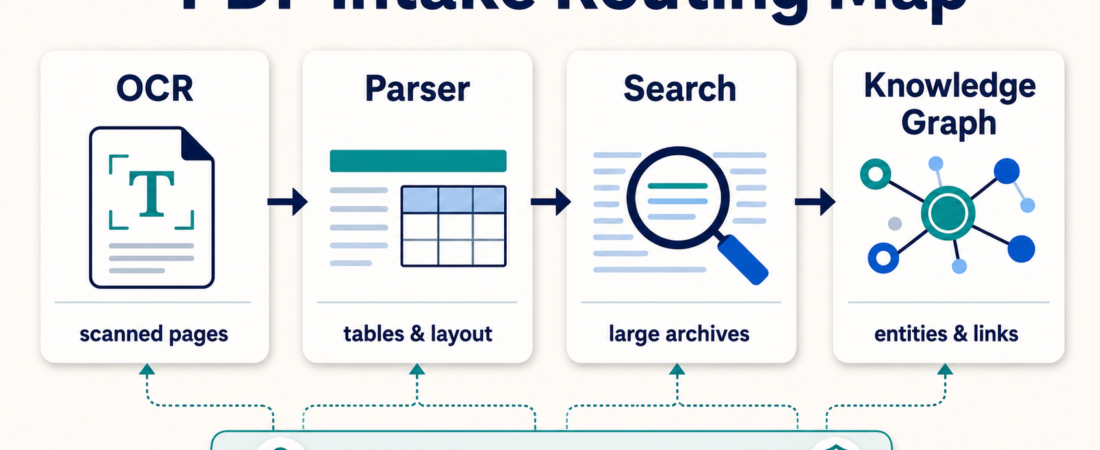
Which Skill Should I Use for PDF Intake: OCR, Parser, Search, or Knowledge Graph?
PDF intake is not one workflow. A scanned form, a clean annual report, a folder of old matter files, and a pile of relationship-heavy research documents all ask for different handling. The mistake is choosing a tool by file extension instead of by the job the operator needs done.
Use this guide as a routing pass before you wire PDFs into an agent. The goal is to choose the least risky path that gives reviewers enough evidence: OCR when text is missing, parsing when structure matters, search when the archive is large, and knowledge graphs when relationships are the point.
| PDF intake route | Best starting point | Use when | Human review point |
|---|---|---|---|
| OCR | Scanned pages | The file is an image, fax, scan, or photo-heavy packet | Check recognition errors and missing pages |
| Parser | Tables and layout | You need rows, sections, coordinates, or markdown output | Compare extracted fields to source pages |
| Search | Large archives | People need to find passages across many documents | Preserve citations and source links |
| Knowledge graph | Entities and links | The workflow depends on people, companies, events, clauses, or relationships | Validate schema and edge evidence |
In Short
Choose the PDF intake skill by failure mode, not by popularity. If the text is not machine-readable, start with OCR. If the text exists but the layout matters, use a parser. If the main job is finding evidence across many files, use search or retrieval. If the output needs entities and relationships, consider a knowledge graph path.
For regulated or client-facing work, do not let the agent jump from extraction to action. Keep source pages, extraction artifacts, and review notes together. A good PDF intake workflow produces evidence a person can inspect, not just a confident summary.
Who this is for
This is for operators handling document-heavy workflows in legal, healthcare, finance, real estate, support, research, or compliance settings. It is especially useful when teams receive mixed PDFs: some are scans, some are digitally generated, some contain tables, and some belong in a searchable archive.
It is also for builders choosing ASE skills for a document pipeline. If the downstream task is invoice review, matter search, intake packet routing, or research synthesis, the first extraction decision controls how reliable every later answer will be.
Decision path
Start with text availability. Open the PDF and test whether you can select real text. If not, route to OCR first. OCRmyPDF Searchable PDF OCR Pipeline is a strong fit when the desired output is a searchable PDF that keeps the original document shape. Tesseract OCR Document Extractor is useful when the workflow needs a proven OCR engine before another parser or reviewer touches the content.
If layout and tables matter, use a parser. OCR alone is often too blunt for statements, exhibits, lab-style forms, or reports with tables. pdfplumber Python PDF Text and Table Extraction Library fits analyst workflows that need tables and layout-aware text. Extract OCR-ready Markdown from documents with Zerox is better when the immediate handoff is markdown that an agent can inspect and summarize. LlamaCloud Services is the managed route when teams want parsing infrastructure instead of a local one-off script.
If the problem is archive recall, do not overbuild extraction. When people ask, “Where did we see this clause?” or “Which packet mentioned this vendor?”, the workflow needs retrieval with citations. A parser may still prepare the text, but the operational value is search. RAGFlow as a retrieval and context layer is a better fit when the team needs source-backed answers across a document set.
If relationships drive the work, consider a graph. Knowledge graphs are not a nicer summary format. They are useful when the review depends on entities and links: companies tied to filings, parties tied to contracts, dates tied to obligations, or documents tied to events. Docling Graph belongs here because the output should be schema-checked, not just conversational.
Recommended ASE skills
| Skill | Use it for | Watch first |
|---|---|---|
| OCRmyPDF | Making scanned PDFs searchable while preserving page form | OCR confidence and skipped pages |
| pdfplumber | Extracting tables and layout-aware text from reports | Table boundary errors |
| MarkItDown | Converting PDFs and Office files into reviewable markdown | Whether structure survives conversion |
| RAGFlow | Retrieval and source-backed answers over document collections | Citation quality and access boundaries |
| Docling Graph | Entity and relationship extraction from bounded document sets | Schema fit and edge validation |
For broader vertical context, compare the Legal Ops & Compliance and Healthcare Documentation & Intake collections. The same parser can appear in both places, but the review boundary changes sharply. Official docs are also worth checking before implementation: see Microsoft MarkItDown, LlamaCloud documentation, and OCRmyPDF.
What to watch
Watch for mixed-document batches. A single folder may need two routes: OCR for scans, parser for generated reports, and retrieval for long-term archive use. Do a small sample pass before promising one tool will cover every file.
Watch for invisible data loss. Markdown conversion can be useful, but footnotes, tables, coordinates, signatures, stamps, and marginal notes may disappear or move. When the document is evidence, keep the original page reference next to the extracted text.
Watch for premature automation. PDF intake is often upstream of sensitive decisions. The agent can extract, compare, route, and prepare review packets, but approvals should stay with the responsible human. This is especially important in healthcare, legal, finance, and compliance workflows.
FAQ
Should every PDF go through OCR first?
No. Digitally generated PDFs may already contain usable text. OCR can add errors and cost. Test text selection first, then route only image-based or damaged files to OCR.
When is a parser better than OCR?
Use a parser when structure matters: tables, sections, page coordinates, headings, exhibits, or repeated fields. OCR gets text out; parsing tries to preserve enough shape for downstream review.
When should I use a knowledge graph?
Use a graph when the work depends on relationships, not just passages. If reviewers need to see how entities, obligations, dates, documents, and events connect, a graph path can be worth the extra setup.
What is the safest starter workflow?
Sample five to ten representative PDFs, classify them by route, run the smallest fitting tool, and keep source-page links beside every extracted artifact. Only then connect the output to search, summaries, or review packets.