Which Category Should I Browse First on ASE?
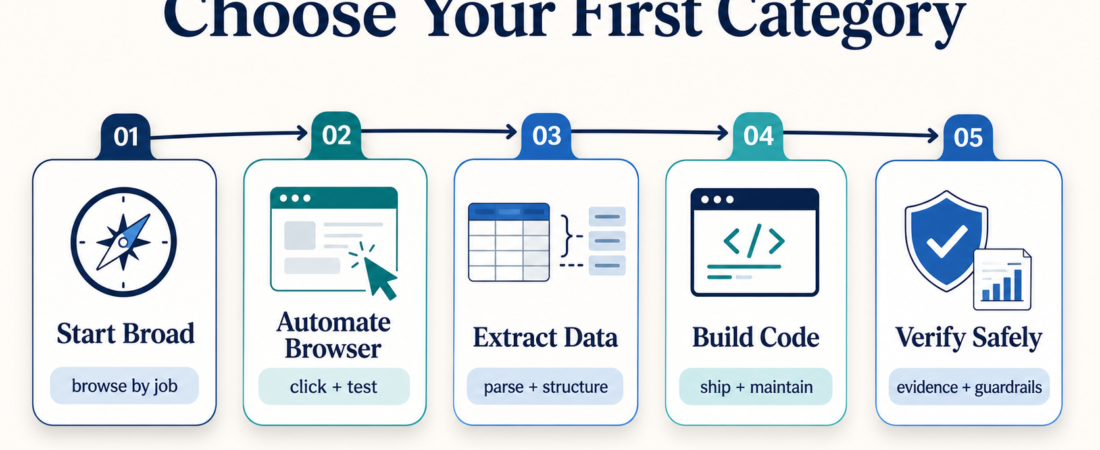
Start with the category that matches the job you need an agent to do this week. ASE categories are useful when they narrow the first decision: browser work, document and data work, coding work, verification work, or broader workflow discovery. If you begin with a technology label instead of the job, you will usually compare too many skills too early.
| Operator job | Browse first | Good first question |
|---|---|---|
| Click through web flows, forms, or QA paths | Browser Automation | Do I need deterministic testing, assisted browsing, or human review? |
| Turn PDFs, pages, CSVs, or messy files into structured output | Data Extraction & Transformation | Is the source scanned, semi-structured, or already machine-readable? |
| Help agents work inside repos, APIs, specs, or dev tools | Developer Tools | What codebase boundary and permissions should the agent have? |
| Check a workflow before trusting it | Security & Verification | What evidence would make this safe enough to use? |
In Short
- Use ASE categories as a routing layer, not a final buying decision.
- Start with the job: automate a browser, extract data, support development, or verify a workflow.
- Open concrete skill pages only after you know the category and output you need.
- If the work touches production systems, regulated data, customer replies, or money movement, browse safety and verification skills before automation skills.
Who this is for
This guide is for operators, founders, support leads, DevRel teams, and engineers who land on ASE with a practical problem but no strong preference about the tool. You may know you need help with documents, browser QA, API docs, launch checks, or customer workflows, but not which skill should be first in the search.
It is also for teams that have already tried one agent skill and now need a cleaner way to compare the next one. ASE has broad categories because a catalog is only useful when it helps you remove bad options quickly. A category should answer, “where should I start?” The skill page should answer, “is this specific tool safe and useful for my case?”
Decision path
1. Start with the artifact you want back. If the output is a screenshot, trace, filled form, or browser-state report, start with Browser Automation. A skill such as Stagehand Browser Automation SDK fits when the job involves real pages and changing UI state.
2. If the input is messy information, start with data extraction. For scanned PDFs, OCR-ready markdown, table extraction, or document normalization, begin with Data Extraction & Transformation. Compare tools like Zerox, LlamaCloud Services, and DocETL by source format, review needs, and how much structure you need at the end.
3. If the work is inside a repository or API surface, start with developer tools. The Developer Tools category is the better first stop for code review helpers, OpenAPI checks, SDK workflows, scaffolding, and agent development utilities. For example, Spectral OpenAPI and AsyncAPI Linter belongs in this path because the operator question is not “can an agent write docs?” It is “can the agent check the contract before docs or SDKs drift?”
4. If you are close to production, browse verification early. The Security & Verification route is for teams asking whether a workflow should be trusted. A skill such as Future AGI release evaluation is useful when the main question is evidence, guardrails, and launch readiness, not raw task completion.
5. When the job crosses categories, choose the riskiest boundary first. A support workflow might use knowledge search, browser automation, CRM context, and reply drafting. Do not start by picking the flashiest automation step. Start where a wrong answer hurts most: customer data, compliance boundary, production write access, or irreversible action. Then add task-specific skills around that boundary.
Recommended ASE skills
| Starting point | Try when | ASE skill or page |
|---|---|---|
| Browser Automation | You need page interaction, QA, or browser workflow checks. | Stagehand Browser Automation SDK |
| Data Extraction | You need OCR-ready markdown from messy documents. | Zerox document extraction |
| Managed parsing | You need a hosted document parsing pipeline with reviewable output. | LlamaCloud Services |
| Developer Tools | You need API linting before docs, SDKs, or client examples drift. | Spectral OpenAPI and AsyncAPI Linter |
| Verification | You need traces, simulations, guardrails, or launch evidence. | Future AGI release evaluation |
What to watch
Do not confuse a category with an endorsement. A skill can be in the right category and still be a poor fit for your environment. Read the source link, prerequisites, setup path, output shape, and safety boundary before installing anything.
Also watch for category overlap. Document skills can support finance, legal, healthcare, real estate, and support work, but the review boundary changes by domain. Browser automation can help QA teams and agencies, but it should not quietly become an autonomous operator for production admin panels. Developer tools can improve repo work, but they still need branch, permission, and rollback discipline.
A good first browsing session ends with a short list, not a final answer. Pick two or three candidates, compare their source evidence and outputs, then test the lowest-risk workflow first.
FAQ
Should I start from categories or search?
Start from categories when your problem is broad. Use search when you already know the tool, framework, or project name.
What if my workflow fits more than one category?
Choose the category closest to the highest-risk step. For example, a document-to-CRM workflow should start with extraction quality and data boundaries before reply drafting or browser automation.
Are category pages enough to choose a skill?
No. Categories narrow the field. The final check happens on the skill page: source, install path, permissions, output, and evidence.
Where should a first-time visitor begin?
Use Browse Skills if you want the full catalog, or start with categories if you want a faster route by operator job.