Which Browser Automation Skill Should I Use for Client Workflow QA?
Client workflow QA looks simple until the workflow crosses a real login, a flaky selector, a third-party portal, and a client-specific approval path. The right browser automation skill depends less on which tool is fashionable and more on what kind of evidence you need before delivery.
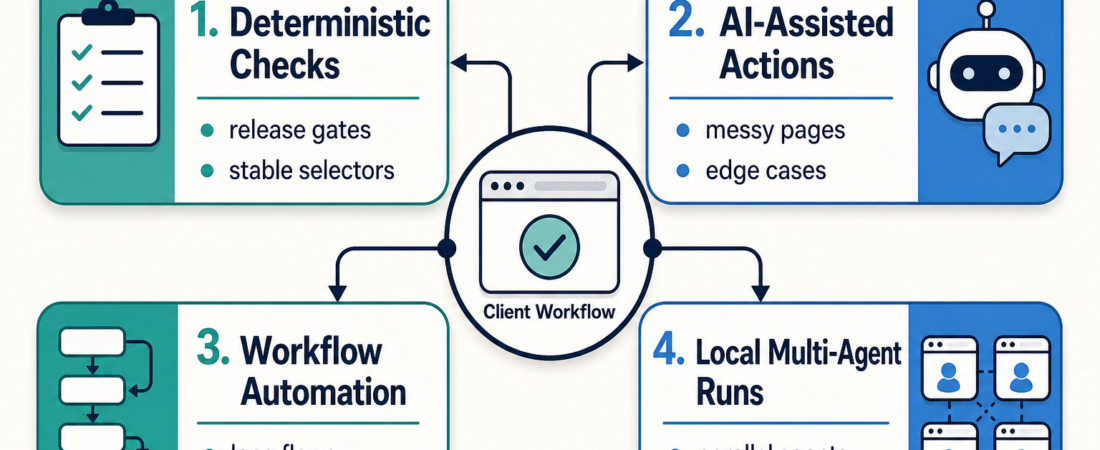
Use deterministic browser testing when the path is stable and release-critical. Use AI-assisted browser control when the page changes often or selectors are weak. Use workflow automation when the task needs to complete a business process across multiple screens. Use local multi-agent browsing when the team needs parallel investigation, research, or supervised exploration before turning the path into a repeatable check.
| QA need | Best fit | What it proves |
|---|---|---|
| Stable release gate | Playwright-style checks | The known path still works |
| Messy or changing page | Stagehand-style AI actions | The agent can adapt with review |
| End-to-end client operation | Skyvern or workflow agents | The task can be completed, not just clicked through |
In Short
If the workflow is part of a release checklist, start with Playwright MCP or Playwright CLI. These are the cleanest choices when you need repeatable evidence: the user can sign in, submit the form, see the confirmation page, and avoid a regression.
If the workflow is real but not yet stable enough for selectors, look at Stagehand Browser Automation SDK. It is better suited to agent-assisted browser actions where the instruction is closer to “find the billing settings and update the tax field” than “click this exact button by test id.”
If the workflow is a business process across unpredictable pages, forms, or portals, consider Skyvern AI Browser Workflow Automation. For local exploratory runs or parallel browser tasks, use Nanobrowser. For supervised browser control through MCP, Browser MCP is another practical option.
Who this is for
This is for AI agencies, FDE teams, and client delivery teams that need to prove a workflow works before handoff. The common pattern is a client-facing web app, admin portal, onboarding flow, internal dashboard, or third-party SaaS workflow that has to survive real browser conditions.
It is also for operators who have been burned by broad “browser agent” language. Browser automation is not one job. A release regression check, a one-off portal task, and a multi-step back-office workflow have different failure modes. Treating them as the same thing usually creates brittle demos instead of useful QA.
Decision path
Start with the evidence you need. If a client asks whether the checkout flow still works after a deploy, use a deterministic check. Playwright is strong here because it gives you reproducible steps, traces, screenshots, and API assertions. The official Playwright documentation is built around this testing model: browsers, locators, assertions, retries, and traceable failures.
Use AI assistance when selectors are not the main truth. Some workflows are hard because pages are inconsistent, labels change, or the agent needs to interpret what it sees. Stagehand is useful when the browser task benefits from natural-language actions but still needs developer control around the run. The official Stagehand docs describe this as browser automation with AI primitives rather than a pure test runner.
Use workflow automation when completion matters more than testing. Skyvern fits cases like filling vendor forms, navigating portals, or operating across pages that were not designed for test automation. The official Skyvern docs focus on automating browser workflows with LLMs and computer vision. That makes it a better candidate for operations-heavy client work than for a tight CI gate.
Use local multi-agent browsing for exploration, not final proof. Nanobrowser can help a team investigate multiple paths, compare sources, or run supervised browser tasks locally. That is valuable during discovery and pre-QA. Once the path becomes release-critical, promote the stable parts into deterministic checks so the evidence is easy to rerun.
Recommended ASE skills
For release gates, start with Playwright MCP when the agent needs browser and API automation through an MCP client. Use Playwright CLI when the coding agent should drive browser checks in a token-efficient, scriptable way.
For AI-assisted interactions, use Stagehand Browser Automation SDK when natural-language browser actions need to stay close to developer-owned automation. If the page is more like a business portal than a test surface, use Skyvern AI Browser Workflow Automation.
For local exploration, use Nanobrowser. For supervised MCP browser access, review Browser MCP. For client delivery teams that also need a broader operating pattern, pair these with the AI Agency Operations collection.
What to watch
Do not let AI browser control replace release evidence. A successful agent run is useful, but it is not the same as a regression check unless the steps, assertions, environment, and artifacts are repeatable.
Watch authentication carefully. Client workflows often depend on logged-in sessions, MFA, expiring cookies, or role-specific permissions. Keep credentials out of drafts and prompts. Prefer scoped test accounts, read-only roles where possible, and explicit human approval before changing client data.
Watch for false confidence from visual completion. An agent can click through a path and still miss the business outcome: the invoice was not saved, the webhook did not fire, the approval stayed pending, or the record was created in the wrong tenant. Good QA checks both the browser state and the downstream result.
Finally, avoid using a heavyweight workflow agent for every problem. If the path is stable, deterministic tests are cheaper to maintain and easier to explain to a client. Save AI-assisted browser control for the places where the page or task genuinely needs interpretation.
FAQ
Should I use Playwright or an AI browser agent for client QA?
Use Playwright when you know the path and need repeatable proof. Use an AI browser agent when the path is ambiguous, changes often, or requires interpretation before it can become a stable check.
Can Stagehand replace a test suite?
Usually no. Stagehand is useful for AI-assisted browser actions, but release gates still need clear assertions and artifacts. It can help discover or operate a workflow before you turn the stable parts into tests.
Where does Skyvern fit?
Skyvern is strongest when the task is an end-to-end workflow across web pages, especially where computer vision and LLM reasoning help complete forms or portals that are not built for automation.
What should an agency show a client?
Show the workflow goal, the chosen automation style, the pass/fail evidence, and what still requires human review. That is more useful than showing a browser agent moving fast without explaining what it proved.