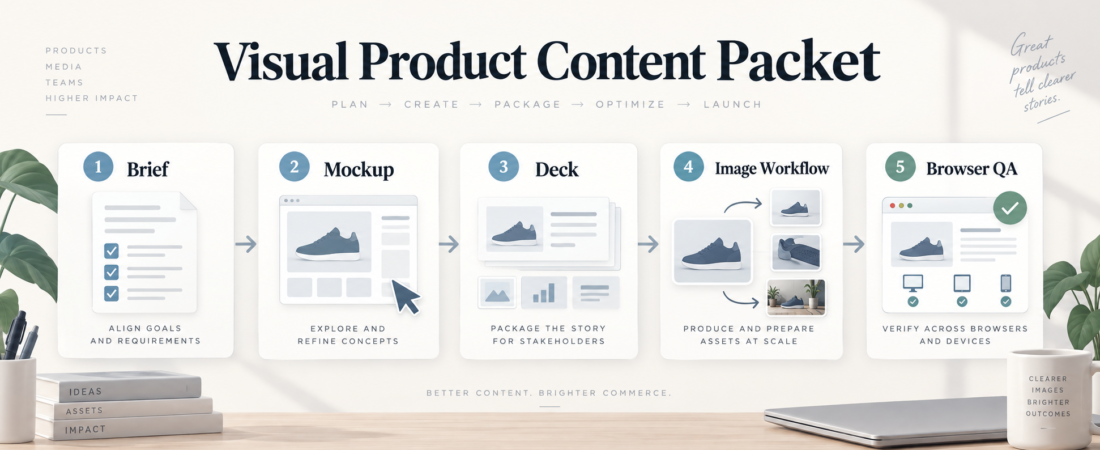
A Visual Product Content Packet for Design and Media Teams
Visual product content work gets risky when the team treats each asset as a separate request. A mockup becomes a deck slide, a deck slide becomes an image prompt, an image prompt becomes a product page, and nobody can tell which source was approved. A visual product content packet keeps that chain bounded before design and media teams publish anything customer-facing.
| Packet part | What it locks | Review evidence |
|---|---|---|
| Brief | Audience, offer, claims, required variants | Approved copy points and source references |
| Editable visuals | Mockup, slide, and image generation handoff | Design notes, export list, prompt inputs |
| Browser QA | Final page behavior before publish | Screenshots, device checks, defects, approval note |
In Short
A visual product content packet is a compact handoff for teams that move from product brief to UI concept, editable deck, generated image assets, and browser-reviewed publishing surface. It is not a brand manifesto or a giant campaign plan. It is the minimum set of evidence that lets a designer, marketer, product lead, and reviewer agree on what is being made, why it is accurate, and whether it is ready to ship.
The packet should keep claims traceable, files editable, and final review visible. That matters more as teams add agent workflows for design systems, slides, image generation, and browser automation. The useful question is not whether an agent can make a prettier asset. It is whether the team can still inspect the source, revise the output, and catch mistakes before the asset reaches a product page, sales deck, launch email, or social post.
Who this is for
This workflow fits design, product marketing, media, ecommerce, and agency teams that produce visual content from multiple sources. It is especially useful when one person owns the brief, another person owns the design system, a third person prepares the deck or images, and someone else checks the published page.
It also helps small teams using agent-assisted visual workflows for the first time. The packet gives them a repeatable lane: start with approved product facts, generate or revise visuals inside known boundaries, then run a supervised browser review before publishing. If the team only needs one internal sketch, this is probably too much process. If the output will be shown to customers, partners, or paid traffic, the packet earns its keep.
Starter workflow
1. Start with the product brief. Capture the audience, product state, offer, required sizes, forbidden claims, launch date, and owner. Separate approved facts from draft messaging. If accessibility or legal review matters, name that gate at the start. The W3C WCAG overview is a useful official reference for keeping accessibility in the workflow instead of treating it as a late polish pass.
2. Tie UI concepts to the design system. Before producing media assets, check whether the design follows the current component, color, type, spacing, and accessibility conventions. Agent-generated mockups are easier to use when they are treated as drafts against a design system, not as finished truth.
3. Keep decks editable. Product narratives often move through sales decks, launch reviews, and stakeholder updates before they become public assets. Use editable slides for the review packet so wording, layout, and image choices can change without rebuilding everything from scratch.
4. Create image assets from approved inputs. Image workflows should inherit the brief, source screenshots or mockups, brand constraints, and export list. Avoid unlabeled folders of generated options. Each candidate should map back to a purpose: hero image, thumbnail, comparison graphic, onboarding panel, or paid creative variant.
5. Review the live surface in a browser. The packet is not done until the final page, deck export, or content surface has been checked where people will actually see it. Browser review should include responsive layout, image loading, obvious text overflow, broken links, and whether the visual still matches the approved story.
Recommended ASE skills
Use the queue’s required skills first because they cover the full handoff from design system to deck to browser review.
- Add Claude design-system and accessibility workflows with ux-ui-agent-skills for grounding UI drafts in component, accessibility, and design-system review.
- Design, render, and visually QA editable PowerPoint decks with PPT Design Skill when the packet needs stakeholder-ready slides that remain editable.
- Run Claude Design-style UI prototyping locally with baoyu-design for fast local UI concepts that can be reviewed before production design work.
- Run visual co-creation workspaces for coding agents with pneuma-skills when product, design, and implementation work need a shared visual workspace.
- Run one-shot and supervised browser automation workflows with AIHawk for browser checks that keep final publishing surfaces reviewable.
What to watch
Do not let image generation outrun source truth. Product visuals can quietly add features, claims, screenshots, labels, or UI states that do not exist. Keep approved facts and source references close to the asset request.
Watch accessibility before final export. Tiny labels, low contrast, decorative-only information, and mobile text overflow are easier to fix while files are still editable. Late browser QA should catch issues, not become the first accessibility pass.
Separate inspiration from approval. A moodboard, rough mockup, or generated image can guide direction without becoming an approved customer asset. The packet should make that status clear.
Keep ownership visible. Someone must own the final decision. A shared workspace is helpful, but publishing still needs a named reviewer who can say whether the story, design, and live page are aligned.
FAQ
How large should the packet be?
Small enough to review in one sitting: brief, approved copy points, editable design or deck links, image candidates, final export list, browser QA evidence, and a publish decision.
Should every generated image be kept?
No. Keep selected candidates, rejected examples only when they teach a useful boundary, and the prompts or source inputs needed to reproduce the approved direction.
Where does brand review fit?
Before final export and again during browser review. Brand issues often appear when a good-looking mockup is resized, compressed, placed on a real page, or mixed with older assets.
What is the fastest useful version?
A one-page brief, one editable design artifact, one export checklist, and one browser-review note. That is enough to prevent most handoff confusion without turning the workflow into ceremony.