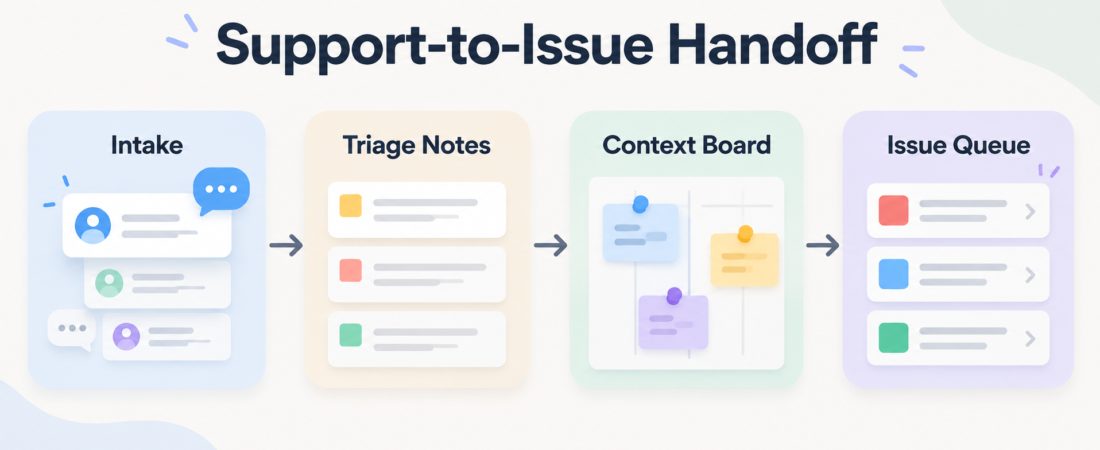
A Support-to-Issue Handoff Packet for Busy Product Teams
Support-to-issue handoff breaks down when intake is treated as a forwarding problem. A customer email, a Slack thread, a product note, and a Linear issue may all describe the same problem, but each one carries a different kind of evidence. The job is not to copy text between tools. The job is to preserve what support learned, make the product decision visible, and create an issue that engineering can act on without guessing.
| Packet part | What it preserves | Review point |
|---|---|---|
| Intake | Original customer language, account context, and channel source | Support confirms urgency and privacy boundaries |
| Triage notes | Impact, reproduction clues, duplicates, and decision history | Product chooses bug, feature, docs, or no-action path |
| Issue queue | A scoped Linear issue with owner, evidence, and next review step | Engineering accepts or sends it back with a clear reason |
In Short
A good handoff packet has five pieces: the raw customer signal, a short support summary, product triage notes, linked workspace context, and a ready-to-review issue. Gmail and Slack are useful intake channels because they preserve thread history and timestamps. Notion works well as the context layer when teams need a shared decision log. Linear is the final queue only after the problem has enough shape to become an engineering task.
The queue topic for this post focuses on Gmail, Slack, Notion, and Linear because their official developer platforms support the pattern directly. The Gmail API documents mailbox access and message organization through a REST API. Slack developer docs cover apps, workflows, and automation inside Slack. Notion developer docs describe connections that read, create, and update workspace content with explicit permissions. Linear developer docs center on GraphQL, authentication, SDKs, and issue workflows.
Who this is for
This workflow is for product teams where support, product, and engineering all touch customer feedback but do not live in the same queue all day. It fits B2B SaaS teams, internal platform groups, and small support teams that need cleaner escalation without adding a full incident process to every customer message.
It is also for teams using agents to help with intake. An agent can summarize a long Gmail thread, pull the key request out of Slack, update a Notion board, or draft a Linear issue. The operator still needs the review boundary. Customer data can include private account details, billing context, contract language, or confidential product plans. Keep the agent on bounded tasks and make the final handoff visible to a person.
Starter workflow
Start with intake capture. For email, use labels or thread metadata to identify messages that need product review, not every support reply. The Gmail API Thread Label Triage skill is the first fit when a team wants consistent thread labeling before an agent summarizes anything.
Next, capture Slack context without treating chat as the source of record. Slack is where duplicates, customer workarounds, and quick staff notes often appear. The agent-slack workflow skill can help an operator inspect and automate Slack flows while keeping the source thread attached.
Then create a product triage page. The page should include the customer quote, support summary, severity, affected area, links to related messages, and a short decision note. The Notion Task Board Automation skill is useful when Notion is the team’s shared workspace for these notes.
Finally, only create the issue once the packet is reviewable. The Linear issue should carry the product decision, expected behavior, observed behavior, customer impact, and links back to the supporting evidence. The Linear MCP Server for Issue Tracking and Project Management skill is the queue fit. If the team already runs sprint triage in Linear, add Linear Issue Triage and Sprint Planner for issue review and sequencing.
Recommended ASE skills
Use the required queue skills first. Pick Gmail API Thread Label Triage when email is the main source of customer signal. Pick agent-slack when Slack threads contain the missing operational context. Pick Notion Task Board Automation when product decisions need a shared board. Pick Linear MCP Server when the packet is ready to become tracked engineering work.
The fifth skill, Linear Issue Triage and Sprint Planner, is for the next step after creation: dedupe, priority review, sprint fit, and owner assignment. That is where many agent-assisted handoffs fail. They create an issue, but no one decides whether it is a support escalation, product backlog item, current-cycle bug, or docs fix.
What to watch
Watch for copied noise. A long customer thread should become a concise evidence packet, not a pasted transcript. Watch for missing consent and permissions; Notion connections require explicit access, and Gmail/Slack automation should be scoped to the channels, labels, and workspaces needed for the task. Watch for premature Linear issues. If support has not confirmed impact or product has not chosen the work type, the issue queue becomes a parking lot.
Also watch the handback path. Engineering should be able to reject an issue with one of a few clear reasons: missing reproduction detail, unclear expected behavior, duplicate, product decision needed, or not an engineering change. Build that return path into the packet instead of letting vague issues sit open.
FAQ
Should every support ticket become a Linear issue?
No. Most support tickets should stay in the support system. Escalate only when the packet shows a product defect, a repeated customer request, a docs gap that needs ownership, or a customer-impacting workflow problem.
Where should the source of record live?
Use one source of record for the decision. Gmail and Slack preserve intake evidence. Notion can preserve triage and product context. Linear should preserve accepted engineering work. Do not ask every tool to be the final record.
What should a human review before the agent creates an issue?
Review customer privacy, severity, the requested outcome, and whether the issue belongs in engineering at all. The agent can draft the packet, but a person should approve the escalation path before it enters the delivery queue.