Skill Spotlight: Source-Grounded NotebookLM Studio Batches
In Short
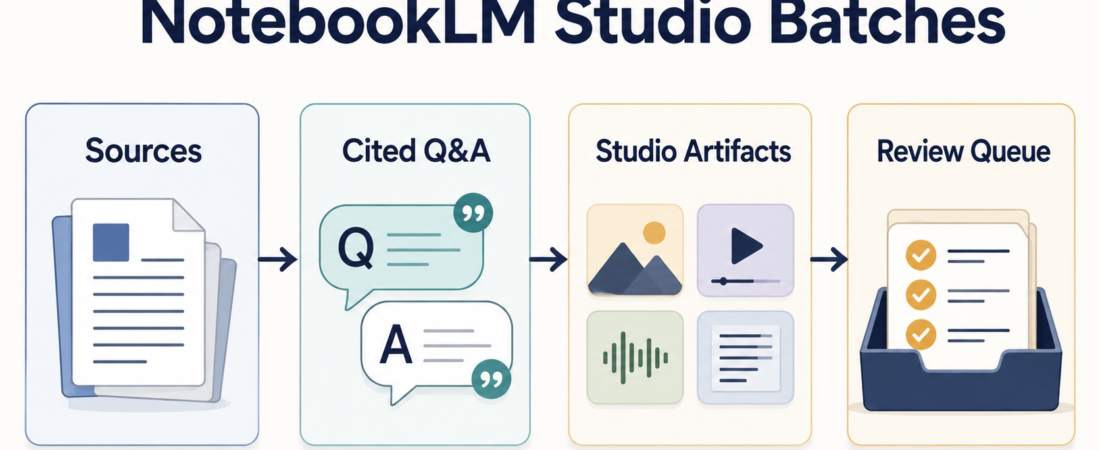
NotebookLM is useful when a research job should stay anchored to a defined source set instead of drifting into broad web synthesis. The source-grounded batch pattern is simple: collect sources, ask narrow questions, generate reviewable Studio artifacts, and route the outputs through a human queue before they become briefs, decks, or customer-facing material.
The ASE skill to start with is Automate NotebookLM Studio generation and cited research batches with notebooklm-mcp. It is best treated as an operator workflow, not a magic research machine. The value is in preserving sources, citations, artifacts, and review points so a team can inspect what happened later.
| Batch stage | Operator check | Evidence to keep |
|---|---|---|
| Sources | Are the inputs approved and current? | Notebook, source list, owner, date |
| Questions | Is each prompt narrow enough to cite? | Question queue and cited answers |
| Artifacts | What needs human review before reuse? | Studio outputs, notes, rejects, approvals |
Who this is for
This is for research ops, product marketing, customer success, sales enablement, analyst relations, and founder-led teams that already have source material but need repeatable extraction. Common inputs include transcripts, support notes, product docs, release notes, policy PDFs, interview notes, and internal briefs.
It is also for teams that like NotebookLM but need more discipline around scale. Google’s Gemini Notebook help center documents notebooks, sources, notes, chat, and generated formats such as audio overviews, slide decks, infographics, quizzes, and video overviews. The unofficial notebooklm-mcp project adds an automation layer around that product surface, including MCP access and a local REST API for cited Q&A, source management, Studio generation, exports, and batch patterns. That extra automation makes review controls more important, not less.
Starter workflow
Start with one notebook and one bounded research goal. Do not begin with “summarize everything.” Use a source inventory with the filename, origin, owner, and reason each source belongs in the notebook. If a document is stale, confidential, or out of scope, remove it before the agent ever sees the queue.
Next, write a question list that can be answered from the supplied sources. Good batch questions ask for evidence: “Which three customer objections appear most often in these call notes?” or “What claims in this launch brief need legal review?” Avoid prompts that ask the model to infer market truth from a private source set.
Then run a small batch through Automate grounded NotebookLM research and artifact export with notebooklm-py or the MCP route, depending on whether your agent stack prefers Python, CLI, REST, or MCP. Keep the first run boring: 10 to 20 questions, one notebook, one destination folder, and a clear stop condition.
After that, generate only the Studio artifacts that match the job. A sales team may need a briefing doc and slide outline. A support team may need a FAQ draft. An enablement team may want a quiz or audio overview for internal learning. The notebooklm-mcp REST API reference describes endpoints for asking questions, batch-to-vault runs, notebook management, source management, content generation, downloads, and generated-content cleanup; that is enough surface area to require explicit routing rules.
Finally, review before reuse. Store the cited answer, the generated artifact, the source list, and the reviewer decision together. If the output is going into a public post, customer deck, or executive brief, require a human to inspect the citation trail and mark unresolved claims.
Recommended ASE skills
Use the NotebookLM-specific skills first. notebooklm-mcp is the primary pick when agents need MCP or REST access to cited Q&A and Studio generation. notebooklm-py fits Python-centered research and export work. notebooklm-mcp-cli is useful when the job is search, source lookup, and retrieval of generated study artifacts.
For adjacent research work, add Open Deep Research when the source set expands beyond NotebookLM, or DocsGPT for document-grounded enterprise assistants when the team needs a private assistant around a broader document collection. Those are not replacements for NotebookLM Studio batches; they are neighboring patterns for different source and governance needs.
What to watch
First, treat unofficial automation as an integration risk. The notebooklm-mcp repository states that it is not affiliated with Google and uses underlying web app behavior with browser fallback. That is a fair trade for some internal workflows, but it should not be hidden from operators.
Second, watch quotas and account boundaries. The project documentation mentions dedicated accounts and NotebookLM limits for high-volume use. Keep batches small until retry behavior, authentication, and cleanup are proven in your environment.
Third, do not confuse cited output with approved output. Citations help reviewers inspect provenance, but they do not decide whether a claim is legally, commercially, or technically safe. The review queue is part of the workflow, not an afterthought.
FAQ
Is NotebookLM now Gemini Notebook?
Google’s support pages currently present the product as Gemini Notebook, and existing NotebookLM links redirect into that help center. Many tools and repositories still use the NotebookLM name, so operators should expect both names in docs and skill pages.
When should I choose MCP instead of a manual NotebookLM workflow?
Choose MCP or REST only when the team has a repeated queue: many similar questions, recurring source refreshes, or artifact generation that needs logging. For a one-off research read, the manual product is often enough.
What is the minimum review evidence to keep?
Keep the source list, question queue, cited answers, generated artifacts, and reviewer decision. That gives the next person enough context to understand what the agent did and where human judgment entered the process.