Skill Spotlight: Onsystem for Catching Invented React Props and Tokens
In Short
Onsystem gives a React coding agent a concrete question to answer before changing UI: does this component contract actually exist in this project? Use it to discover component props, variants and semantic tokens, then check a small TSX change against those definitions. A plausible-looking button can still use an invented prop or an unsupported variant.
This spotlight proposes a bounded exercise: update one confirmation panel in an existing application, preserve its design system, and return the findings alongside the patch. The goal is a reviewable change grounded in repository evidence. Static contract checks complement rendered UI review and accessibility testing.
Who this is for
This is for frontend maintainers and design-system owners reviewing agent-written React changes. Start with a repository that already has components and token sources. Choose a task such as changing a destructive confirmation button, where a reviewer can identify the expected behavior and compare the result with a working screen.
The official Onsystem repository currently specifies Node.js 20.19 or later and documents local discovery with npx -y onsystem inspect. Recheck those requirements when installing. For a first trial, record the tool version, repository revision, target app and changed paths so another maintainer can reproduce your result.
Starter workflow
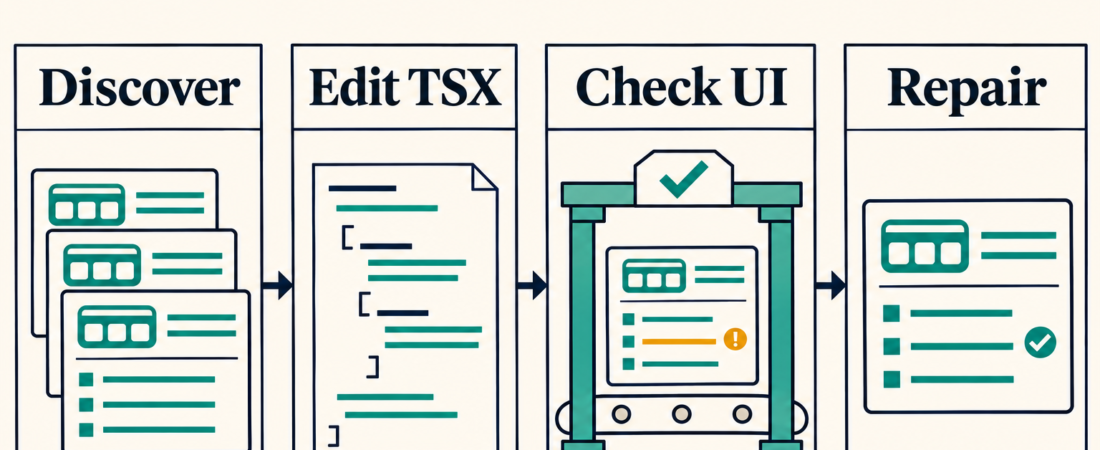
- Confirm discovery before editing. From the app folder, run
npx -y onsystem inspect. Verify that the discovered components belong to the application you intend to change. If discovery misses the design system, stop and investigate configuration; an empty inventory cannot substantiate a clean component review. - Read the actual contract. Use MCP
search_componentsorlist_components, thenget_componentfor each component involved. Readget_tokensbefore choosing styles. The pinned upstream skill documents these tools and file-specific lookup in monorepos. - Make one small TSX change. Suppose an agent proposes
variant="danger". Check whether the local Button actually exposes that value. If its contract listsdestructive, use that supported variant. Likewise, confirm whether the exported part isCardHeaderbefore inventingCard.Header. These are illustrative choices, not universal React APIs. - Check and repair. Run MCP
check_uion each changed file, supplying its filename or path. Compare findings with the starting file, correct newly introduced violations, and rerun the check. Keep the final diagnostics with the diff so review covers both the change and what remains unresolved. - Review the rendered result. Open the confirmation panel at the target viewport. Check text wrapping, focus movement, button labeling and the actual confirmation behavior. A contract-compliant destructive button still needs a sensible interaction and a clear accessible name.
| Stage | Evidence to retain | Stop condition |
|---|---|---|
| Discover | Target app, component imports, permitted variants and tokens | Wrong or missing design system |
| Edit | One bounded TSX diff | Unsupported API or token assumption |
| Check and repair | Before/after findings for changed files | New violations remain |
| Render | Screenshot and interaction notes | Visual or accessibility issue remains |
Without MCP tools, the upstream skill documents a CLI path: inspect the project, read component source, export tokens with npx -y onsystem export --format design-md, then run npx -y onsystem check path/to/file.tsx --format json. Replace the example path with the changed file. Fix reported errors and repeat the check. Installing the skill alone should not be treated as proof that MCP tools are connected.
Recommended ASE skills
- Ground React UI edits with Onsystem is the central workflow for discovering the existing contract and checking the patch.
- Figma layout context through MCP belongs upstream when incoming design intent needs clarification. Reconcile that intent with the implementation contract.
- Figma Design Token Exporter is a companion route for reviewing incoming token context. Confirm the repository has adopted those tokens before referencing them in code.
- Local webapp verification with Playwright belongs after static repair, when the team needs browser evidence for the changed interaction.
- Oil UI design-direction comparison belongs earlier if the visual direction is still undecided. Record that selection before enforcing its implementation against existing components.
What to watch
Baseline handling changes how findings should be interpreted. Upstream states that CLI checks and the hook honor onsystem.baseline.json, while MCP check_ui shows everything in the file. Capture the starting findings, repair issues introduced by your patch, and report unrelated existing ones separately. Do not refresh the baseline merely to make a new violation disappear.
Discovery quality also matters. The current repository explains that compiled component packages need type declarations for component-level checks; packages without them retain token checking but lose component-contract coverage. Record that limitation in the handoff. Prefer a precise coverage statement over an unexplained “passed.”
FAQ
Can Onsystem choose our design direction?
Use this exercise after the team has chosen its direction. The acceptance question is whether the implementation follows the project’s discovered contract.
Does a clean check prove accessibility?
No. Review keyboard use, focus, names and behavior in the running application. Treat static findings as one part of UI review.
What should the handoff contain?
Return changed paths, discovered contracts, before/after findings, tool version and browser evidence. State any unresolved discovery gaps or existing violations explicitly.