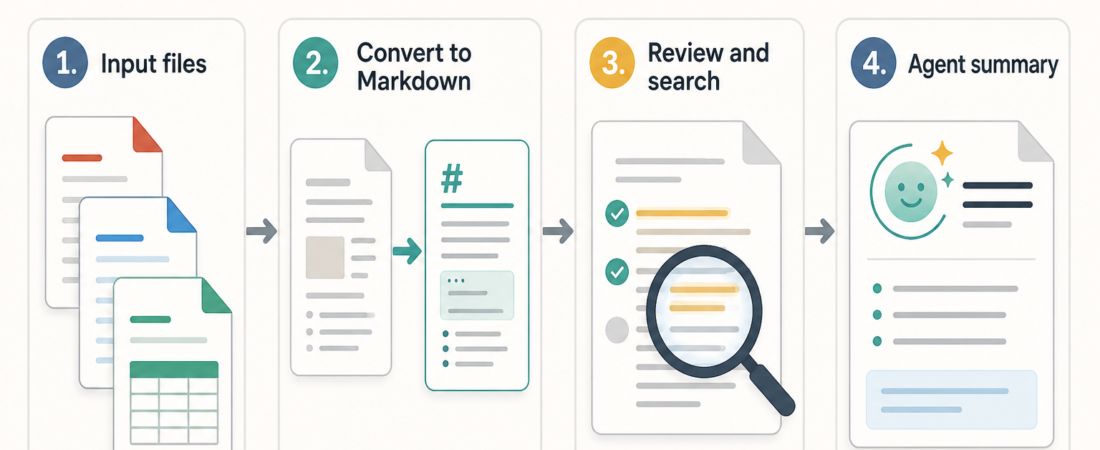
Skill Spotlight: MarkItDown for Document-to-Markdown Agent Workflows
MarkItDown is useful when the job is not “summarize this file” yet. The first job is usually more basic: turn a mixed document into Markdown that an agent, reviewer, search tool, or downstream pipeline can inspect without pretending the conversion is the final answer.
| Stage | Operator question | Review artifact |
|---|---|---|
| Convert | Can the source be represented clearly enough for machine review? | Markdown with headings, lists, tables, links, and file provenance |
| Check | What was lost, guessed, skipped, or pulled from a risky location? | A sampled diff, warnings, and blocked input notes |
| Route | Which agent task can safely use this text next? | Search, review, extraction, summary, or human handoff packet |
In Short
Use the MarkItDown Document-to-Markdown Converter by Microsoft when your agent workflow needs a plain, inspectable text layer before analysis. The official Microsoft repository describes MarkItDown as a lightweight Python utility for converting files to Markdown for LLM and text analysis pipelines, with support across PDF, PowerPoint, Word, Excel, images, audio, HTML, CSV, JSON, XML, ZIP files, YouTube URLs, EPUBs, and more. It also warns that MarkItDown performs I/O with the privileges of the current process, so untrusted input needs tight handling.
That combination makes the skill valuable but easy to misuse. Treat it as a conversion step, not as a source of truth. Markdown can preserve useful structure such as headings, lists, tables, and links, but conversion quality still depends on the input format, document layout, OCR needs, optional dependencies, and the way the agent is allowed to access files or URLs.
Who this is for
This is for operators building document intake, research, support, compliance, content review, or knowledge-base workflows where agents need to read more than clean web pages. The common pattern is a shared folder, ticket attachment, vendor deck, spreadsheet, exported PDF, meeting audio, or ZIP file that someone wants summarized or searched.
MarkItDown is a good fit when the first useful artifact is Markdown that humans can sample and agents can consume. It is a weaker fit when the business requirement is pixel-perfect reproduction, signed document retention, legal record handling, or guaranteed structured extraction from messy scans. In those cases, MarkItDown may still be a first pass, but it should sit beside stronger OCR, document intelligence, or review controls.
Starter workflow
Start with one document class, not every file in the company drive. For example, choose vendor PDFs, onboarding decks, exported spreadsheets, or product requirement docs. Define the allowed source path, file size limit, accepted extensions, and whether remote URLs are allowed at all. The official MarkItDown guidance is clear that the tool can access resources available to the process, so hosted use should restrict file paths, URI schemes, network destinations, and private or metadata-service addresses.
Next, convert a small sample set to Markdown and keep the raw file, generated Markdown, command or API path, and timestamp together. Have a human inspect 5 to 10 representative outputs before wiring the result into an agent. The inspection should check headings, table readability, link retention, page order, image treatment, and any sections that silently disappear.
Then route the Markdown into a narrow agent task. Good first tasks include “find relevant sections,” “draft a review packet,” “extract questions for a human,” or “summarize the differences between three documents.” Avoid letting the agent take an irreversible action from converted text alone. If the summary matters, keep citations back to the converted section and the original file name.
Finally, add a second pass for files MarkItDown is not meant to solve alone. Scanned PDFs may need OCR. Dense tables may need a structured extractor. Large archives may need search before conversion. The goal is a repeatable document-to-Markdown lane with clear exceptions, not a single converter pretending to cover every edge case.
Recommended ASE skills
- MarkItDown Document-to-Markdown Converter by Microsoft for the core mixed-document conversion step.
- OpenDataLoader PDF when PDF output needs structured Markdown or JSON instead of a loose text handoff.
- Search PDFs, Office files, ebooks, and archives with one query when the operator needs to locate relevant files before asking an agent to read them.
- Docext for PDF and document-image conversion paths that should be compared against MarkItDown on your own sample set.
- MinerU PDF-to-Markdown Document Parser when PDF-heavy work needs another Markdown-oriented parser in the evaluation set.
What to watch
Security boundaries matter more than converter convenience. Do not hand MarkItDown arbitrary user-controlled paths or URLs in a server process. Prefer the narrowest conversion API that fits the job, and block access to private networks, loopback addresses, metadata services, and unrestricted shared drives.
Watch for false confidence in Markdown output. A clean Markdown file can still miss footnotes, embedded images, spreadsheet formulas, scanned content, hidden slides, or table relationships. Keep sampling in the workflow, especially when the next agent step affects customers, invoices, contracts, access decisions, or public content.
Also watch dependency sprawl. MarkItDown supports optional dependencies by format, including targeted installs such as PDF, DOCX, and PPTX support. For production, install the smallest useful set instead of every optional package by default, then document which formats are actually supported in your workflow.
FAQ
Is MarkItDown a replacement for OCR?
No. MarkItDown can be part of an OCR-aware workflow, and its repository describes OCR-related options and integrations, but operators should test scanned documents separately. If image text is central to the task, compare OCR-focused skills and keep a human review sample.
Should agents summarize directly from original files?
Sometimes, but a Markdown intermediate is easier to inspect, search, diff, archive, and cite. It also lets operators separate file access from agent reasoning, which is useful when permissions and review controls matter.
What is the first production gate?
Use a fixed sample set. Convert the same files repeatedly, compare output stability, check for missing sections, and require at least one human-reviewed Markdown artifact before the content feeds an agent action.
What official source should operators read first?
Start with the Microsoft MarkItDown repository, especially its supported-format notes, installation guidance, plugin behavior, and security considerations.