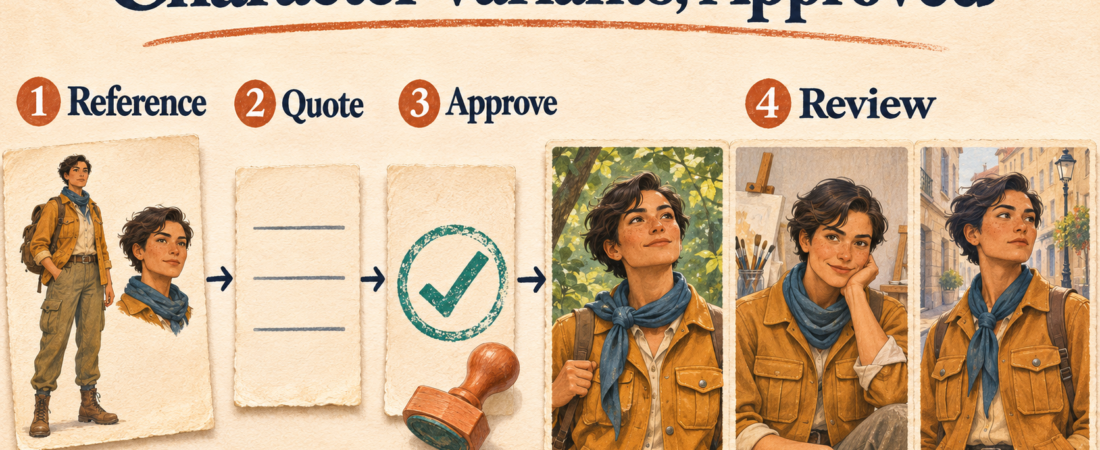
Skill Spotlight: Imagera for Cost-Approved Character Reference Variants
In Short
Imagera MCP can give a creative team a useful starting point for character consistency: begin with an authorized reference, describe a small scene list, obtain a quote, and approve spending before generation. Review every variant against the reference before accepting it. A saved identity sheet helps express the intended character; it does not establish that every result preserves the same face, hair, or clothing.
This spotlight focuses on the Listed Imagera addition in ASE. It is a practical spending and review workflow, with separate companion skills for other generation routes and later inspection. No paid generation was performed to validate this article.
Who this is for
This is for illustrators, creative producers, and agent operators preparing a few character reference variants for review. Bring one reference you are authorized to process remotely, a short description of fixed character traits, and a named person who can approve credits. Start with three scenes, such as a neutral portrait, a walking pose, and a seated conversation.
The official Imagera MCP setup page currently describes browser OAuth sign-in and Pro access for use inside an assistant. Confirm your account entitlement before planning a run. Connecting an account and approving a particular generation are separate decisions.
Starter workflow
- Freeze the reference brief. Record the reference file, permission basis, intended use, aspect ratio, and three scene descriptions. Write acceptance criteria such as dark cropped hair, a blue scarf, and an ochre jacket. Mark which details may vary, including pose and lighting. Do not send confidential client material until remote processing is authorized.
- Inspect the connected tools. Authenticate, discover the current tool schemas, and locate the character-consistency template and its estimate-only route. The pinned upstream skill documents supplied for this spotlight returned 404 during verification; an unauthenticated tools/list request returned 401. Consequently, exact current arguments could not be independently confirmed. Do not reconstruct them from an old example. Stop if the connected schema does not clearly separate estimation from execution.
- Quote the bounded request. Ask for an estimate only, with the chosen template, reference, scene count, model, and output settings. Save the returned quote and all assumptions. Present the credit amount and scope to the approver, then wait for an explicit confirmation. A general request to improve a character is not approval for unlimited revisions.
- Submit once and preserve identifiers. After approval, execute the quoted request using the current documented confirmation mechanism. Record the job identifier before doing anything else. Set a local polling budget, for example five checks across ten minutes, while following the service’s documented polling interval. An exhausted local budget means unresolved status, not permission to submit another paid job.
- Compare and archive. Inspect each completed result beside the original reference. Check face shape, hairline, hairstyle, clothing color, accessories, and silhouette. Save the original reference, prompt, quote, approval, job identifier, returned asset references, and downloaded output paths together. Rejected results stay in the record. Every requested revision gets a fresh quote and a new approval.
| Stage | Evidence to keep | Stop condition |
|---|---|---|
| Reference | Authorized source and fixed traits | Permission or identity unclear |
| Quote | Scope, settings, estimated credits | Execution cannot be separated |
| Approve | Explicit approval and job ID | Outcome of submission uncertain |
| Review | Drift notes and saved output paths | Revision needs a new quote |
Recommended ASE skills
- Imagera Media Generation is the central entry for the hosted media workflow. Read its quote-before-spending and uncertain-job guidance before connecting the account. Verify current upstream instructions before execution.
- ComfyUI workflows as agent-callable skills offers a separate route for an approved exported workflow with constrained inputs. Evaluate its infrastructure and dependencies independently.
- ComfyUI generation through comfyui-mcp is another separate generation route when graph control and troubleshooting are needed. It does not automatically inherit Imagera identities or approvals.
- Video inspection with frame extraction and audio context belongs later, if accepted stills become video. Review extracted frames for identity drift; still-image acceptance does not approve a subsequent clip.
- Summarize source material into briefs can prepare a separate source summary. Preserve the original sources and resolve contradictions before turning that summary into generation instructions.
What to watch
Saved Character IDs and reference sheets are aids to character consistency, not an acceptance test. Keep the exact sheet used with each request. If a different sheet or model is proposed, treat that as a changed request and quote it again.
Review Imagera’s current terms and privacy policy before uploading references. They address user inputs, outputs, processing, and retention; do not infer a rights guarantee from a successful generation. Download accepted assets and keep your review record under your own retention policy. Avoid treating a remote library as your only archive.
FAQ
Does a saved identity guarantee identical results?
No. Compare every output with the approved reference and document visible drift. Decide whether each image meets the intended use before handing it onward.
Can the agent retry when a job stops responding?
Keep the existing identifier, record the uncertainty, and resume status checks through the documented route. Do not create a duplicate paid request merely because a local wait ended.
What should happen before another revision?
Describe the precise defect and proposed change, request a fresh estimate, and obtain explicit spending approval. Keep that revision linked to its original reference and review notes.