What Product Teams Should Check Before Giving Agents Analytics Access
Product analytics access sounds harmless until an agent turns a vague product question into a broad database query, stale dashboard summary, or overconfident launch recommendation. The risk is usually not that the agent can read a chart. The risk is that nobody defined which data it may inspect, how fresh the data must be, and what kind of decision the output is allowed to support.
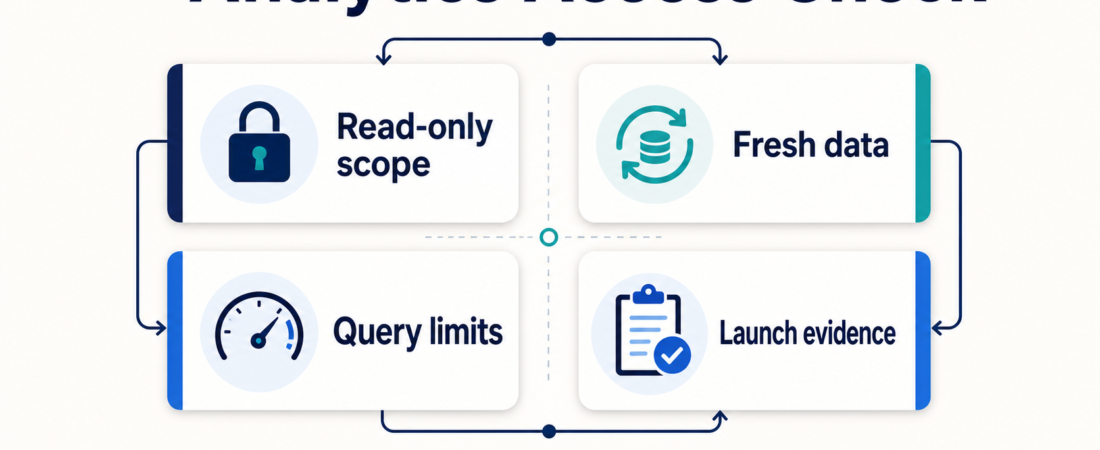
For product teams, the right starting point is not “connect the agent to analytics.” It is a small access model: read-only scope, known data freshness, bounded query behavior, and a human-reviewed evidence packet before any product or rollout decision.
| Check | What to define | Healthy output |
|---|---|---|
| Read-only scope | Which events, tables, dashboards, and projects are visible? | Named sources, no write permissions |
| Data freshness | How recent must the data be for this question? | Timestamped results and caveats |
| Query limits | What size, cost, and PII boundaries apply? | Small queries with reviewed SQL |
| Launch evidence | What proof is needed before a rollout decision? | Summary, links, metrics, and review notes |
In Short
Before giving agents analytics access, product teams should define five things: read-only scope, data freshness, query limits, sensitive-data boundaries, and the review path for any recommendation. Start with a narrow analytics task, such as summarizing a launch metric or checking a feature-flag cohort, then expand only after outputs are reliable.
A practical ASE starting set includes PGMCP for read-only Postgres workflows, PostHog Product Analytics and Feature Flags SDK, LaunchDarkly rollout safety checks, SQLCoder for validated analytics SQL, and Future AGI for release checks.
Who this is for
This guide is for product managers, growth operators, data leads, and internal-tool builders who want agents to answer product questions without turning them into unbounded analytics users. It fits teams using product analytics tools, feature flags, session replay, BI dashboards, or read-only database access to understand adoption, activation, retention, regressions, and launch health.
It is especially relevant if the agent will touch customer behavior data, account metadata, experiment results, or launch metrics. Those systems may be read-only, but they still contain context that can be sensitive, stale, incomplete, or easy to misinterpret. The goal is not to slow product work down. The goal is to make the agent’s evidence easy to inspect before someone acts on it.
Decision path
1. Start with the product decision, not the connector. Ask what the agent is allowed to help with. “Summarize yesterday’s activation drop by segment” is a bounded task. “Tell us what to build next” is not. Good analytics access begins with a job: launch monitoring, cohort comparison, dashboard summary, funnel investigation, experiment readout, or support for a weekly product review.
2. Make access read-only by default. For database-backed analytics, begin with a read-only pathway such as PGMCP or a scoped Postgres MCP setup. The agent should not mutate data, create broad exports, or bypass the same permissions a human analyst would need. If the team wants generated SQL, route it through a validation step such as SQLCoder and require the final query to be shown before execution when the data is sensitive or expensive.
3. Separate event analytics from raw warehouse access. Product analytics tools are often safer starting points because they already encode events, cohorts, and dashboards. PostHog Product Analytics and Feature Flags SDK can help when the question is about product events, flags, funnels, and feature behavior. A warehouse query may still be useful, but it should not be the first answer to every product question.
4. Tie analytics to rollout state. Many analytics questions only make sense when paired with release context. If a feature flag, experiment, or AI config changed yesterday, the agent should inspect that rollout before summarizing the metric. ASE has LaunchDarkly-oriented skills for targeting and rollout checks and AI Config online evaluations. Those are useful when the product question depends on who saw what, when, and under which variation.
5. Require an evidence packet before action. The agent’s final answer should include the metric definition, time range, segments, source links, query or dashboard reference, freshness timestamp, and caveats. For release-quality work, Future AGI release checks can support evaluation and guardrail context, while the broader Product Analytics & Growth Ops collection shows how ASE frames analytics as evidence assembly rather than autopilot decision-making.
Recommended ASE skills
| Skill | Use it for | First boundary |
|---|---|---|
| PGMCP read-only Postgres workflows | Database-backed analytics questions | Read-only role, limited schemas, reviewed queries |
| PostHog Product Analytics and Feature Flags SDK | Events, cohorts, funnels, and feature behavior | Named project and dashboard scope |
| LaunchDarkly rollout safety checks | Feature-flag targeting and rollout review | No autonomous rollout changes |
| SQLCoder validated analytics SQL | Drafting and checking analytics SQL | Show SQL before execution |
| OpenReplay session replay analytics | Investigating user sessions and product behavior | Privacy review before replay access |
| Future AGI release checks | Evaluation, simulation, and guardrail evidence | Human review before launch decisions |
What to watch
Watch for agents that answer without naming the source, time range, metric definition, or cohort. That is usually a sign the workflow is too loose. Also watch for dashboards that look authoritative but lag behind the product event stream, especially during launch weeks or incident follow-up.
Privacy boundaries matter even in product analytics. Session replay, account-level segmentation, raw event exports, and free-text user properties can expose sensitive context. Keep access narrow, log what the agent inspected, and prefer aggregate evidence unless the product question truly requires account-level detail.
Finally, do not let an analytics agent become the final decision-maker. It can assemble evidence, compare cohorts, draft SQL, summarize launch health, and flag uncertainty. Product judgment still belongs with the team that understands roadmap context, user research, support load, and business tradeoffs.
FAQ
Should agents get direct warehouse access?
Only when there is a clear reason. Start with product analytics tools, dashboards, or narrow read-only database scopes. Direct warehouse access should be limited by role, schema, query cost, and review requirements.
Is read-only access always safe?
No. Read-only access can still expose sensitive customer behavior, stale data, or misleading aggregates. Treat it as lower risk than write access, not risk-free.
What should the agent return after an analytics check?
Ask for a short evidence packet: question answered, data source, metric definition, time range, segment, freshness timestamp, query or dashboard link, findings, and caveats.
When should product teams expand access?
Expand only after the narrow workflow produces reliable, reviewable outputs. Add one source or permission at a time, then inspect examples before making it part of a recurring product process.