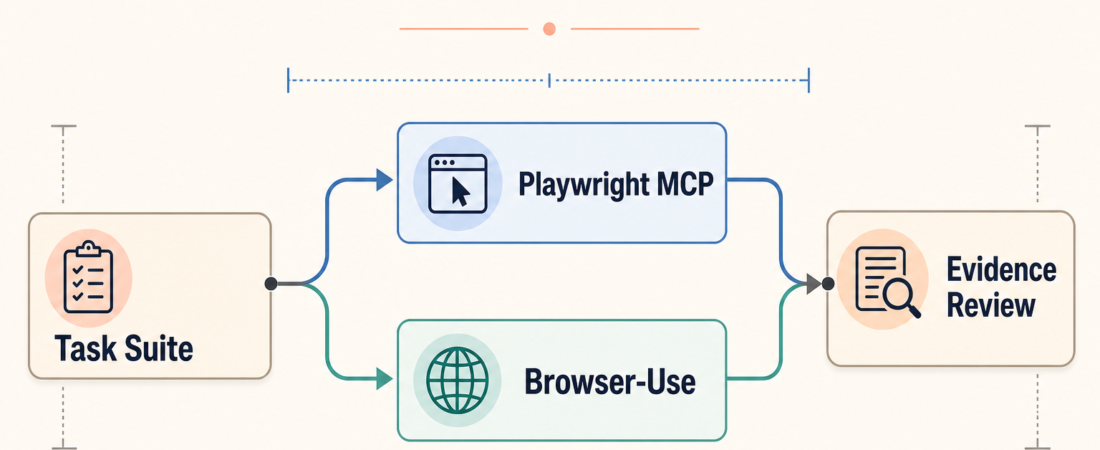
Playwright MCP vs Browser-Use Benchmarks: What Should Operators Compare?
Browser-agent benchmarks are useful only when they answer an operator question. Playwright MCP and Browser-Use live near each other in the automation stack, but they should not be compared as if they were the same thing. One is a structured route for browser and API automation through the Model Context Protocol. The other is a browser-agent framework that can be evaluated against fixed task suites. A fair comparison starts with the task shape, the evidence you need, and the failure modes you are willing to accept.
| Compare | Ask first | Evidence to keep |
|---|---|---|
| Task suite | Is the task fixed, repeatable, and reviewable? | Task prompt, start URL, success rule |
| Automation path | Does the agent need deterministic browser/API tools or open-ended browsing? | Trace, screenshots, network notes |
| Benchmark result | Can a reviewer reproduce the pass or failure? | Run log, failure category, retry policy |
In Short
Do not ask which browser-agent benchmark is “best” in the abstract. Ask which comparison is fair for your work. Playwright is a browser automation project with cross-browser testing, tracing, assertions, and network inspection. The Playwright MCP server exposes browser and API automation through MCP so an agent can operate against known pages with more structured control.
Browser-Use is aimed at letting AI agents control browsers for web tasks. That makes it useful to evaluate against task suites, but it also means the benchmark has to say exactly what counts as success. A vague score is weak evidence. A fixed task, reproducible run, screenshot, trace, and failure label are much better.
Who this is for
This guide is for engineering leads, QA owners, platform teams, and agent operators who need to compare browser-agent behavior before letting agents touch customer flows, admin panels, research tasks, or web-based operations. It fits teams that already know browser automation can help, but need a sober way to decide what to measure.
It is not a leaderboard. It does not claim that one project outranks the other. The practical question is narrower: when should you compare deterministic MCP-driven automation, when should you evaluate an agentic browsing framework, and what evidence should survive the run?
Decision path
Start with the task type. If the work is a known product journey such as login, settings update, checkout, report export, or regression QA, favor a Playwright-shaped comparison. The task has stable pages, clear assertions, and concrete evidence: traces, screenshots, console output, and API responses. In that case, Playwright MCP can be a good agent-facing route because the browser actions and request checks stay close to the review surface.
If the work is exploratory browsing, multi-site navigation, or information gathering across pages that may change, evaluate it as an agent task. Browser-Use-style benchmarks are more relevant when the agent has to plan steps, inspect pages, recover from surprises, and decide when it has enough evidence. The benchmark should still be bounded: fixed start conditions, allowed tools, timeout, retry policy, and human-readable success criteria.
Next, decide what counts as a pass. For product QA, a pass might mean the expected UI state appears, the request returns the right status, and no console errors show up. For web research, a pass might mean the agent returns the requested facts with cited pages and no unsupported claim. For anti-bot or session-heavy tasks, avoid fake certainty. Record whether the blocker was login, CAPTCHA, rate limit, session expiry, page drift, or tool failure.
Finally, compare failure quality, not just pass rate. A tool that fails with a clear trace and reproducible step may be more useful than a tool that sometimes succeeds without explaining how. Operators need to know whether a failed run can be repaired, retried, or safely escalated to a person.
Recommended ASE skills
Use the required queue skills first, then add neighboring browser skills when the comparison needs more coverage.
- Run browser and API automation through the Playwright MCP server for structured browser and request checks from an MCP-capable agent.
- Benchmark browser agents on a fixed stealth and task suite with browser-use benchmark when the main question is how an agent handles a repeatable web task suite.
- Benchmark browser agents on repeatable Playwright web tasks with Bananalyzer when you want Playwright-shaped browser tasks as the repeatable benchmark surface.
- Drive token-efficient browser testing from coding agents with Playwright CLI for local browser inspection and reviewer-friendly screenshots during code review.
- Browse from MCP clients with Browser Use MCP Server when Browser-Use needs to be exercised from an MCP client environment.
For broader regression coverage, Run AI browser regression checks with Playwright and multi-model verification through Passmark can help teams compare natural-language checks against captured browser evidence. Keep these skills tied to the task definition rather than treating them as interchangeable tools.
What to watch
Watch for benchmark drift. If the pages, credentials, or success criteria change between runs, the comparison is no longer clean. Save the task prompt, start URL, browser settings, timeout, and allowed recovery steps with the result.
Watch for anti-bot and login constraints. A browser-agent benchmark can turn into a test of session handling instead of task ability. That is still useful if labeled correctly, but it should not be mixed with ordinary browsing scores.
Watch for screenshots that look convincing but prove little. A final page image without the steps, trace, or assertions can hide a broken path. The result should explain what the agent did, what it observed, what passed, and where a human should review.
FAQ
Should teams compare Playwright MCP and Browser-Use directly?
Only for a defined job. Compare them on a fixed task with the same start state, same timeout, same allowed tools, and the same success rule. Otherwise the result is too vague to guide production decisions.
What is the smallest useful benchmark?
Three to five tasks can be enough for an internal decision if each task is realistic, repeatable, and reviewed. A small benchmark with clean evidence beats a large suite no one can interpret.
What should be in the final evidence pack?
Keep the task definition, environment notes, run log, screenshots or trace, pass/fail result, failure category, and reviewer notes. That gives the next operator enough context to reproduce or challenge the result.