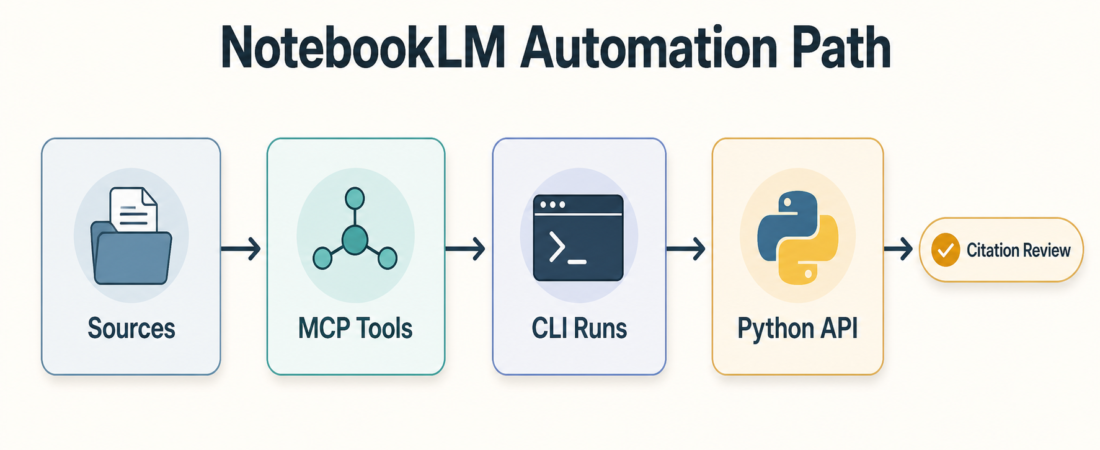
NotebookLM MCP, CLI, or Python API: Choosing a Research Automation Path
NotebookLM is useful when a research workflow needs source-grounded answers, summaries, study artifacts, and citations that a reviewer can trace. The automation question is not whether to use NotebookLM at all. It is where to put the automation boundary: an MCP server, a command-line workflow, or a Python API wrapper.
Docs, links, notes
MCP, CLI, or API
Answers, briefs, audio
Citations, auth, export
In Short
Choose MCP when the agent should work inside a client that already understands tool calls and approvals. Choose a CLI when the team wants a repeatable local operation that can be run, logged, and reviewed from a terminal. Choose a Python API when NotebookLM becomes one step inside a larger research pipeline that also touches files, queues, databases, or custom review logic.
Google’s own NotebookLM support material should remain the product reference for what NotebookLM does and how source-grounded output behaves. Community automation projects can make the work more repeatable, but they also move authentication, source import, and export steps into code. That is the part to review carefully.
Who this is for
This guide is for operators, researchers, analysts, and engineering teams that already use NotebookLM manually and now want more consistent research batches. The common pattern is familiar: collect sources, ask the same question set, generate a briefing artifact, export the useful answer, then hand it to a person who checks the citations before it enters a customer note, strategy doc, sales brief, or internal knowledge base.
It is also for teams deciding how much access an agent should have. A research assistant that only searches a few notebooks has a different risk profile from one that creates notebooks, imports Drive files, generates Studio artifacts, and downloads outputs at scale.
Decision path
Start with the review boundary, not the integration style. If the reviewer needs to see every source added to a notebook and every prompt used to produce a summary, pick the path that leaves the clearest log in your environment.
Use an MCP route when the agent’s main workspace is an MCP-compatible client and the team wants NotebookLM actions exposed as named tools. This fits interactive work: search notebooks, add a source, ask a cited question, and bring the result back into the same agent thread for review. MCP is often the easiest path to put human approval close to the action because the client can show tool calls before or after execution.
Use a CLI route when the work is operational and repeatable: one command to authenticate, one command to add sources, one command to query or export. A CLI is straightforward to document in a runbook and easier to test in isolation. It also gives reviewers something concrete to inspect: command history, parameters, output files, and logs.
Use a Python API route when NotebookLM is only one stage in a larger pipeline. For example, a team may pull source files from a controlled folder, create or update a notebook, ask a standard set of cited questions, export the artifact, run a quality check, and write a review packet. In that case, Python gives the most control over retries, file naming, source manifests, and handoff metadata.
Do not let the choice become a debate over which wrapper looks most useful. The practical question is which path makes citations, authentication, source scope, and output review easiest to explain after the run.
Recommended ASE skills
Start with Automate NotebookLM Studio generation and cited research batches with notebooklm-mcp when the workflow belongs inside an MCP client or local REST-style automation layer. It is the best first match when agents need to run cited Q&A, manage research batches, and generate NotebookLM Studio artifacts through a tool boundary.
Use Automate grounded NotebookLM research and artifact export with notebooklm-py when the work needs Python control. This route fits teams building a pipeline around source ingestion, cited questions, artifact export, and review steps.
Use Search NotebookLM notebooks, sources, and generated study artifacts from agents when the important job is search and retrieval across existing notebooks and generated study artifacts. It is a good fit when the team wants agent-side access without treating every run as a full research batch.
If the research job extends beyond NotebookLM, compare it with Run autonomous deep research workflows with GPT Researcher for broader cited web research, or Run local deep research workflows with Local Deep Research when privacy and local document handling matter more than NotebookLM-specific artifacts.
For broader browsing, start from the ASE skill browser and keep the selected skill page linked in your runbook. That gives reviewers one stable place to check source URL, install notes, trust tier, and operational scope.
What to watch
Authentication is the first watch point. Browser cookies, local login state, and account-scoped access should be documented before automation runs on a schedule. If a tool depends on a human browser session, say that plainly in the runbook.
Source scope is the second. NotebookLM’s value comes from grounded sources, so a batch workflow should record which files, links, or Drive items were added. The output is only as reviewable as the input manifest.
Citations are the third. A cited answer still needs human review when it will influence a customer-facing artifact, financial decision, legal note, medical workflow, or executive recommendation. The automation should make citation review easier, not replace it.
Exports are the fourth. Decide whether the final artifact is a Markdown note, a downloaded study item, a report, or a link back to NotebookLM. Ambiguous exports create duplicate versions and make later audits harder.
FAQ
Is MCP always the best path for agent workflows?
No. MCP is useful when the agent client is the center of work. A CLI or Python API can be better when the run needs scheduled execution, versioned scripts, or deeper pipeline control.
Can this replace manual NotebookLM review?
No. Treat automation as a way to prepare sources, questions, and artifacts consistently. A person should still review the source set, citations, and final claims before publication or operational use.
Should every research workflow use NotebookLM?
No. NotebookLM is strongest when the team has a defined source set and wants grounded synthesis. For open-ended web research, local private corpora, or benchmark-style evaluation, another ASE research skill may be a better first route.