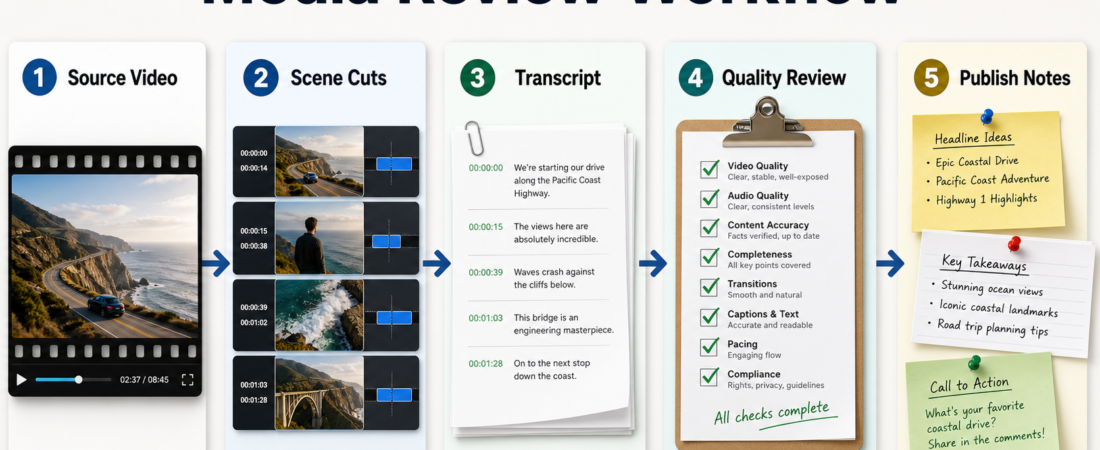
A Media Review Workflow From Video to Transcript to Publish Notes
A useful media review workflow does not ask an agent to “finish the video.” It asks the agent to turn source media into reviewable evidence: scene boundaries, transcript text, timestamps, quality notes, and a short publish handoff that an editor can approve or reject. That is the difference between speeding up production and quietly outsourcing editorial judgment.
| Stage | Agent output | Human review question |
|---|---|---|
| Source video | File list, duration, codec notes | Is this the right asset? |
| Scene cuts | Candidate boundaries and cut list | Do the segments match the story? |
| Transcript | Timestamped text and speaker hints | Are names, quotes, and terms correct? |
| Publish notes | Summary, risks, captions, next edits | Is this ready to publish? |
In Short
For publishing teams, the safest first media workflow is a bounded review packet. Start with the source asset, extract scene and audio evidence, create a timestamped transcript, check quality, then prepare publish notes. The agent can do the repetitive preparation, but the editor should still decide what the clip means, what should be cut, and what is safe to publish.
The official FFmpeg documentation is the right source for media inspection, conversion, and filter behavior. The OpenAI Whisper repository describes Whisper as an approach to automatic speech recognition. The WhisperX repository adds practical context around timestamping and diarization workflows. Use those source-backed capabilities as preparation tools, not as final editorial authority.
Who this is for
This playbook is for content teams, course producers, podcast editors, developer advocates, research teams, and small marketing teams that handle recordings but do not have a dedicated media operations group. It fits interview footage, webinars, screen recordings, demos, podcasts, lessons, and YouTube source material.
It is especially useful when the team’s pain is not creative direction but review friction: finding the right moments, checking transcript accuracy, normalizing audio, drafting captions, and giving an editor enough context to make the final call.
Starter workflow
First, freeze the source set. Capture filenames, durations, checksums when available, language expectations, and the intended publishing surface. If an agent starts from the wrong file, every later output becomes suspect.
Second, split the review surface into scenes or segments. A scene boundary pass is not the same as a finished edit. Treat it as a map: likely starts, likely stops, and sections that deserve human attention. For a 45-minute webinar, the useful output may be 12 candidate sections with timestamps and one-line descriptions.
Third, transcribe the audio with timestamps. Ask for confidence-sensitive notes: uncertain names, acronyms, product terms, overlapping speakers, and sections with poor audio. For multilingual or speaker-heavy recordings, keep diarization and timestamp alignment visible so reviewers can challenge the transcript instead of hunting through the whole file.
Fourth, run quality checks before writing publish notes. Look for clipped or low audio, missing captions, visual glitches, private information on screen, wrong slide versions, and claims that need source review. The FFmpeg docs matter here because media transformations should be explicit and repeatable, not hidden inside a summary.
Fifth, produce publish notes as a handoff, not a verdict. A good packet includes source files, selected timestamps, transcript excerpt, caption draft, quality risks, suggested headline angles, and open editor questions. The editor should be able to approve, revise, or reject the recommendation in minutes.
Recommended ASE skills
Use the queue skills first. They cover the core path from source video to transcript to publish-ready review notes.
- Detect scene boundaries and export cut lists before video review with PySceneDetect for candidate segment maps before an editor reviews the footage.
- faster-whisper high performance speech transcription library when the workflow needs efficient transcription over local or batch media.
- WhisperX speech recognition timestamps diarization when speaker separation and timestamp alignment are part of the review packet.
- Normalize loudness across podcast, lesson, or video batches before publishing for audio consistency checks before release.
- Capture YouTube transcripts without browser automation using youtube-transcript-api when the source is an existing YouTube asset and transcript capture is the bounded task.
The important pattern is not using every media skill at once. Pick the smallest chain that creates the evidence your reviewer actually needs.
What to watch
Watch for transcript confidence disguised as certainty. Names, numbers, brand terms, and technical acronyms need explicit review because a fluent transcript can still be wrong.
Watch for agents that over-edit. Scene detection can suggest sections, but it should not decide the story, tone, or final cuts without a human editorial pass.
Watch for hidden media transformations. If audio was normalized, frames were extracted, or files were converted, the command or settings should be part of the handoff.
Watch for rights, privacy, and consent issues. A publish note should flag visible personal data, private screens, unreleased roadmap details, and speaker approvals before anyone schedules the post.
FAQ
Should this workflow create the final edit automatically?
Usually no. Start with a review packet. Once the team trusts the evidence and approval path, you can automate narrow edit operations with explicit constraints.
What is the minimum useful packet?
Keep the source file list, scene timestamps, transcript, quality notes, suggested publish angles, open risks, and the exact commands or tools used for media processing.
Where should human review happen?
Human review should happen after segmentation, after transcript generation, and before publish notes become a scheduled asset. Those are the points where meaning, accuracy, and risk enter the workflow.
Can this work for podcasts as well as video?
Yes. For audio-only work, skip visual scene checks and focus on transcript accuracy, speaker labels, loudness, edit points, show notes, and claims that need source review.