How to Read an ASE Skill Page Before Installing Anything
Installing an agent skill should feel boring. The page should tell you what the skill claims to do, where it came from, what it needs, and where the responsibility boundary sits. Read those pieces in the right order and most bad fits reveal themselves before you paste a command into a terminal.
This guide gives operators a repeatable pass for reading an ASE skill page before installing anything. Use it for quick experiments, team-approved skills, and client environments where a small shortcut can become a large cleanup job.
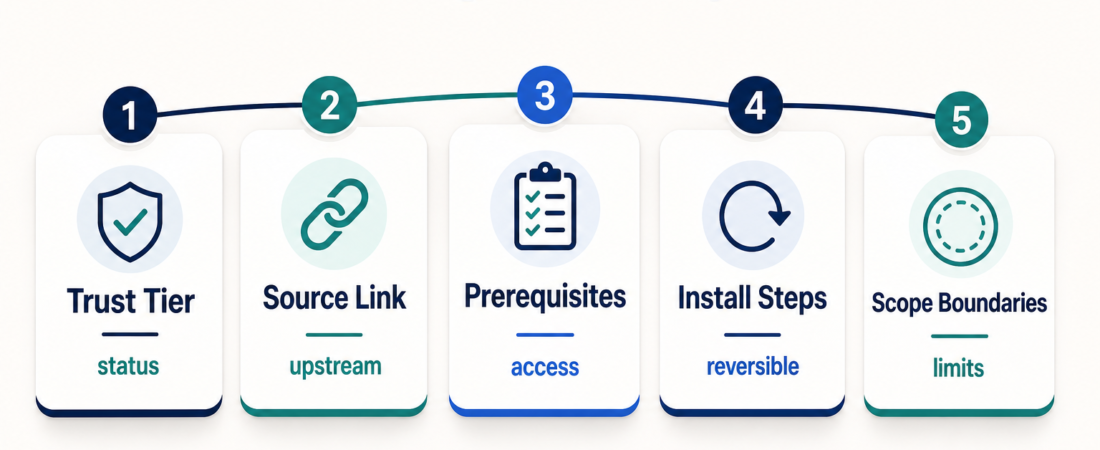
| Check | What to look for | Stop if |
|---|---|---|
| Trust tier | Published or Security Reviewed status | The tier does not match the environment risk |
| Source | A real upstream repo, package, or docs page | The source identity is unclear or unrelated |
| Prerequisites | Tools, accounts, keys, runtime, permissions | The skill needs access you cannot safely grant |
| Install steps | Commands you understand and can reverse | The command is broad or unexplained |
| Boundaries | What the skill should and should not do | It claims judgment or guarantees it cannot own |
In Short
Read an ASE skill page from risk to convenience, not the other way around. Start with the trust tier and source link. Then check prerequisites, install instructions, examples, and workflow boundaries. Only after that should you decide whether the skill belongs in your agent environment.
A good page does not make every skill safe for every team. It gives you enough evidence to make a sane choice. A browser testing page like Playwright MCP Browser Automation should help you understand the upstream project, local runtime needs, and browser access involved. A local browser agent such as Nanobrowser should make you ask where tasks run, what data stays local, and how much review is needed before using it on real accounts.
Who this is for
This is for operators who install skills into coding agents, support assistants, research agents, internal automation, or personal workspaces. It is especially useful when you are not the original developer of the skill and need a fast way to decide whether the page is credible enough to test.
It is also for team leads who want a simple review habit. You do not need a full audit for every low-risk experiment, but you do need a consistent first pass. The goal is to catch obvious mismatches: excess access, weak source evidence, or an install command that reaches too widely.
Decision path
First, read the trust tier. ASE keeps the user-facing model simple: Published means the skill is listed with available marketplace metadata, while Security Reviewed means it has passed additional security review. Treat the tier as a routing signal, not a blanket guarantee. A local note-formatting skill and a database-querying skill do not carry the same blast radius.
Second, open the source link. A useful skill page should point to a real upstream identity: a GitHub repository, package page, official documentation, or another source that explains the underlying tool. Compare names, authors, and install instructions. GitHub’s guidance on supply-chain security is a useful reminder that provenance is not decoration; it is part of how you decide what code to run.
Third, check prerequisites before you read the happy path. Runtime requirements, API keys, accounts, MCP servers, browser access, local files, and cloud credentials all change the risk profile. A documentation assistant such as DocsGPT is a different operational choice from a browser-control skill. A memory skill such as Self-Improvement / Learnings Capture is useful only if you are comfortable with where it writes lessons.
Fourth, inspect install instructions as if you will have to undo them later. Prefer commands that name specific packages, repositories, or host configuration. Be careful with broad shell pipes, unnecessary global installs, and privileged access without a clear reason. For npm-based tooling, npm’s package provenance guidance at docs.npmjs.com shows what stronger package identity looks like.
Fifth, read for boundaries. The page should make clear whether the skill drafts, verifies, executes, summarizes, searches, or controls tools. This matters because operators often install a skill for one task and later reuse it in a higher-risk setting. A project coordination skill such as CCPM can structure work, but review responsibility still stays with the operator.
Recommended ASE skills
Use concrete pages as practice. Start with Playwright MCP Browser Automation when you want to evaluate browser-control prerequisites and local runtime assumptions. Compare it with Nanobrowser to see how local multi-agent browser work changes the review questions.
For knowledge and support use cases, inspect DocsGPT and focus on document access, source boundaries, and retrieval behavior. For learning loops, read Self-Improvement / Learnings Capture and decide where durable notes should live. For project execution, review CCPM and ask how worktrees, issues, commits, and review responsibilities are separated.
What to watch
Watch for source mismatch. If the page names a tool, but the source link points somewhere unrelated, pause. It may be a metadata problem, a renamed project, or a bad fit. In any case, the operator should not be the first person to reconcile it in a production environment.
Watch for permissions creep. A skill that only needs read-only access should not require broad write permissions. A local analysis task should not need access to private accounts unless the task itself requires it. The higher the access level, the more you should prefer a test workspace, sample data, and a reversible install.
Watch for overclaiming. Skills can make agents more consistent, but they do not transfer accountability away from the operator. Be skeptical of pages that sound like they replace legal, financial, clinical, or security judgment. Safer pages usually use narrower verbs: draft, summarize, extract, check, compare, route, or prepare evidence for review.
FAQ
Should I install only Security Reviewed skills?
No, but you should match review depth to risk. Published skills can be fine for low-risk experiments. Security Reviewed skills are better candidates when the skill touches sensitive data, automation, credentials, or production systems.
What if a page has no source link?
Treat that as missing evidence. It does not automatically mean the skill is harmful, but it does mean you have less to verify. For anything beyond casual experimentation, prefer a skill with a clear upstream source.
Is a GitHub link enough to trust a skill?
No. A GitHub link is the start of verification, not the end. Check whether the repo matches the page, whether the project is maintained, what the install path does, and whether the requested permissions fit the job.
What is the fastest safe install habit?
Read the trust tier, open the source, scan prerequisites, inspect install commands, and test in a low-risk workspace first. If any one of those checks feels unclear, slow down before connecting the skill to real data or real accounts.