Helpdesk Agents vs CRM Agents vs Knowledge-Base Agents: What Support Teams Actually Need
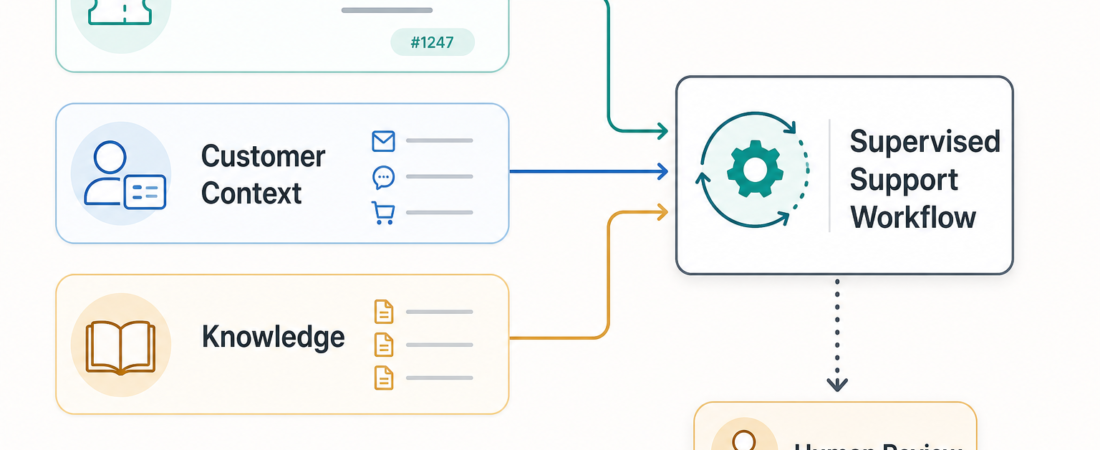
Support teams rarely need one giant “customer service agent.” They need a workflow that knows which system is responsible for which part of the job. A helpdesk agent should work the queue. A CRM agent should bring account and contact context into view. A knowledge-base agent should ground replies in current product facts, policy, and troubleshooting material. When those lanes blur, the output may look fluent but miss the operational truth of support work.
| Agent lane | Primary source | Best output |
|---|---|---|
| Helpdesk | Tickets, threads, queues, SLAs | Triage, summaries, draft replies, escalation notes |
| CRM | Accounts, contacts, lifecycle records | Customer context, handoff notes, record updates for review |
| Knowledge base | Docs, help center, runbooks, saved notes | Cited answer material, gaps, article updates |
The useful question is not which agent “does support.” It is where the next decision should come from. If the blocker is a messy queue, start with helpdesk context. If the blocker is account history, start with CRM context. If the blocker is answer accuracy, start with the knowledge base. The strongest support stack usually combines all three, but it gives each lane a narrow job and keeps human review close to customer-facing actions.
Helpdesk agents own the ticket workflow
A helpdesk agent is closest to the actual support work: inbound tickets, conversation threads, priorities, assignments, attachments, internal notes, status changes, and escalation paths. Its job is to make the queue easier to operate. It should not invent customer history or product policy from memory. It should read the ticket, identify the issue, find missing information, draft a response, and make the handoff cleaner for the human who owns the queue.
ASE has several skills that fit this lane. Connect MCP agents to Zendesk ticket and Help Center workflows is a practical example for teams already running Zendesk. Let MCP agents inspect and update Freshdesk tickets safely is useful when the support stack is Freshdesk and the team wants bounded, reviewable agent actions. Inspect Freshservice service management tickets and modules through MCP extends the pattern into ITSM-style queues where incidents, assets, and service modules may all matter.
Open-source teams may prefer owning the ticketing layer directly. Zammad Open Source Helpdesk Ticketing System and Chatwoot Open Source Customer Engagement and Omnichannel Support give support operations a self-hostable base for queue management and customer conversations. In those environments, an agent can help classify conversations, summarize long threads, prepare macros, or flag tickets that need escalation before a reply goes out.
The quality bar for helpdesk agents should be operational, not theatrical. Can the agent preserve the exact customer request? Did it separate facts from assumptions? Did it identify missing information? Did it avoid changing ticket state without review? A good helpdesk agent reduces queue drag. A risky one quietly mutates the system of record.
CRM agents own customer and account context
CRM agents answer a different question: who is this customer, what relationship do we have with them, and what context should change how we handle the ticket? That may include account tier, contract status, renewal risk, recent sales notes, open opportunities, past support history, implementation status, lifecycle stage, or contact ownership. This context can change the tone, urgency, and routing of a reply, but it should not be mixed blindly into the ticket response.
For teams building a CRM-backed support workflow, Twenty Open Source CRM Platform and Salesforce Alternative gives an open CRM foundation for account and contact records. HubSpot CRM Contact Enrichment Pipeline fits teams that need cleaner contact and company context before account reviews or support-to-success handoffs. Salesforce CRM Sync Agent is the natural pattern for organizations where Salesforce remains the commercial source of truth.
The CRM lane is especially important for success teams. A ticket from a trial user, a strategic account, and a churn-risk customer may look similar at the message level but require different coordination. A CRM agent can prepare that coordination: “This customer is in onboarding,” “Their renewal is due next month,” “The account owner left a note yesterday,” or “This ticket should be escalated to success before a policy exception is offered.”
The mistake is letting CRM context become a license to over-personalize or overpromise. CRM data is often incomplete, stale, or politically sensitive. A support workflow should surface the context and cite the record it came from. Customer-facing language should still be reviewed, especially when it references contracts, pricing, renewals, or exceptions. The agent can prepare the handoff; it should not become the account owner.
Knowledge-base agents own answer grounding
A knowledge-base agent is responsible for truth maintenance. It searches docs, help center articles, runbooks, release notes, internal notes, and saved examples before drafting an answer. This lane matters because support replies fail when they rely on memory, old policy, or a plausible but unsupported troubleshooting step. The best knowledge-base agent returns source-backed answer material and exposes gaps when the answer is not documented.
ASE includes several useful building blocks. Outline Open Source Team Knowledge Base and Wiki Platform gives teams a structured internal knowledge base. AFFiNE Knowledge Base and Collaborative Workspace Platform supports notes, whiteboards, and lightweight workspaces for support playbooks. nb CLI Note-Taking Bookmarking and Knowledge Base Application is a better fit for smaller teams and support engineers who want local notes, snippets, and bookmarks in a tool-friendly format.
There are also skills that connect knowledge search directly to support writing. Search Help Scout conversations and thread context before drafting support replies captures the right habit: read prior conversation context before writing. Convert HTML emails and web fragments into clean plain text for downstream agents and Strip quoted email history and signatures before summarizing inbound replies help clean the raw material so the agent is not reasoning over footers, duplicate threads, and formatting noise.
The strongest knowledge-base workflows do two things at once: they answer the current ticket and improve the source material. If the agent cannot find a documented answer, that should become a knowledge gap, not a hallucinated response. If it finds three conflicting articles, that should become a cleanup task. If it drafts a good reply from a private runbook, the team may need a public help-center update. Support quality compounds when every hard ticket teaches the knowledge base something.
How to choose the first lane
Start with the bottleneck. If agents are spending too much time reading long threads, choose a helpdesk lane first. If replies are technically fine but miss account nuance, add CRM context. If answers vary by agent or depend on tribal knowledge, invest in the knowledge-base lane. Trying to automate all three at once usually creates a fragile demo that works only for simple tickets.
A mature support workflow often looks like this: the helpdesk agent summarizes the ticket and detects urgency; the knowledge-base agent retrieves cited answer material; the CRM agent adds account context and handoff notes; then a human support agent reviews the draft, chooses the customer-facing language, and decides whether to send, escalate, or update the source article. This is not slower than full automation in practice. It is faster than cleaning up a confident wrong reply after it reaches a customer.
There are also clear boundaries. Helpdesk agents should not silently close tickets. CRM agents should not change account records without review. Knowledge-base agents should not answer from stale or uncited material when policy matters. The right safety model is not a vague warning at the bottom of the screen. It is permission design: read widely, propose narrowly, require review for writes, and log what changed.
What support teams actually need
Most support teams need less “AI support replacement” and more disciplined workflow assistance. They need queue triage that respects ownership. They need customer context that does not leak or overreach. They need answers grounded in current docs. They need clean handoffs between support, success, product, engineering, and billing. Above all, they need a system that makes uncertainty visible before it reaches the customer.
That is why the helpdesk, CRM, and knowledge-base split is useful. It turns a fuzzy automation goal into three concrete responsibilities. The helpdesk lane handles the work item. The CRM lane handles the relationship. The knowledge-base lane handles the evidence. Put them together, and the agent becomes a support copilot with a clear operating model instead of a chatbot trying to act like the whole department.
The practical recommendation is simple: pick the lane with the highest current drag, connect it to real systems, and measure whether it produces a better review artifact. For many teams, that first artifact is a clean ticket summary plus suggested routing. For others, it is a source-cited answer draft or a CRM handoff note. Once that artifact is reliable, add the next lane. Support automation earns trust one reviewable step at a time.