A GTM Data API Trial Playbook Before RevOps Commits to a Provider
In Short
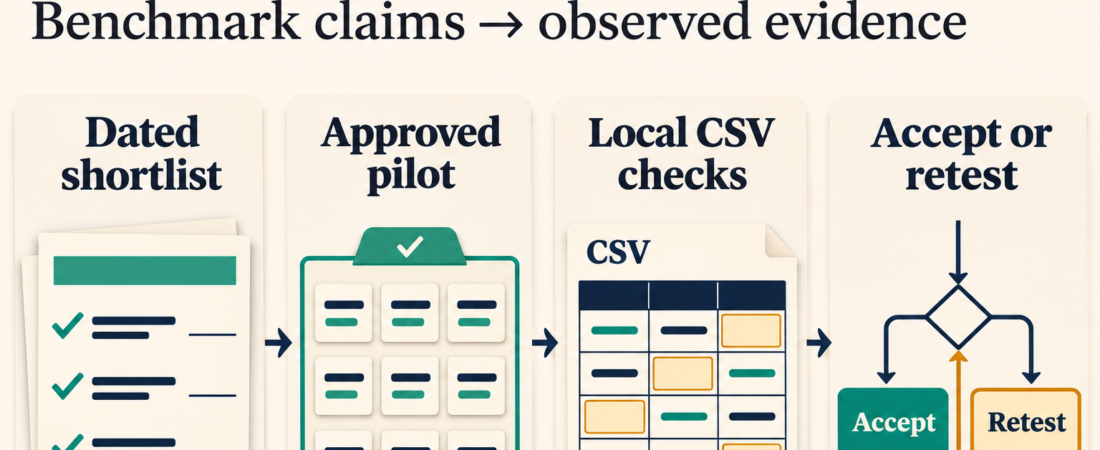
A GTM data API trial should end with evidence about your own cohort. Start with a dated Datacircle shortlist, run a small authorized pilot, then inspect separately obtained exports locally for data completeness. Keep provider evaluation scores beside their source; give observed pilot results their own columns.
This RevOps playbook uses the Datacircle ASE addition as a discovery step, qsv for CSV inspection and DuckDB for cohort comparisons. The stages are manually connected. An operator owns credentials, provider calls and spend approval; this workflow does not write to a CRM.
Source check: November 18, 2026. The public company-enrichment benchmark response was inspected during preparation; no paid provider pilot was run for this article. Use the steps below to produce your own trial evidence.
Who this is for
RevOps analysts and operations leads choosing a company-enrichment provider can use this packet before committing engineering time or a subscription. It also helps procurement reviewers distinguish a promising benchmark from demonstrated vendor fit.
Choose one API category and one business question. For example: can this provider return the required company identifier and country for the authorized accounts in our target regions? Comparing unrelated endpoints or different populations will obscure the decision. Synthetic records can test request handling; only appropriate consented or otherwise authorized inputs can establish real coverage.
Starter workflow
- Freeze the shortlist evidence. Save the current Datacircle OpenAPI document, request URL, UTC retrieval time and raw benchmark response. Discover the category slug through
/apis, then inspect its plans. The documented/plansendpoint useslimitandoffset; retain returned totals and offsets and record whether pagination is complete. A first page is a bounded sample, not the whole market. - Check what each row means. The current Datacircle skill documentation describes a downloadable dataset with one row per plan and call. Preserve the provider documentation links and missing plan fields. Attribute scores and ordering to Datacircle. Recheck current terms, permitted use, pricing, billing units and retention directly with any shortlisted provider before recommending a purchase.
- Approve a bounded pilot. Propose two providers and twenty authorized company inputs, divided into named cohorts. These are suggested trial bounds. Agree on required fields, a spending ceiling, a stop condition and the handling of timeouts before calls begin. Keep credentials outside exports. Have the operator obtain trial responses and record failures alongside successful results.
- Prepare comparable files. Keep original exports unchanged. Manually map copies into a shared schema:
provider,input_id,cohort,returned_id,country,status. Document every mapping and null convention. Preserve one input ledger row per approved input, including those with no returned record. Treat blank identifiers as missing; preserve leading zeros in identifiers. - Inspect locally and decide. Use qsv to check headers, field distributions and duplicate identifiers. Load the mapped CSVs with explicit types in DuckDB, compare coverage by cohort, and attach the output to a dated accept-or-retest note. Link each exception to its original response or export row.
| Stage | Evidence retained | Review question |
|---|---|---|
| Dated shortlist | Response, pagination, provider docs | What is still unknown? |
| Approved pilot | Fixed inputs and call outcomes | Was each input accounted for? |
| Local checks | Missing fields and duplicate keys by cohort | Does coverage meet the agreed need? |
| Decision | Exceptions, owner and next review date | Accept or retest? |
For an initial local profile, run qsv stats trial.csv and qsv frequency -s provider,cohort,status trial.csv. The qsv project documentation covers these inspection commands. Inspect duplicates before removing anything: repeated records may expose provider behavior or a mapping error.
In DuckDB, load the prepared file with read_csv('trial.csv', all_varchar=true) and explicitly convert measured numeric fields later. Its CSV documentation explains reading options. Group by provider and cohort, count distinct input IDs, and count missing required values. Join back to the fixed input ledger to expose absent responses; a table containing only successes inflates coverage.
Recommended ASE skills
- Datacircle GTM API Benchmark: begin the dated shortlist and retain source links.
- CSV profiling with qsv: inspect the separately prepared trial exports.
- DuckDB SQL Analytics Agent: compare cohort coverage locally.
- REST API contract review: separately review authentication and response assumptions.
- httpYac request checks: optionally retain operator-approved request assertions. This companion does not authorize provider calls.
What to watch
Keep unknown limits and costs null. Missing data does not mean zero cost, unlimited capacity or unsupported functionality. Distinguish a missing required field from a failed request and from an input outside documented coverage.
Agree on acceptance thresholds before seeing results. Deliver a cohort-level evidence table, unresolved terms, documented exclusions and a named reviewer. If a key cohort lacks enough observations, choose retest. A benchmark ranking alone cannot settle that uncertainty.
An illustrative acceptance rule might require at least nine of ten inputs in each cohort to return both required fields, with every failed input explained. Label that threshold as your team’s choice. Record numerator and denominator beside each percentage, and keep the benchmark score outside the acceptance calculation. This makes a small pilot reviewable without implying that its results generalize to every market.
FAQ
Can a benchmark select the provider?
It can narrow research. Acceptance needs observed pilot results and verified provider terms.
Should we remove duplicates first?
Retain them as evidence, investigate their keys, and document any later cleanup.
Does this connect directly to our CRM?
No. This packet ends at human review; production integration needs its own approved scope.