Finance & Filings Update: Four New Skills That Make the Collection More Practical
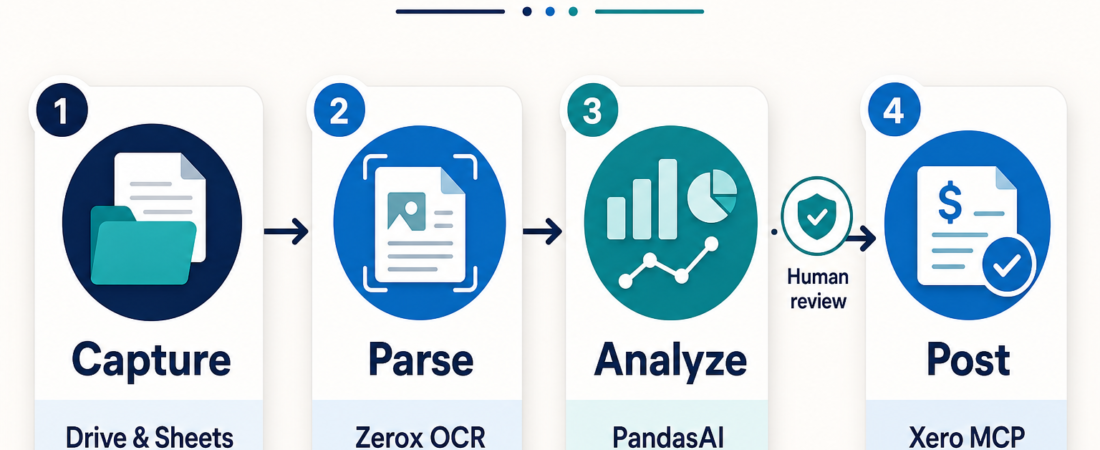
The Finance & Filings collection on ASE is getting more useful for the kind of work finance teams actually repeat: collecting source files, turning documents into usable records, checking the numbers, and handing reviewed results to an accounting system. The point is not to let an agent “do finance” unsupervised. The useful pattern is narrower and safer: give the agent bounded tools, keep source evidence attached, and make human review the step before anything becomes a system of record.
| Stage | Skill to try | Operator handoff |
|---|---|---|
| Collect | Drive and Sheets access | Confirm source folder, sheet, and permissions |
| Parse | OCR-ready document extraction | Check confidence, missing fields, and source page |
| Analyze | Spreadsheet and CSV questioning | Review formulas, outliers, and assumptions |
| Post | Accounting connector | Approve records before writeback |
In Short
The practical update is a starter finance ops stack built around four jobs: source-file access, document OCR, spreadsheet analysis, and accounting-system handoff. The four skills to look at first are Read Google Drive files and edit Sheets through MCP, Extract OCR-ready Markdown from documents with Zerox, Use PandasAI for conversational CSV and spreadsheet analysis, and Connect accounting agents to Xero through MCP.
This is not a replacement for controls, approvals, or bookkeeping judgment. It is a way to move repetitive finance work out of scattered prompts and into a repeatable workflow with evidence at every step. The broader Finance & Filings collection still includes filing research, invoice extraction, reporting, reconciliation, and dashboard skills, but these four picks make the collection easier to start with.
Who this is for
This update is for operators who already have finance work moving through shared folders, spreadsheets, PDFs, billing exports, or accounting systems. That includes a founder reconciling invoices once a week, a RevOps person checking subscription exports, an analyst turning PDFs into review packets, or a finance lead trying to reduce copy-paste between Drive, Sheets, and Xero.
It is also for teams that are not ready to build a full internal finance platform. A small team may not need a warehouse, dbt project, or bespoke approval app on day one. It may need a cleaner way to gather invoices, parse documents, compare exports, ask questions of CSVs, and route exceptions to a human. If that is the shape of the work, an agent skill stack can be useful without becoming a risky automation project.
Starter workflow
Start with source access. The Google Drive and Sheets MCP skill is useful when the team already stages finance files in shared folders or uses Sheets as the review surface. Keep permissions narrow. Give the agent the folder or workbook it needs, not broad account access. The official Google Sheets API documentation is worth checking when you need to understand what read and write scopes really allow.
Then parse the messy documents. Zerox fits scanned receipts, statements, and PDFs that need to become text or Markdown before structured extraction. It is not the end of the workflow. Treat OCR output as a draft record with page references. For invoice-shaped work, pair it with Extract invoice fields from vendor PDFs into structured records so the agent has a more specific target than “summarize this PDF.”
Next, analyze the working data. PandasAI is a good fit when a finance operator has CSV exports, spreadsheet tabs, or cleaned OCR results and wants to ask practical questions: which vendors changed amounts, which rows are missing account codes, which totals do not match last month, or which invoices need review. For larger local exports, DuckDB SQL Analytics Agent is a stronger companion because it keeps analysis explicit and repeatable through SQL.
Finally, use Xero as a handoff point, not a blind destination. Connect accounting agents to Xero through MCP can connect the reviewed workflow to accounting records, invoices, contacts, and related objects. The official Xero developer documentation should guide the permissions model. If your team also lives in QuickBooks, compare the same handoff boundary with QuickBooks Online Invoice Reconciliation Agent.
Recommended ASE skills
Use these as a practical starter set, not a mandatory bundle:
- Read Google Drive files and edit Sheets through MCP for controlled source access and spreadsheet handoff.
- Extract OCR-ready Markdown from documents with Zerox for scanned documents, statements, and PDFs.
- Extract invoice fields from vendor PDFs into structured records when invoices need consistent fields.
- Use PandasAI for conversational CSV and spreadsheet analysis for fast questions over review data.
- Connect accounting agents to Xero through MCP for accounting-system handoff after review.
- Stripe Revenue Reconciliation Agent if the workflow includes subscription revenue, disputes, refunds, or payouts.
What to watch
The biggest risk is letting the workflow look cleaner than the evidence underneath it. OCR can miss a decimal. A spreadsheet can carry stale formulas. A CSV export can omit a filter. An accounting connector can have write permissions that are too broad. The fix is not to avoid agent skills; it is to keep each stage inspectable.
For finance and filings work, every generated record should point back to a source file, source page, export timestamp, or system object. Any proposed writeback to Xero, QuickBooks, Stripe, or a shared reporting sheet should be queued for approval unless the team has already built a tested control around that exact action. That boundary keeps the stack useful for preparation and review without quietly turning it into unapproved accounting automation.
FAQ
Should this replace our accounting workflow?
No. Use it to prepare, check, and route work. Keep approvals and final posting inside the controls your finance team already trusts.
Which skill should we start with?
Start where the bottleneck is. If files are scattered, start with Drive and Sheets. If PDFs are the problem, start with Zerox and invoice extraction. If exports are already clean but slow to review, start with PandasAI or DuckDB.
Can agents write directly to Xero?
They can only do what their connector and permissions allow, but the safer operating model is reviewed writeback. Let the agent prepare records and exceptions, then require a person to approve the accounting-system change.
How does this relate to the Finance & Filings collection?
The collection is broader than these four skills. This update highlights a practical starting path through the collection for teams that want invoice intake, document parsing, spreadsheet analysis, and accounting handoff without building a custom platform first.