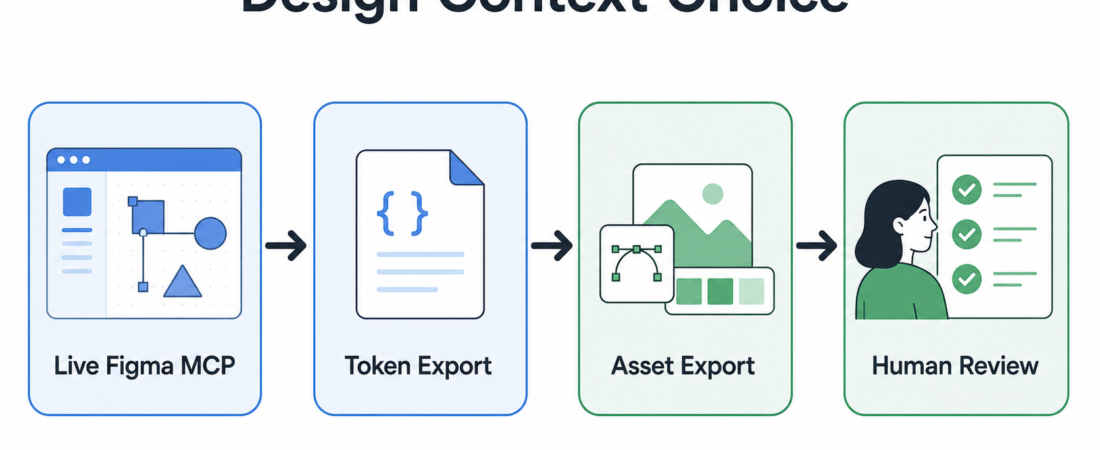
Figma MCP or Token Export: Choosing Design Context for Coding Agents
Design-to-code work gets brittle when the agent receives the wrong kind of design context. A live Figma file can answer layout questions that a token file cannot. A token export can keep a design system stable without granting an agent broad file access. An asset export can move icons and images cleanly while leaving interpretation to a human reviewer.
| Path | Use it when | Review checkpoint |
|---|---|---|
| Live Figma MCP | The agent needs frame, node, spacing, and component context. | Limit file scope and confirm target nodes before edits. |
| Token export | The codebase only needs colors, type, spacing, or variable values. | Diff token names and aliases before applying generated changes. |
| Asset export | The agent needs inspectable images, icons, or slices, not design authority. | Check naming, resolution, and licensing before shipping. |
In Short
Use Figma MCP when a coding agent must inspect live layout structure or operate against specific nodes. Use a token export when the agent only needs stable design system values. Use asset export when the job is moving graphics into code without asking the agent to interpret a whole design file. The wrong choice either starves the agent of context or gives it broader access than the change requires.
Figma’s official REST API documentation describes access to files, nodes, images, comments, variables, webhooks, and other resources through HTTP endpoints, with authentication through access tokens or OAuth2. That is useful source evidence for API-backed export work, but it does not automatically answer every design-to-code question. The operator decision is narrower: what context does this coding task actually need?
Who this is for
This guide is for product engineers, design system maintainers, and agent operators who already have a Figma-backed workflow and want coding agents to implement UI changes with less guessing. It is especially relevant when a team is moving from screenshot-based handoff toward agent-readable design context.
It is not a reason to let an agent rewrite a design system from a file link. Treat design context as an input to a bounded task: implement this component, compare this screen, export these tokens, or prepare this review packet. The narrower the request, the easier it is to inspect the result.
Starter workflow
Start by classifying the change. If the task depends on live frame structure, component hierarchy, auto-layout, or node positions, route it through a Figma MCP skill. Read and modify Figma designs from coding agents with Talk to Figma MCP fits agent workflows that need a live bridge into the file. Give coding agents Figma layout context through MCP is the safer starting point when the primary need is layout context rather than broad editing.
If the task is mostly about design system values, prefer tokens first. Figma Design Token Exporter gives an agent a cleaner input surface: names, values, and structured token output. That is usually enough for theme updates, CSS variable alignment, Tailwind config checks, or component library drift reviews.
If the task needs images or slices, keep it out of live design interpretation. Figma REST API Asset Exporter and Figma Export Automator are better fits when the job is controlled asset movement. For narrower design-system extraction, Figma Design Token Extractor can support a review packet without letting the agent browse or mutate unrelated frames.
Then add one human checkpoint before code changes land. Ask the agent to report which Figma file, frame, node IDs, tokens, or assets it used. Ask for the code diff separately from the design-context summary. A useful run ends with two artifacts: what the agent read, and what the agent changed.
Recommended ASE skills
- Give coding agents Figma layout context through MCP for read-oriented design context before implementation.
- Talk to Figma MCP when the operator has approved live file interaction.
- Figma Design Token Exporter for token-first design system handoff.
- Figma Design Token Extractor for focused token review packets.
- Figma REST API Asset Exporter for controlled image and asset movement.
- Figma Export Automator for repeatable export jobs with explicit output checks.
What to watch
Watch authentication scope first. Figma documents access tokens and OAuth2 as API authentication paths, and teams should treat those credentials like production integration secrets. A one-off coding task rarely needs organization-wide reach. File-level access, short-lived tokens, and explicit target frames are easier to review than a broad personal token.
Watch token naming drift next. A token export can look clean while still hiding semantic changes: color.primary may no longer mean the same thing after a redesign. Require a before-and-after diff of token names, aliases, and affected code paths before accepting generated changes.
Finally, watch screenshots. Screenshots are useful for human review, but they are weak source material for implementation. If an agent is inferring spacing, typography, and states from pixels alone, the review should be stricter. Prefer structured Figma data, exported variables, or an explicit asset list when the code change matters.
FAQ
Should every design-to-code task use Figma MCP?
No. Use MCP when the task needs live file structure or node-level context. For a theme update or spacing-token check, a token export is usually simpler and easier to audit.
When is token export enough?
Token export is enough when the implementation question is about values: colors, type scales, radii, spacing, shadows, aliases, or variable mappings. It is not enough when the agent must understand page layout, interaction states, or component composition.
What official Figma sources should operators verify?
Start with the Figma REST API documentation for API capabilities and authentication behavior, then use the Figma Help Center for product and collaboration guidance. For ASE routing, the skill pages above remain the working catalog entries.
What should the agent return after using design context?
Ask for the source file or frame, the context path used, the code files changed, and any assumptions about tokens or assets. That report gives reviewers something concrete to check before merging UI changes.