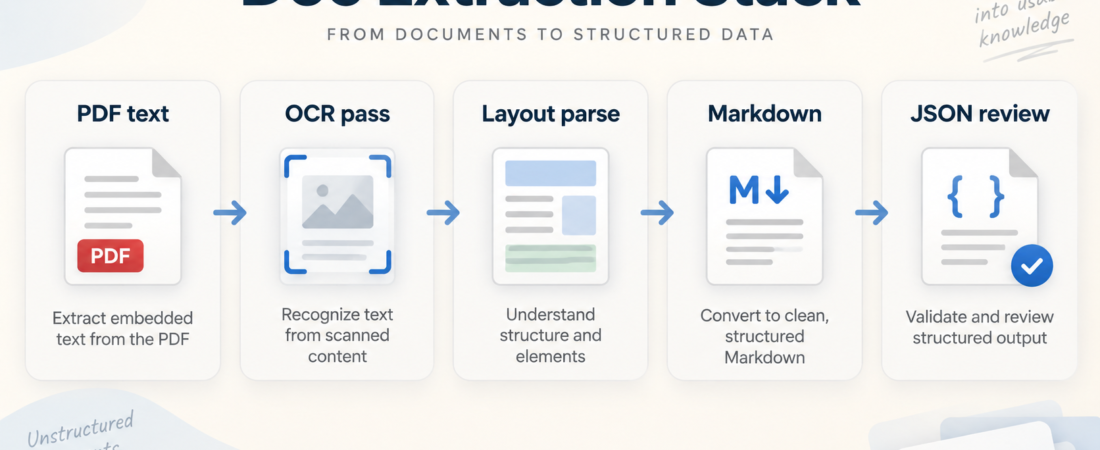
Doc Extraction Stack: PyMuPDF, OCRFlux, MonkeyOCR, DocExt, or DocStrange?
Document extraction is not one job. A text-first PDF, a scanned invoice, and a research report with tables all need different handling before an agent can review the result. The right stack depends on what you need to preserve: text fidelity, OCR coverage, layout order, Markdown handoff, JSON fields, or private preprocessing.
This guide uses the queue topic directly: document extraction, PDF parsing, OCR, Markdown, and JSON review. Treat the stack choice as a routing decision before an agent touches the content, not as a generic “best OCR tool” contest.
Text, scan, or mixed
PDF text or OCR
Layout and tables
Markdown or JSON
Evidence and gaps
In Short
Start with the document, not the tool. If the PDF already contains selectable text and you need deterministic access to pages, blocks, annotations, and embedded assets, PyMuPDF is a practical first stop. Its official documentation describes a Python library for working with PDF and other document formats, which makes it useful for local preprocessing before an agent sees the output.
If the input is scanned, photographed, or layout-heavy, route it through an OCR-aware path instead. OCRFlux and MonkeyOCR-style workflows belong in the branch where text must be recovered from images or complex visual structure. If the team needs an agent-ready artifact rather than a low-level parsing library, DocExt and DocStrange-style skills are better fits because the expected output is Markdown or JSON that can be reviewed downstream.
Who this is for
This is for operators building document intake workflows for contracts, invoices, technical manuals, forms, research packets, support attachments, or evidence bundles. It is also for teams that let agents summarize documents and now need a cleaner boundary between extraction, transformation, and reasoning.
The guide is especially useful when documents vary by source. A vendor invoice may be a clean digital PDF one day and a scanned attachment the next. A product manual may contain selectable text, but the useful information may sit in tables, captions, and diagrams. A reviewer needs to know which parts of the source were extracted faithfully and which parts came from OCR or model interpretation.
Decision path
First, classify the source. Open a sample and ask three basic questions: can you select the text, does the reading order match the visible page, and are the important facts stored in tables, forms, stamps, handwriting, or images? If text selection works and the reading order is acceptable, begin with a PDF parser. If the page is an image or the selected text is nonsense, go to OCR.
Second, choose the handoff format. Markdown is usually best when the next step is human review, summarization, retrieval, or note-taking. It gives the agent enough structure without pretending every field is known. JSON is better when the downstream system expects fixed fields such as invoice numbers, dates, line items, vendors, or compliance checks. Do not ask a JSON extractor to solve an unclear document unless you also keep the original evidence nearby.
Third, decide where privacy-sensitive preprocessing happens. If the document contains customer data, contracts, medical records, private financials, or internal incident evidence, keep the early steps local where possible. A local PyMuPDF pass can split pages, remove irrelevant attachments, inspect metadata, and isolate the pages that actually need OCR. That reduces the amount of sensitive material sent into later tools.
Fourth, preserve review evidence. For every extraction run, keep the source filename, page range, extraction route, tool version when available, and a short note about missing or low-confidence sections. Agent workflows fail quietly when they receive polished Markdown that hides an OCR miss, a skipped table, or a rotated page. The extraction packet should make those gaps visible.
Finally, test the stack with three real documents before standardizing it: one clean digital PDF, one scanned or photographed document, and one mixed-layout file with tables or figures. If the same tool handles all three poorly, split the route. A stack can be small and still be conditional.
Recommended ASE skills
Use the queue-mandated skills first. They cover the main routes from low-level PDF preparation to OCR-heavy conversion and structured handoff:
- Prepare agent-ready PDF and document extraction with PyMuPDF for local PDF inspection, page handling, and preprocessing before agent review.
- Convert complex PDFs and document images into agent-ready Markdown with OCRFlux when scanned pages or visual layout make plain text extraction unreliable.
- Parse agent-ready PDFs and document images with MonkeyOCR for OCR-oriented document parsing workflows that need a reviewable handoff.
- Convert PDFs and document images into agent-ready Markdown with DocExt when Markdown is the main artifact for review, retrieval, or summarization.
- Convert mixed documents into agent-ready Markdown and JSON with DocStrange when the workflow needs both narrative context and structured fields.
What to watch
Watch for false cleanliness. Markdown can look tidy even when the extraction skipped footnotes, reordered columns, or flattened a table into misleading prose. Build a habit of spot-checking the output against page images before agents act on it.
Watch for OCR overuse. OCR is valuable when the source needs it, but it adds latency, confidence issues, and extra review burden. Do not OCR a clean digital PDF just because the workflow has an OCR tool available.
Watch for schema pressure. JSON output is useful only when the fields are stable enough to validate. If every document type needs a different schema, keep the first pass in Markdown and add field extraction as a second, explicit review step.
Watch for lost provenance. A document answer should be traceable to a page, section, or extraction note. If the stack cannot tell a reviewer where a claim came from, it is not ready for higher-risk workflows.
FAQ
Should one extractor handle every document?
No. A small router is usually safer than one overloaded extractor. Separate clean PDFs, scanned files, and mixed-layout documents before choosing the tool.
When should I prefer Markdown over JSON?
Prefer Markdown when humans or agents need to read, summarize, compare, or cite the document. Prefer JSON when the downstream task has stable fields and validation rules.
Where does PyMuPDF fit if I still need OCR?
Use it as a preprocessing layer: inspect files, split pages, isolate attachments, and route only the pages that need OCR into an OCR-aware workflow.
How do I know the stack is production-ready?
Run it against representative documents, record extraction gaps, check page-level evidence, and require review for any low-confidence OCR or structured fields.