ComfyUI Skills, MCP, or Direct Workflow Runners: Choosing an Image Automation Path
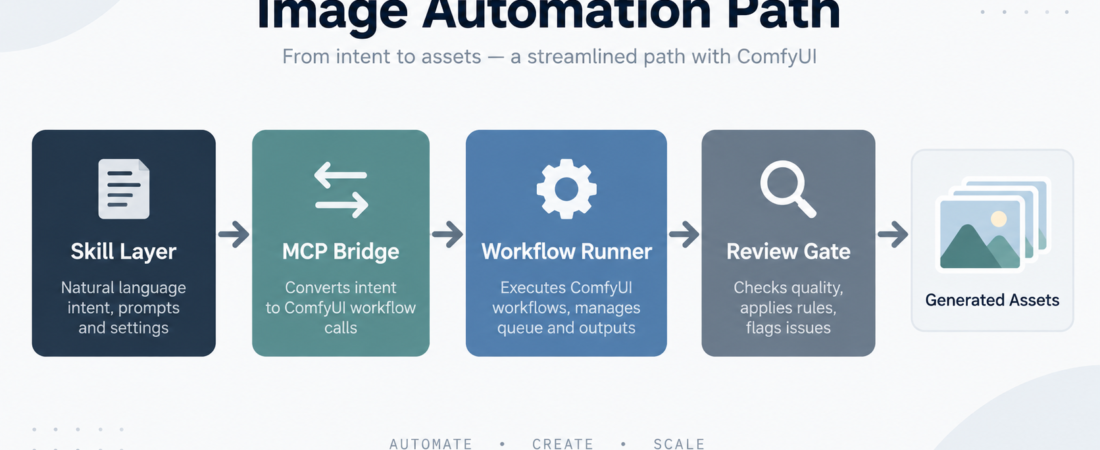
Image automation is usually framed as a model choice, but operators hit the real decision one layer later: how should an agent ask for the work, run the workflow, preserve settings, and hand back assets that someone can review? For ComfyUI-based teams, the practical choices are a skill layer, an MCP bridge, a direct workflow executor, or a narrower runner built around repeatable Stable Diffusion jobs.
| Path | Best use | Main control point |
|---|---|---|
| Skill layer | Natural-language jobs with reusable defaults | Prompt, parameters, allowed workflows |
| MCP bridge | Agent access through a tool protocol | Tool schema, permissions, server boundary |
| Workflow executor | Batch runs and exact graph reuse | Workflow file, inputs, output path |
| Review gate | Brand, safety, and publishing checks | Human approval and asset metadata |
In Short
Choose a ComfyUI automation path by the boundary you need to control. Use a skill layer when operators should request image work in plain language with curated defaults. Use an MCP bridge when an agent needs a standard tool interface to call ComfyUI from a broader workspace. Use a direct workflow executor when the important thing is repeatable graph execution, not conversational flexibility. Use a specialized runner when the team already knows the workflow family and mainly needs predictable generation jobs.
ComfyUI’s official docs describe ComfyUI around node-based workflows, custom nodes, and reusable generation graphs. That matters for operations: the workflow graph is the production artifact. The question is not just whether an image looks good, but whether the team can name the graph, pass bounded inputs, reproduce a run, store outputs, and review the result before it ships.
Who this is for
This guide is for product teams, design engineering groups, agencies, and internal automation owners who already use ComfyUI or are evaluating it for repeatable image work. It fits teams generating marketing variations, product mockups, UI concept art, internal illustrations, training images, or design prototypes where a human still reviews the output.
It is less useful for one-off experimentation. If a person is manually exploring prompts in a local ComfyUI canvas, keep the workflow loose. Automation starts to pay off when the same graph, style, or review rule appears more than a few times.
Decision path
1. Start with the requester. If a non-specialist should ask for the job, wrap ComfyUI in a skill. A skill can hide graph details, expose only approved fields, and document what the requester must provide. This is a good fit for repeatable work such as “make three product-background variants” or “draft a hero image using this style guide.”
2. Choose MCP when ComfyUI is one tool among many. The Model Context Protocol project defines a pattern for connecting applications, tools, and context to AI systems. In this setting, an MCP bridge is useful when the same agent also needs files, tickets, docs, or browser context before calling ComfyUI. The server boundary can make tool inputs clearer than an ad hoc script call.
3. Use a direct executor when reproducibility is the job. If the team already has a known workflow JSON and a queue of inputs, a direct executor is often cleaner. The agent can prepare inputs, run the graph, and return output paths without pretending the graph is conversational. This path is strong for batches, regression checks, and controlled variants.
4. Prefer a specialized runner for narrow Stable Diffusion routines. If the work is mostly one class of image generation with known model and node assumptions, a Stable Diffusion ComfyUI runner can reduce choice. Less flexibility can be a feature when operators need consistent results, clear defaults, and fewer accidental parameter changes.
5. Add the review gate before adding scale. Image workflows can create brand, licensing, safety, and privacy problems quickly. Decide where generated files land, which metadata is kept, who approves public use, and which prompts or references are not allowed. Automation without a review gate is just a faster way to create assets nobody trusts.
Recommended ASE skills
Use the queue’s required skills first. Together they cover the main implementation choices without pretending there is one universal best path.
- Run ComfyUI workflows as agent-callable skills when the goal is a human-friendly skill interface over approved ComfyUI workflows.
- Drive ComfyUI generation workflows through ComfyUI MCP when the agent should call ComfyUI through a protocol server alongside other tools.
- ComfyUI workflow executor when repeatable workflow files, inputs, and output handling matter more than a broad interaction layer.
- Stable Diffusion ComfyUI workflow runner for narrower image-generation routines where constrained parameters are preferable.
- Run Claude design-style UI prototyping locally with Baoyu Design when the image path sits next to UI exploration and local design prototyping.
If the workflow touches production brand assets, keep an approval step outside the generation tool. The generation path should produce reviewable candidates, not silently publish final creative.
What to watch
Do not expose every node as an agent option. More parameters can make the system harder to operate. Start with the fields that change the business outcome: prompt, reference asset, dimensions, workflow name, seed policy, output count, and review destination.
Version the workflow graph. A small custom-node change can alter outputs. Keep enough workflow metadata to explain which graph produced an asset and whether the run can be repeated.
Keep references and outputs governed. Image inputs may include people, products, logos, customer material, or unreleased designs. Store them where your team already handles sensitive creative work, and avoid sending them through unnecessary bridges.
Separate generation from acceptance. A successful run only means the workflow produced files. It does not mean the files are on-brand, licensed for use, accessible, or safe to publish.
FAQ
Is MCP always better than a direct executor?
No. MCP is useful when an agent needs a standard tool interface and shared context. A direct executor can be simpler when the workflow and inputs are already fixed.
When should a ComfyUI workflow become an ASE-style skill?
Make it a skill when the same job recurs, the requester should not edit the graph directly, and the allowed inputs can be documented clearly.
What is the first thing to standardize?
Standardize the workflow file and output location first. Without those, review and reproduction become guesswork.
How many image variants should an automated run create?
Use the smallest number that supports review. For many production workflows, three to five candidates is enough to compare direction without creating asset clutter.