ASE Weekly Changelog: Guardrails, Browser Automation, and Code Navigation
In Short
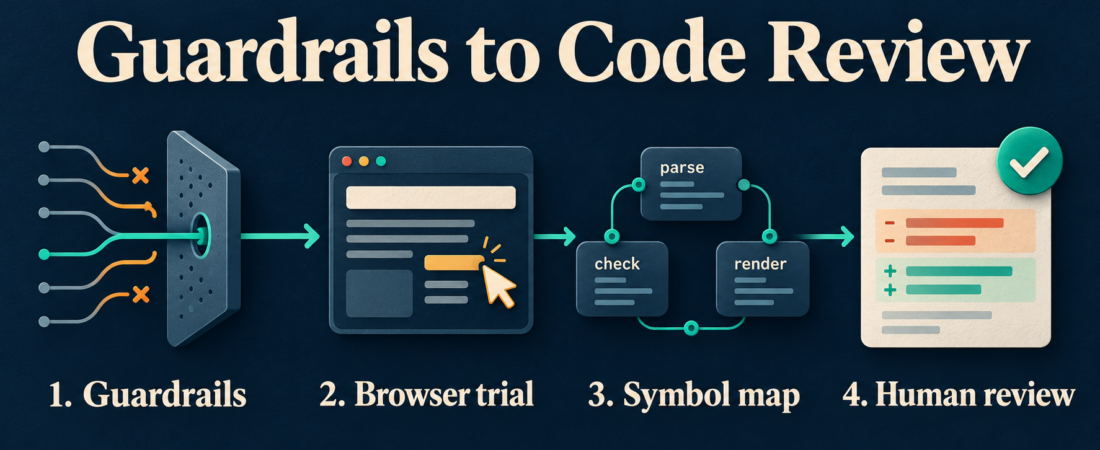
This ASE weekly changelog brings together five catalog routes for a familiar problem: an agent needs to inspect a website, understand the code behind it, and propose a change without gaining unchecked access. Start with guardrails, run a bounded browser trial, then use semantic code navigation to prepare a reviewable patch. Choose the smallest capability set that answers the task.
This is a roundup of available ASE entries and their upstream documentation, checked on October 30, 2026. It does not imply that every project released a new version this week. The useful outcome is a trial packet containing the permitted actions, observed browser behavior, affected symbols, and a human decision.
Who this is for
This article is for platform engineers, coding-agent operators, and application maintainers connecting browser automation to repository work. A good first exercise is investigating a broken settings-page validation message in staging. The agent can gather evidence and suggest a code change while a maintainer retains ownership of account permissions and deployment.
Assign one operator to the trial and one reviewer to the resulting patch. Use a disposable account, a clean checkout, and synthetic form values. Write down which hostname, repository, and branch are in scope before selecting tools. A successful trial should explain both what the agent observed and where its authority ended.
Starter workflow
- Define the boundary. Record allowed destinations, permitted reads, and any actions requiring approval. Evaluate Pipelock for mediated network traffic and AgentGuard for skill inspection or action evaluation. Treat these as separate controls with separate evidence; confirm how each connects to the actual host.
- Capture one browser case. Open the staging settings page, record the initial state, and reproduce the validation message using synthetic input. Keep the task to one page and one expected outcome. Stop before submitting changes that affect other users.
- Find the relevant code. Ask Serena for the validation symbol and its references. Record the language backend, the files returned, and any unresolved callers. Keep the proposed patch small enough that a reviewer can connect each changed line to the browser observation.
- Review the result. Compare expected and observed behavior, inspect the diff, and run the relevant project checks. Save the browser evidence, code references, and test result together. Ask the maintainer to decide whether the change should proceed.
| Stage | Evidence to retain | Stop condition |
|---|---|---|
| Guardrails | Policy and enforcement test | Traffic or actions bypass the control |
| Browser trial | Initial state and observed result | Unexpected account or destination |
| Code navigation | Symbols, references, and patch | Unresolved callers or excessive scope |
| Human review | Diff and project checks | Missing evidence or failed checks |
For the settings-page example, the final packet might contain one reproduction, the validation function, its callers, and a narrow diff. Avoid turning an investigation into a broad cleanup. If the page behaves differently across sessions, record that uncertainty before proposing a fix.
Recommended ASE skills
- Pipelock: investigate the network mediation layer. Its official repository describes scanning mediated traffic for exfiltration and prompt injection. Confirm that the traffic you care about actually traverses the control; retain an enforcement test alongside the configuration.
- AgentGuard: inspect a candidate skill and evaluate runtime actions. The upstream guide documents local and repository scans plus host-specific hooks. Pin the inspected revision and keep the findings with the trial packet.
- Agent Browser Operator: review this ASE entry when selecting the browser operation route. Check its current installation instructions and supported actions against your host. Require an observable page result before accepting the operator’s completion claim.
- Microsoft Playwright MCP: consider this route when an MCP client needs browser interaction through structured accessibility snapshots. The official server documentation explains configuration and cautions that the server is not a security boundary. The underlying Playwright project supports browser testing and automation across Chromium, Firefox, and WebKit.
- Serena: use symbol-oriented retrieval to investigate the code implicated by the browser case. Its official capability table distinguishes language-server and JetBrains functionality. Verify support for your language before relying on a particular refactoring operation.
What to watch
Guardrail coverage depends on deployment. AgentGuard documents that hooks cannot intercept skill installation itself, and that asynchronously scanned OpenClaw plugins may receive very early tool calls before scanning finishes. Include startup behavior in your trial rather than assuming a clean scan covers every subsequent action.
Browser access also carries the authority of its session. Playwright MCP’s origin controls are explicitly not security boundaries and do not cover redirects. Keep browser credentials limited and test the surrounding network restrictions. For code navigation, unresolved references are a reason to inspect further; semantic retrieval does not establish that a patch preserves behavior.
FAQ
Do we need all five skills?
No. Select the entries that fill a demonstrated gap. Begin with one browser route and one bounded task, then add the controls and code context that task requires.
What should we try first?
Reproduce one staging bug with synthetic data. Save the observed result, find its code path, and prepare a small patch with relevant checks. Review the evidence before widening access.
Does this roundup certify the tools as safe?
No. It identifies documented capabilities and practical checks. The next step is to review the linked ASE entries, verify current upstream instructions, and test the chosen configuration in your environment.