An Ecommerce Inventory Exception Playbook for Shopify and WooCommerce Teams
In Short
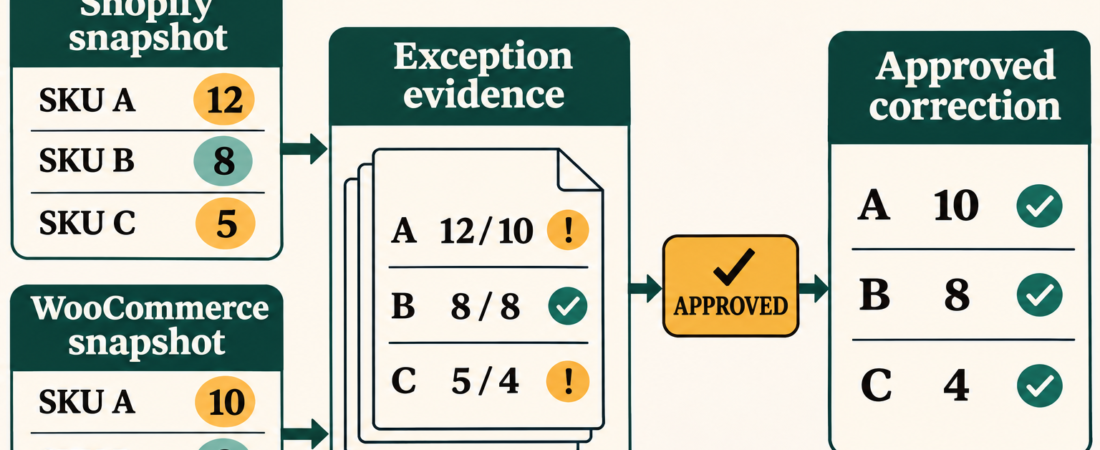
An ecommerce inventory exception playbook turns conflicting stock records into a reviewable list of decisions. Capture a bounded snapshot, match stable product identifiers, inspect event evidence, and assign an owner to each discrepancy. Keep Shopify and WooCommerce as separate platform paths, even when the same team operates both stores.
The deliverable is an exception packet with source IDs, observation times, quantities, and proposed next steps. Start from ASE’s Ecommerce and Retail Operations collection. These skills support individual parts of the workflow; combining their outputs requires your own mapping and review process.
Who this is for
This is for store operators, ecommerce engineers, and retail operations teams investigating oversells, unexplained stock differences, or delayed inventory updates. It suits teams that can read store APIs and obtain a warehouse or stock-ledger export with a known observation time.
For the first run, choose 20 SKUs and one warehouse location as an illustrative scope. Name the authoritative stock source and the person allowed to approve corrections. If a store has no reliable location mapping, record that gap before comparing quantities.
Starter workflow
1. Establish the comparison contract
Write down the store identity, snapshot window, quantity definition, and expected mapping. Available-to-sell, physical stock, and reserved units answer different questions. Decide which measure you are reconciling and how orders arriving during the snapshot window will be handled. Save exports unchanged so a reviewer can reproduce the comparison.
Use platform IDs as primary references. Treat SKU as a matching aid that needs uniqueness checks. Duplicate or missing SKUs belong in an identity exception list; an agent should not resolve them by guessing from a similar product name.
2. Follow the Shopify path
Shopify’s inventoryItems query documentation describes a paginated inventory-item list with SKU filtering. Record item IDs and the pagination boundary. Obtain the location-specific quantities needed for your contract through the appropriate documented inventory fields, checking permissions and the API version your integration uses.
The Shopify MCP server upstream repository includes product and inventory operations. Review its exposed tools before connecting production credentials. Begin with supervised reads and keep any inventory update tool outside the reconciliation step. Retain the store, inventory item, location, and request timestamp with every comparison row.
3. Follow the WooCommerce path
The WooCommerce REST API documentation identifies v3 as the current integration version. Read product and variation records for the selected scope. Its product reference documents stock-management and quantity fields. Preserve product and variation IDs alongside SKU, stock-management settings, quantity, and observation time.
Record any warehouse extension and its documented location mapping separately. A Shopify location ID and a WooCommerce product ID need an explicit business mapping before their values can be compared. Treat a missing or unmanaged quantity as an exception requiring interpretation, rather than converting it to zero.
4. Attach event evidence and classify exceptions
For a suspect WooCommerce update, collect the webhook configuration reference, topic, delivery time, receiver response, and any available processing log. Distinguish delivery evidence from proof that the receiving system applied the change. Correlate events with the exact product or variation and keep credentials out of the packet.
Classify each row as identity ambiguity, quantity-definition mismatch, timing uncertainty, delivery failure, or unexplained stock delta. For example, a warehouse snapshot showing 12 units and a store showing 9 units produces a difference of 3 units. It does not establish which value should replace the other. Check intervening orders and reservations first.
| Platform path | Required evidence | Review destination |
|---|---|---|
| Shopify | Store, inventory item, location, quantity, timestamp | Mapped stock exception |
| WooCommerce | Store, product or variation, stock setting, timestamp | Mapped stock exception |
| Event investigation | Event reference, delivery outcome, receiver processing evidence | Explained or unresolved delta |
| Correction proposal | Fresh read, exact target, approved change, recovery plan | Named operator decision |
5. Prepare a correction for explicit approval
Record the exact target, observed value, proposed value or adjustment, reason, and approver. Re-read the target immediately before an approved change; if it differs from the reviewed snapshot, stop and reassess. Afterward, read back the result and retain the operation reference. Review recovery against current orders before reversing a change.
Recommended ASE skills
- Shopify Admin workflows through MCP: the Shopify branch for supervised catalog and inventory investigation.
- WooCommerce REST Inventory Sync: the WooCommerce branch for inventory reads and reviewed reconciliation proposals.
- WooCommerce Webhook Orchestrator: review event routing when an update may have missed its destination.
- WooCommerce Webhook Delivery Inspector: structure the delivery investigation around specific failed or uncertain events.
- WordPress operations with targeting and rollback guardrails: support environment checks when investigation extends to the WordPress host.
What to watch
Watch for incomplete pagination, stale exports, duplicate SKUs, and variation-level stock settings. Never replay an event until you understand whether the receiver already applied it. Missing receiver logs should remain an evidence gap. Keep the first run small enough that an operator can inspect every exception and approve each proposed write independently.
FAQ
Does this automatically synchronize Shopify and WooCommerce?
No. This playbook prepares separate platform evidence and a shared exception report. Cross-platform synchronization needs a deliberately implemented connector, mapping rules, and tested recovery behavior.
Can an agent fix every stock difference?
Only changes within an explicitly approved scope should proceed. Uncertain identity, unexplained timing, or a changed live value should return the row to investigation.
What should the first handoff contain?
Include the scope, original snapshots, mapping, exception rows, event references, owner, and approval status. Begin with that packet before expanding to more products or locations.