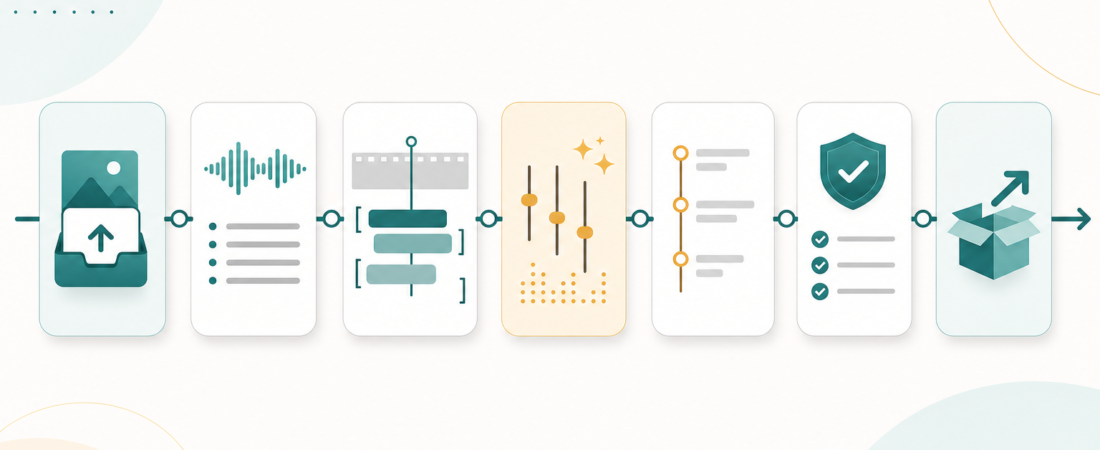
The Agent Skill Stack for a Modern Content Studio
A modern content studio does not need one giant agent that “makes content” in a single opaque pass. It needs a chain of small, inspectable skills: one to ingest source media, one to transcribe, one to build a review packet, one to align subtitles, one to polish media, one to prepare publishing metadata, and one to run QA before anything ships.
That distinction matters because audio, video, transcripts, show notes, captions, links, thumbnails, and publishing metadata all fail in different ways. A transcript can be mostly right but miss a product name. Subtitles can be accurate but drift after an edit. A polished audio file can still be too loud for a platform target. A generated chapter list can be useful, but it should never become the final editorial structure without review. The right stack treats each stage as a handoff with evidence, not as a magic box.
| Stage | Agent skill output | Human review | Artifact to keep |
|---|---|---|---|
| Ingest | Source manifest and normalized media | Rights, source quality, target formats | Media manifest |
| Transcribe | Timestamped transcript and speaker notes | Names, jargon, diarization mistakes | Raw transcript |
| Review packet | Summary, claims, quotes, title angles | Editorial framing and factual claims | Producer brief |
| Subtitles | Aligned caption files | Timing, readability, accessibility | WebVTT/SRT |
| Polish | Trimmed clips and measured audio | Pacing, fairness, loudness target | Render report |
| Metadata | Chapters, descriptions, links | Claims, sponsors, platform fit | Publishing packet |
| QA | Pass, needs review, or blocked verdict | Final approvals and launch decision | QA checklist |
Here is a practical stack for a content studio that handles podcasts, interviews, recorded webinars, product demos, and short-form clips. The examples link to real Agent Skill Exchange catalog pages, but the pattern is more important than any single tool: keep the workflow modular, preserve source evidence, and make every automated output reviewable.
1. Start with ingest, not generation
The first useful agent is a media intake assistant. Its job is not to summarize or rewrite anything yet. It should gather the raw file, source URL, recording date, speaker names, campaign or episode brief, expected output formats, and any publishing constraints. For web video, a skill such as yt-dlp Feature-Rich Audio and Video Downloader CLI can help pull source media where the team has the right to process it. For local batches, FFmpeg-oriented skills such as FFmpeg Media Transcoder or FFmpeg Batch Transcoder can normalize files into predictable formats before downstream steps run.
This stage should produce a small manifest: file paths, durations, codecs, source URLs, ownership notes, and target outputs. That manifest becomes the audit trail for the rest of the workflow. If the agent cannot identify the source or the usage rights are unclear, it should stop and ask for review. Content operations break down quickly when teams treat media provenance as a detail to clean up later.
2. Transcribe with timestamps and speaker context
Once the source file is stable, transcription is the next anchor. A content studio should prefer transcript skills that preserve timestamps, speaker boundaries, and confidence boundaries. The ASE catalog includes several practical options, including faster-whisper High-Performance Speech Transcription Library, WhisperX Speech Recognition with Word-Level Timestamps and Diarization, and whisper.cpp High-Performance C/C++ Speech Recognition Engine. For teams that already use hosted audio intelligence, AssemblyAI Audio Intelligence Agent can fit into the same slot.
The transcript agent should not pretend that speech-to-text is final copy. Its output should flag uncertain terms, likely proper nouns, skipped sections, and places where diarization may have merged speakers. A useful pattern is to create two files: a raw timestamped transcript and an editorial transcript with light cleanup. The raw transcript remains the reference. The editorial transcript becomes the input for summaries, chapters, and show notes.
If the content is a podcast, a skill such as Podcast RSS Feed Transcriber can make ingestion and transcription repeatable across episodes. If the source is YouTube and the transcript is already available, YouTube Transcript API can avoid unnecessary browser automation. The operational rule is simple: use the least lossy source available, then keep timestamps attached for as long as possible.
3. Turn transcripts into review packets
After transcription, the agent can assemble a review packet. This is where general summarization becomes useful, but it should be framed as editorial support rather than replacement. The Summarize skill is a good example of the pattern: convert a source into an agent-ready brief that a human can scan, challenge, and refine.
A strong packet includes a short abstract, key claims with timestamps, notable quotes, follow-up questions, possible title angles, and a list of sensitive or unverifiable statements. For interviews and webinars, the agent should separate what a guest said from what the brand can safely claim. For product demos, it should identify UI moments that need screenshot or clip review. For educational videos, it should flag sections where the transcript may need subject-matter review before publication.
This is also where a content studio can decide what not to automate. The agent can propose a title, but an editor should approve it. The agent can draft show notes, but a producer should check names and links. The agent can extract claims, but the team should verify anything factual, regulated, or reputationally sensitive.
4. Align subtitles after the edit is stable
Subtitles are a separate workflow, not a side effect of transcription. They need timing, line breaks, accessibility judgment, and format checks. For alignment, ASE includes Force-align narration and transcript text into subtitle or SMIL timing maps, ffsubsync Subtitle Synchronization Tool, and Realign drifting subtitles against finished video audio. For multilingual packaging, Video Subtitle Translator Agent can sit behind a translation review step.
The timing of this step matters. If captions are generated before the final edit, they will drift. A better workflow is transcript first, edit second, subtitle alignment third, then QA. The agent should report subtitle duration, character density, missing ranges, and any segments that could not be aligned cleanly. Where possible, it should validate against common caption formats such as WebVTT, whose specification is maintained by the W3C.
5. Polish audio and video as measurable assets
Audio polish is another place where agent skills should produce measurable outputs. A podcast episode can sound acceptable in a studio monitor and still miss loudness targets. Skills such as Normalize loudness across podcast, lesson, or video batches before publishing, Podcast RSS Feed Audio Normalizer, and FFmpeg Audio Transcoder can standardize outputs and report before/after values.
For video-heavy studios, trimming, clipping, thumbnails, and render pipelines may be separate steps. Auto-Editor Automated Video and Audio Silence Trimmer CLI can help prepare rough cuts, while FFmpeg Clip Extractor and FFmpeg Thumbnail Mosaic Generator support review and repackaging. The important guardrail is that automated cuts should be treated as proposals. A human still decides pacing, emphasis, and whether a clip represents the speaker fairly.
External standards are useful here. The EBU R 128 loudness recommendation is a common reference point for broadcast-style audio normalization. Even if a studio uses platform-specific targets, the agent should make the target explicit and record the final measurement.
6. Generate chapters, descriptions, and publishing metadata
Chapters and descriptions are where the stack starts to look like content generation, but the source remains the transcript. A skill such as YouTube Chapter Generator from Transcripts can propose chapter markers from timestamped sections. Publishing-oriented skills such as Podcast RSS Feed Builder, Ghost Admin API Headless Publishing and CMS Automation, or PeerTube Video Publishing and Moderation API can help package the final asset for the right destination.
The agent should keep generated metadata tied to source evidence. A chapter marker should point back to transcript timestamps. A summary should avoid claims that are not in the source. A description should distinguish guest claims from editorial framing. For teams publishing across YouTube, podcast feeds, blogs, and social channels, the safest approach is to produce platform-specific drafts from the same reviewed packet, then require a final approval before any upload or schedule action.
7. Run QA before anything ships
The last stage is a publishing QA agent. It checks that the files exist, captions open, timestamps match, links resolve, image sizes are valid, metadata is present, and any required approvals are recorded. For text artifacts, markdown-link-check, lychee Async Broken Link Checker, and Vale Prose Linter are useful analogs for content QA. For media assets, the QA report should include duration, file size, codec, loudness target, caption status, chapter count, link status, and unresolved warnings.
This is the step that prevents the stack from becoming a fast way to publish mistakes. The agent should return a verdict such as pass, needs review, or blocked. “Needs review” is not failure; it is the normal state for creative work. “Blocked” should be reserved for missing source files, unclear rights, broken final links, inaccessible captions, or metadata that would mislead the audience.
What still needs human review
A content studio can automate a surprising amount of production work, but the final responsibility stays human. Editors should review titles, thumbnails, claims, guest quotes, legal or medical statements, sponsor language, and anything that changes the audience’s understanding of the source. Producers should confirm that clips are fair, captions are readable, and translations are culturally appropriate. Marketers should approve campaign framing. Technical reviewers should check product claims and demo accuracy.
That review layer is not a drag on automation. It is what makes automation usable. The best stack gives people better packets: source-linked transcripts, measurable audio reports, aligned captions, proposed chapters, draft metadata, and a QA checklist that says exactly what changed.
The practical blueprint
If you are building this as an internal skill stack, start with seven directories or skill entry points: ingest, transcribe, review-packet, subtitles, polish, metadata, and QA. Each step should read the previous step’s manifest and write a new artifact rather than mutating everything in place. Each artifact should be easy to inspect without running the whole pipeline again.
A good first version is deliberately boring:
- One manifest per asset: source URL, owner, rights note, duration, file paths, and target outputs.
- One raw transcript: timestamped, preserved, and never overwritten by cleanup passes.
- One review packet: summary, claims, quotes, links, and unresolved questions for an editor.
- One publish packet: approved title, description, chapters, captions, thumbnail notes, and platform-specific metadata.
- One QA verdict: pass, needs review, or blocked, with evidence attached.
Use stable filenames, keep raw and edited transcripts separate, and store decisions alongside outputs. When an editor changes a title or chapter list, record that as an editorial decision, not as a mysterious overwrite. When a QA agent finds a broken link or caption drift, attach the evidence. When a publish agent prepares final metadata, require approval before the upload action.
The goal is not to remove the studio from the studio. It is to remove the repetitive handoffs that slow teams down: downloading files, transcoding formats, finding timestamps, rebuilding captions, checking links, and packaging the same source for five destinations. Agent skills are a good fit because they turn those handoffs into reusable playbooks with clear boundaries.
For content teams, that is the real promise: faster production without losing editorial control. A modern content studio should not trust one giant prompt to do everything. It should trust a stack of focused skills, each one small enough to inspect, rerun, and improve.