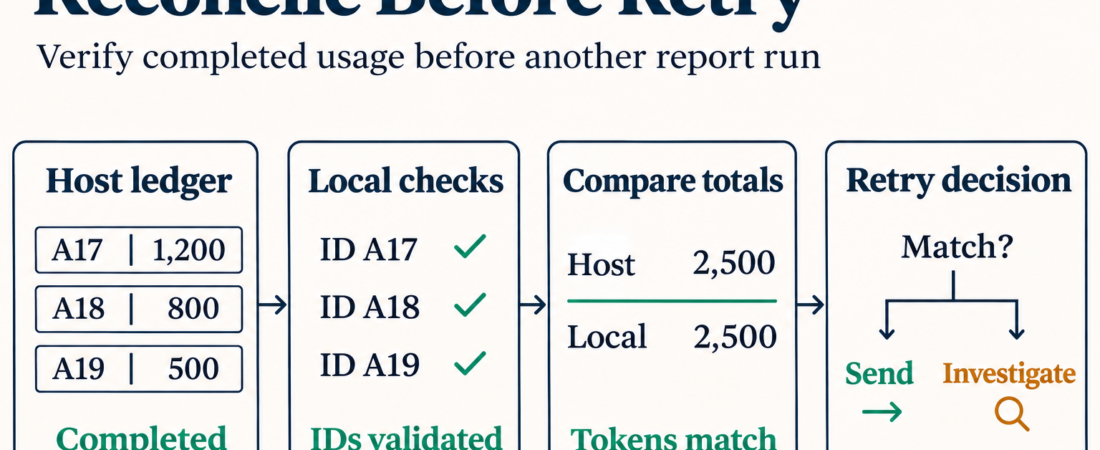
A Completed-Run Usage Reconciliation Before Retrying Agent Analytics Reports
In Short
Before retrying agent analytics reports, reconcile completed executions against the host ledger. Keep the original summaries, execution IDs and actual token accounting intact. Validate locally, compare coverage and totals, then decide whether an authorized reporting retry is justified. An analytics receipt answers whether usage reached its destination; it does not establish whether the underlying task succeeded.
This practical LoopForge workflow covers a small, explicitly selected batch. It connects file validation, CSV inspection and SQL comparison manually. It does not assume a bundled qsv or DuckDB integration.
Who this is for
This is for operators investigating missing usage after external agent runs finish. Start with access to the host’s terminal summaries and authoritative usage ledger, an installed reporting skill, and a documented reporting configuration. Limit the exercise to designated executions; leave unrelated conversations and native runs outside the batch.
For a broader instrumentation discussion, see the agent telemetry packet. Here the acceptance question is narrower: can each completed execution be accounted for without duplicating or rewriting its facts?
Starter workflow
- Freeze the evidence. Select, for example, three completed executions from one host ledger. Preserve their source summaries, terminal outcomes and reporting receipts in a local evidence directory. Record the selection rule and observation time. Assign an investigation note to each execution so every later finding points back to its original file.
- Validate each designated summary. Follow the official reporting skill. Its
--checkmode validates locally without networking or a token. Missing actual usage stops reporting; unknown cost can remain null. Final agent usage requires a host-side report after agent exit. Retain each validation result beside its input. - Document a CSV projection. Manually prepare one row per execution and provider/model pair. Include record ID, external execution ID, terminal status, provider, model, input tokens, output tokens and source filename. Keep identifiers as text. Explain how absent values and repeated usage rows are represented; preserve the JSON as the authoritative input. The CSV export drift check offers a useful preparation pattern.
- Inspect keys before totals. Use qsv locally to inspect empty keys and duplicate rows. Its official command reference documents operations including frequency analysis and duplicate handling. Investigate repeated identifiers before aggregating: a repeated CSV row may be an export mistake, while multiple model rows can be legitimate. Record the commands, input files and findings.
- Compare with the ledger. Use local DuckDB SQL to compare execution coverage in both directions, then group token totals by provider and model. The official DuckDB repository describes its analytical SQL engine. Retain queries and outputs. A matching grand total can conceal a missing execution offset by a duplicated one; inspect individual mismatches before accepting the batch.
- Make the retry decision. Only an explicitly configured or authorized reporting step may send data. Preserve the original file and stable identifiers for a retry. Keep accepted or duplicate receipts; investigate conflicting facts without replacement IDs. Document analytics delivery and business outcome in separate columns.
| Checkpoint | Evidence to retain | Decision |
|---|---|---|
| Local validation | Original JSON and check result | Stop if actual usage is missing |
| Coverage and totals | Key differences and grouped SQL results | Investigate unexplained differences |
| Reporting receipt | Record ID, execution ID, response | Accept delivery or investigate conflict |
Use a reconciliation table with one line per selected execution: host outcome, local validation, coverage finding, token comparison, receipt and next action. For a fictional batch, execution A could have matching usage and an accepted receipt, B matching usage and a duplicate receipt, and C missing host usage. Close A and B’s delivery investigations; hold C for host evidence. Preserve all three original business outcomes.
Recommended ASE skills
- LoopForge completed-run usage reporting is the central entry for validating designated summaries and handling configured reporting.
- qsv CSV profiling supports inspection of the manually prepared projection, especially missing keys and repeated records.
- DuckDB SQL Analytics Agent provides the local comparison stage. Keep the SQL and schema with the evidence.
- JSON Schema CLI is optional preparation when your team maintains an approved local schema. It does not replace the reporter’s validation.
- Structured document coauthoring is an optional handoff aid for explaining findings and unresolved decisions. It does not establish ingestion success.
What to watch
The upstream ingestion contract requires real input and output counts, aggregated by provider/model. Input includes cache tokens; output includes reasoning tokens. Adding those subdivisions again would double-count. Unknown cost uses costUsd: null with unknown status. Keep omitted detail distinct from a measured zero.
Accepted records cannot be overwritten through this contract. A 409 response means facts conflict and require investigation. Keep credentials in the configured secret environment, outside prompts, files and logs. Share the minimal reconciliation evidence rather than full execution logs.
FAQ
Should a reporting retry create another execution ID?
No. Reuse the original identity and content. A genuinely new business execution needs its own identity; retransmitting its report does not create one.
Can estimated tokens fill an incomplete summary?
No. Request the missing host measurements and hold delivery. Keep uncertainty visible in the reconciliation table.
Does a duplicate receipt mean the task succeeded?
It confirms persisted analytics delivery. Retain the host’s succeeded, failed or cancelled outcome independently.