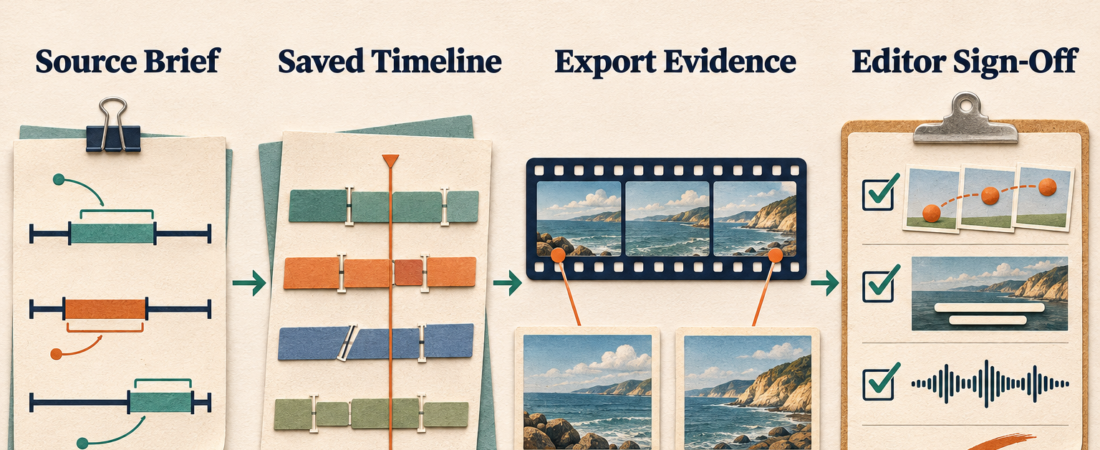
A Local Video Cut Acceptance Packet Before Editors Sign Off
In Short
A local video cut acceptance packet connects the requested edit to the exact file an editor reviews. Keep the source brief, editable project, source-to-timeline map, export completion evidence and timestamped findings together. An export finishing successfully does not establish that the cut has correct motion, captions or sound.
This video edit review workflow uses Concat MCP for assembly, a separate inspection step for the exported file, and optional loudness normalization when the delivery brief requires it. The stages are connected manually. The example below is a proposed review exercise, not a claim that a video was rendered or approved.
Who this is for
This is for editors and media operators delegating a small, authorized local cut while retaining final acceptance. Start with two approved clips and one caption rather than an entire campaign. Keep original footage intact and create a separate agent-owned project. Publishing is outside this exercise.
Write a brief before editing: source paths, allowed source ranges, requested dimensions, exact caption text, destination and acceptance criteria. For example, request a 20-second, 1920-by-1080 review copy with the supplied caption visible during seconds 4–8. Those are exercise settings; replace them with the editor’s requirements.
| Handoff stage | Evidence to retain | Acceptance question |
|---|---|---|
| Source brief | Approved files, ranges and caption copy | Is every selected range authorized? |
| Saved project | Project path and source-to-timeline map | Can another editor resume the cut? |
| Exported artifact | Job status, output path and review timestamps | Was this exact file inspected? |
| Human review | Motion, caption and sound findings | Which issues still block acceptance? |
Starter workflow
- Discover the editing surface. The pinned Concat MCP documentation describes launching the installed binary with
--mcp. Callconcat_versionand inspect current tool schemas before choosing arguments. Respect project locks and permitted filesystem roots. Do not edit the project open in the desktop window. - Preserve timeline evidence. Concat exposes
timeline_read,preview_frameandproject_save. Edits remain in memory until saved. Record actual clip and media identifiers alongside approved source ranges. Retain boundary previews and caption samples, then save the editable project. Mark uncertain mappings for editor review. - Track the export. Use the discovered export tools and retain the job identifier, terminal status and exact output path. Concat documents
export_start,export_statusandexport_wait. A running or failed job leaves acceptance incomplete. Keep the export evidence next to the saved project, not only in chat history. - Inspect the exported file separately. The Claude Video Vision upstream README requires Node.js 24+ and ffmpeg. Its setup wizard selects an audio backend; options include local Whisper, Gemini and OpenAI. Choose the backend explicitly and approve data handling before analysis. Request targeted ranges around edits and caption changes, then record timestamps, observed problems and unexamined intervals. Frames and timestamped transcripts support inspection; neither certifies every frame or sound.
- Normalize only against a delivery requirement. If the brief specifies a loudness target, process a separate output with ffmpeg-normalize. Its documentation covers EBU R128, RMS and peak normalization, with statistics and summary options. Record the selected method, target, settings and available measurements. Review the resulting file again, including picture, captions and sound. Do not silently substitute it for the earlier reviewed export.
Use a simple findings log: artifact path, timestamp or range, expected behavior, observation, severity, owner and disposition. “Caption clips at 00:06” is actionable. “Looks fine” does not identify what was inspected. Retain unresolved findings even when another stage succeeds.
Recommended ASE skills
- Assemble and review local video cuts through Concat MCP: the central assembly and project handoff entry.
- Analyze videos with frame extraction and audio context in Claude Code: the separate exported-file inspection stage. Follow current upstream prerequisites.
- Normalize loudness across podcast, lesson, or video batches: optional when the brief defines a measured target.
- Video Frames Extractor: an optional alternative to evaluate when planning a separate frame-inspection step.
- OpenAI Whisper Transcription: a companion entry to evaluate for a separate local transcription task.
These entries establish distinct responsibilities. They do not imply shared project state, automatic integration or interchangeable backend configuration. Install only what the chosen review path needs.
What to watch
- Artifact confusion: identify which export each finding concerns, especially after another trim or audio pass.
- Sampling gaps: boundary stills can miss dropped frames, awkward transitions and audible clicks. Require playback review.
- Caption errors: compare spelling, timing, framing and readability against the supplied copy.
- Incomplete delivery: return the saved project, mapping, output, export status, review evidence and remaining blockers together.
FAQ
Does a successful export mean the editor can sign off?
No. It establishes export completion. The editor still needs to inspect motion, captions and sound in the identified final artifact and resolve blocking findings.
Should every cut receive loudness normalization?
No. Apply it when the delivery brief defines the requirement. Preserve the original export, document the processing choice and inspect the separate output before acceptance.
What should the human acceptance checklist contain?
Confirm approved source ranges, requested dimensions, readable captions, continuous motion, intelligible sound and the correct final path. Record reviewer, date and outstanding exceptions. If a blocker remains, return the packet for revision rather than marking the cut accepted.