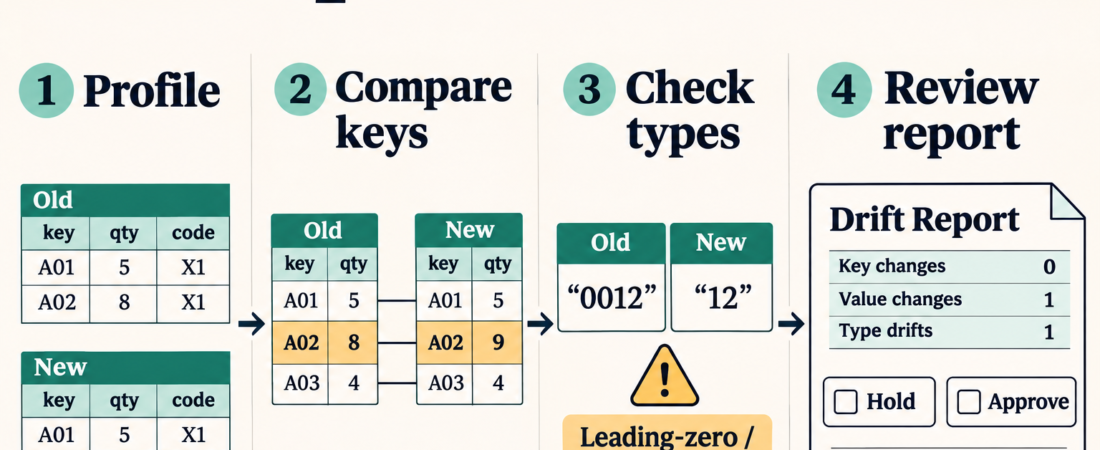
A Recurring CSV Export Drift Check Before Agents Append New Rows
In Short
A recurring CSV export drift check should answer three questions before an agent appends anything: did the columns change, did existing records change, and are the proposed new rows actually new? Preserve yesterday’s accepted export and today’s candidate, profile both, validate their keys, and save a change report. Give the append step access only to reviewed additions.
The workflow below uses qsv for column profiles, csv-diff for keyed record changes, and local DuckDB queries for exceptions. It is an operator procedure, not an automatic repair policy. A successful parse alone does not establish that an export is safe to append.
Who this is for
This is for operations and analytics teams receiving recurring vendor, inventory, CRM, or reporting exports. It fits an agent that prepares candidate rows for an existing dataset while a person owns the acceptance rules. Start with one feed and a stable identifier such as record_id.
First establish whether each delivery is a complete snapshot or an incremental batch. Snapshot comparisons can identify disappeared records; a missing record in an incremental delivery usually means nothing. For event feeds, use an event identifier rather than a customer identifier, since several legitimate events may belong to one customer.
Starter workflow
1. Freeze inputs and profile both exports
Keep immutable copies named old.csv and new.csv in a dated run directory. Record their hashes, export windows, source, and tool versions. Keep the destination unchanged while checking them. Confirm the delimiter, encoding, header names, and expected columns before interpreting differences.
qsv stats old.csv --output old-profile.csv
qsv stats new.csv --output new-profile.csv
The official qsv documentation describes column statistics and type inference. Compare the saved profiles for changed field types, null counts, and ranges. Treat an inferred type as evidence to investigate: a numeric-looking identifier is still an identifier if leading zeros matter. Save observations without silently cleaning the source files.
2. Validate keys before producing the record diff
Check both files for blank and duplicate keys before trusting a keyed comparison. In DuckDB, create separate temporary views for old and new inputs using read_csv with header=true, all_varchar=true. Run these queries against each view; this example names the candidate view candidate.
CREATE TEMP VIEW candidate AS
SELECT * FROM read_csv('new.csv', header=true, all_varchar=true);

SELECT count(*) AS missing_keys FROM candidate
WHERE record_id IS NULL OR trim(record_id) = '';

SELECT record_id, count(*) AS copies FROM candidate
GROUP BY record_id HAVING count(*) > 1;
DuckDB’s CSV reader documentation explains that all_varchar disables type detection. This preserves identifiers for inspection. Stop if the key column is absent, either key check fails, or parsing fails. Whitespace normalization requires an explicit rule and another uniqueness check; it can merge previously distinct identifiers.
csv-diff old.csv new.csv --key=record_id --json > change-report.jsonThe csv-diff README documents added, removed, and changed records plus column additions and removals. Review schema changes separately: added or removed columns are excluded from its individual row-change calculations. A small row diff can therefore accompany a consequential schema change.
3. Investigate exceptions and save the decision
Use explicit checks for fields with a known contract. For an integer quantity, investigate every nonblank value that fails TRY_CAST(quantity AS BIGINT). DuckDB’s casting documentation explains that TRY_CAST returns NULL on conversion failure. Check allowed values and ranges separately; convertibility does not prove business validity.
For example, an export with 12 added records, 2 changed records, and 1 removed record is not permission to append all candidate rows. Review the changes, explain the removal against the export window, and isolate only accepted additions. Check those keys against the current destination as well: yesterday’s snapshot cannot detect rows appended by another process today.
| Stage | Evidence | Hold condition |
|---|---|---|
| Profile | Old and new column reports | Unexplained schema change |
| Compare keys | Blank, duplicate, and record checks | Ambiguous identity |
| Check types | Exception queries | Contract violation |
| Review report | Accepted additions and owner decision | Unresolved change |
Recommended ASE skills
- Profile and clean CSV datasets with qsv: start with saved profiles; approve cleanup rules separately.
- Compare recurring exports with csv-diff: produce the keyed change report after validating identity.
- DuckDB SQL Analytics Agent: investigate local key, type, and duplicate exceptions.
- CSV dialect inspection with CleverCSV: an optional route when parsing assumptions need review.
- Interactive CSV inspection with csvlens: an optional human inspection step for suspicious records.
What to watch
Write explicit hold rules: zero blank keys, zero duplicate keys, no unexplained removed columns, and no unresolved contract failures. These are suggested starting rules, not vendor guarantees. Missing rows may reflect a filtered export; new columns may require destination mapping. Save the decision, input hashes, exception counts, and approved additions together.
Make retries idempotent with destination uniqueness enforcement or an equivalent transactional check. After appending, reconcile accepted and written counts. Advance the accepted baseline only after that reconciliation succeeds; a report generated before a failed append must not become tomorrow’s success marker.
FAQ
Can an agent just compare row counts?
No. Equal counts can conceal replacements, field edits, or duplicate keys. Compare schema and keyed records, then examine contract failures.
Should changed records be appended?
Only under an explicit versioned-record policy. Otherwise, route existing-key changes to a separate update review.
What should happen when a check fails?
Keep the destination and accepted baseline unchanged. Save the failed check and affected records, then ask the feed owner to resolve the ambiguity.