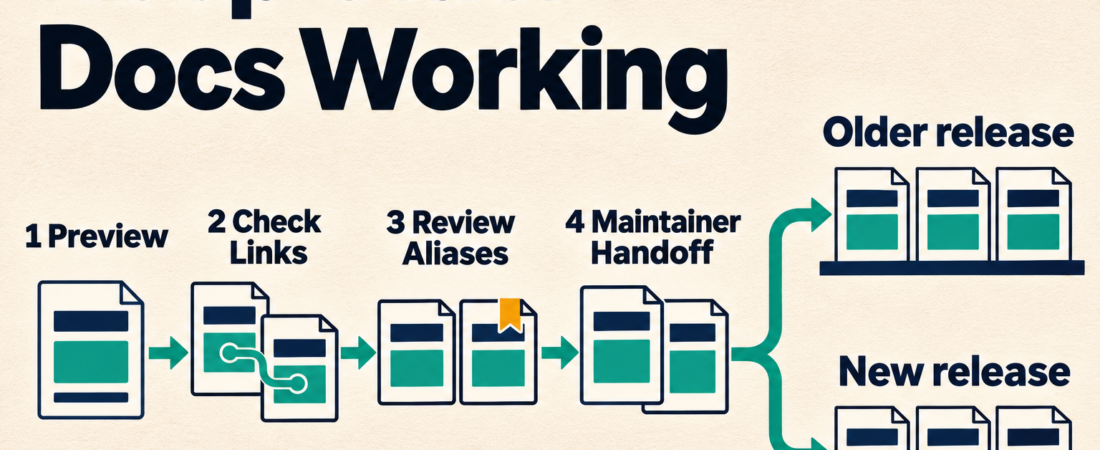
A Versioned Documentation Handoff That Preserves Older Release Guides
In Short
A versioned documentation handoff succeeds when readers can still open the guide for the release they actually run. For an existing MkDocs project, prepare a local preview, check Markdown and links, record version aliases, and give the maintainer a deployment plan with explicit older-URL acceptance checks.
Make the handoff evidence concrete: a source revision, build log, link report, alias map, and rollback reference. The agent prepares that packet; the maintainer decides when to deploy. This workflow addresses release continuity, with the existing site and its older guides as the starting point.
Who this is for
This is for documentation maintainers and engineering teams that already publish MkDocs documentation and support more than one software release. It is especially useful when an agent updates installation instructions or API examples that would mislead users on an older version.
Choose a single release for the first rehearsal. Keep the current theme, hosting destination, and supported-release policy visible in the review. Broader documentation discovery belongs in a separate research task; here, success means that a known set of release guides stays reachable and accurate.
Starter workflow
1. Record the continuity contract
Create a small acceptance file before editing. Record the deployment branch, site base path, current default destination, and representative older URLs. Include an older installation page, a nested API page, and a link from a past release announcement. For each URL, write the expected release and a recognizable passage. A successful HTTP response alone cannot prove that a reader received the right instructions.
2. Check the source and preview
Use the project’s pinned dependencies and record the source commit. Run the established MkDocs build, then inspect the new release locally. Check navigation, code examples, images, and relative links under the intended version prefix. Keep the preview address and build output in the packet so another reviewer can reproduce the observation.
Run rumdl check docs/ as the initial Markdown gate. The official rumdl documentation distinguishes checking from formatting. If formatting is useful, apply it on the working branch and inspect the diff before repeating the build. Style fixes can still alter examples or heading text that readers depend on.
3. Separate broken links from uncertain results
Run markdown-link-check ./docs with the repository’s chosen configuration and installed version. Its official documentation describes recursive folder checks and configurable retries. Keep the complete report. A rate-limited destination needs a bounded retry or manual review; an ignored link remains an exception, not a verified reference.
Also open important rendered links from the local preview. Markdown checks and a successful build provide different evidence. Inspect fragment destinations and pages behind the version selector, particularly where a relative path changes meaning under an older release directory.
4. Rehearse version and alias changes
The official mike guide explains version directories, movable aliases, and local serving. Capture mike list --json before planning changes. In an isolated local clone containing the deployment history, rehearse the new version without pushing, then inspect the result with mike serve. Record the commands and branch diff.
Distinguish the fixed release path from an alias such as latest. Document each proposed alias move and its previous destination. Confirm theme compatibility against the installed theme’s current documentation and test the selector locally; support for a selector is not universal.
| Checkpoint | Review evidence | Continuity test |
|---|---|---|
| Preview | Source revision and build log | New release renders correctly |
| Links | Report and exception notes | Nested pages and anchors work |
| Aliases | Before and proposed maps | Older fixed paths retain their release |
| Handoff | Deployment and rollback plan | Maintainer repeats acceptance checks |
5. Hand over a bounded deployment plan
Give the maintainer the proposed release identifier, target branch, alias changes, dependency versions, and exact acceptance URLs. Include the previous deployment commit and a reviewed recovery procedure. After deployment, repeat the older-page checks against public URLs, confirming content as well as status. Retain the packet with the release record.
Recommended ASE skills
- Publish versioned MkDocs documentation with mike: use for the release-directory and alias portion of the handoff. Review the upstream commands before applying them to an existing deployment branch.
- Verify Markdown links with markdown-link-check: use for a recorded link report and explicit exceptions before the maintainer reviews the preview.
- Lint and format Markdown with rumdl: use for source consistency, then review formatting changes alongside the rendered documentation.
- Verify local web apps with Playwright: Use for browser evidence when a rendered preview needs navigation and page assertions.
- Inspect failing GitHub Actions checks: Use when an existing documentation CI gate fails; keep its diagnosis with the release packet.
Start with the three required documentation roles. Check adjacent options through Browse Skills, and use the ASE blog for related operator workflows.
What to watch
Stop the handoff if an older URL silently shows the new release, an alias has an unexplained destination, or a theme change makes version navigation unreliable. Keep credentials out of saved link reports. Treat deletion, branch replacement, and default-destination changes as separate maintainer decisions with a recovery plan.
FAQ
Should every release rebuild the old guides?
Preserve existing release artifacts unless a reviewed correction requires rebuilding one. Keep the old environment record so a targeted correction remains reproducible.
Does a clean link report prove release continuity?
No. Check representative public pages for the expected release content, including nested paths and anchors.
What should the maintainer receive first?
A reproducible preview and acceptance list, followed by the proposed deployment commands, alias map, and recovery reference.