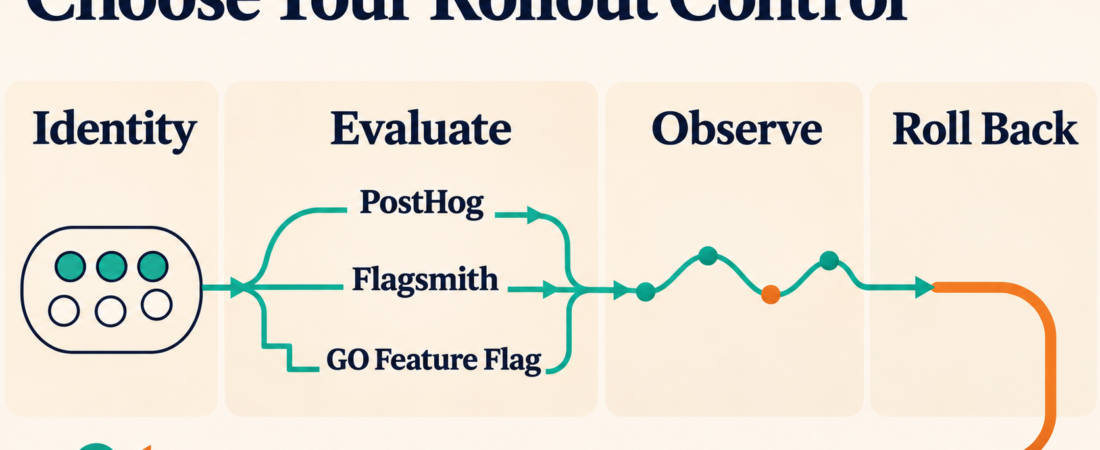
PostHog, Flagsmith, or GO Feature Flag: Choosing a Rollout Control Surface
In Short
Choosing between PostHog, Flagsmith, or GO Feature Flag starts with the launch you must control. Shortlist PostHog when rollout decisions need product analytics context, Flagsmith when the central task is feature flags and remote configuration, and GO Feature Flag when your team wants an OpenFeature-oriented deployment it operates. These are starting points for evaluation, not feature-parity claims.
Use one sample launch throughout: a new account dashboard, enabled for internal accounts first, then 10% of eligible accounts, with the old dashboard as the safe default. Compare where evaluation happens, which identity reaches it, what you must host, and who can stop exposure. The percentages here are proposed rehearsal settings, not measured product performance.
Who this is for
This decision guide is for application engineers, platform operators, and product owners choosing a rollout control surface before an agent implements the integration. It assumes you already have a working dashboard and can test changes in staging. Keep approval of production targeting and credential access with a named owner.
The useful output is a short decision record: selected SDK and version, evaluation location, account identifier, configuration path, evidence destination, and rollback owner. A successful demo that cannot explain a stale decision or identify its author leaves the central operational question unanswered.
Decision path
- Define the same identity contract. Give each test account a stable, pseudonymous identifier and an eligibility attribute. Map that contract explicitly to each SDK. Include two users in the same account, an anonymous visitor, and a missing-attribute request. Decide whether account-wide consistency is mandatory before comparing percentage allocation.
- Choose the evaluation boundary. Draw the request from application to evaluator, including configuration refresh and fallback. Keep server credentials on the server. Test a cold start without network access separately from an outage after configuration has loaded.
- Rehearse the same change. Enable internal accounts, move to the proposed 10% cohort, then disable the flag. Record when each application instance observes the change. A saved setting is evidence of intent; an observed application response is evidence of effect.
- Assign the operating burden. Name the person responsible for configuration storage, service availability, credentials, and emergency changes. Compare this work alongside the developer integration.
| Control point | Evidence to retain | Stop condition |
|---|---|---|
| Identity | Account key and eligibility mapping | Users in one account disagree unexpectedly |
| Evaluation | SDK mode, configuration revision, fallback | Missing context enables the new dashboard |
| Observation | Exposure and dashboard error records | Behavior cannot be tied to a decision |
| Rollback | Owner, change timestamp, observed recovery | Disabled flag remains active beyond the agreed window |
PostHog route. Its feature flag documentation connects targeting with person properties, cohorts, groups, and product observations. For our dashboard, assess whether that context helps explain exposed accounts and their outcomes. Separately inspect server-side local evaluation for your exact SDK and rule set; support and restrictions depend on the chosen implementation. Do not assume a browser integration evaluates flags locally because a server SDK can.
Flagsmith route. The official documentation covers flags, remote configuration, client and server SDKs, and self-hosting. Its server SDK guide distinguishes remote evaluation, local evaluation, and offline behavior. For this launch, select the actual SDK mode and inspect its environment refresh and fallback settings. Compare the operational ownership of your chosen hosted or self-hosted setup; self-hosting still needs an availability and upgrade plan.
GO Feature Flag route. The upstream project documents a hosted-by-you relay proxy for multiple languages through OpenFeature, plus a Go module that evaluates within Go code. It also documents configuration-file retrieval and usage-data export. For the same dashboard, identify the configuration store, review process, relay endpoint where applicable, and recovery procedure. Its example requires a targetingKey: verify that your mapping preserves the intended account-level grouping.
Recommended ASE skills
Start with the three product entries, then use separate verification steps to test the application behavior:
- PostHog Product Analytics and Feature Flags SDK: a starting point for reviewing instrumentation and flag-driven behavior against current upstream setup instructions.
- Flagsmith feature flags and remote config: use when planning the configuration and environment boundaries.
- Control launch behavior with GO Feature Flag: review the provider, relay, and configuration prerequisites.
- HTTP request checks with httpyac: a candidate for repeatable account-context and fallback assertions.
- Playwright browser and API automation: a candidate for confirming that eligible and ineligible accounts see the intended dashboard.
What to watch
Retain two kinds of evidence: who changed configuration, and what the application evaluated. Set an explicit rollback propagation budget, then measure it during rehearsal. Record credential permissions and environment separation. Confirm audit evidence in the deployment you will actually use, rather than assuming every hosting option supplies the same controls.
Flag disablement changes future behavior; it cannot reverse data already written. Keep authorization checks independent of UI visibility, and avoid sending unnecessary personal data in evaluation context.
FAQ
Does OpenFeature make the three options interchangeable?
OpenFeature standardizes an evaluation API and provider abstraction. Treat identity mapping, targeting rules, defaults, and telemetry as migration work that still needs testing.
Which option should our dashboard team choose?
Pick the candidate whose rehearsal meets your identity, evidence, and recovery requirements with operating responsibilities your team can sustain. This guide makes no benchmark or universal winner claim.
What should block production rollout?
Block it when the safe default fails, account grouping changes unexpectedly, or nobody can demonstrate rollback. Resolve those gaps before expanding exposure.