ASE Weekly Changelog: Terminal Agents, PR Diagrams, and Skill Maintenance
Terminal agents, PR diagramming, and skill maintenance all point at the same operator problem: teams want agents to move faster, but they still need changes to be visible, reviewable, and easy to unwind. This week’s ASE routes are useful because they keep the work bounded. One skill helps a coding agent operate inside a terminal workflow, one turns pull request structure into a diagram reviewers can inspect, and one keeps Claude Code skills aligned with what actually happened in real sessions.
- Run: keep terminal-agent work inside a visible command path.
- Explain: diagram architecture impact before review gets scattered.
- Refresh: update skills from real sessions instead of stale assumptions.
- Gate: keep a human review point before broader reuse.
In Short
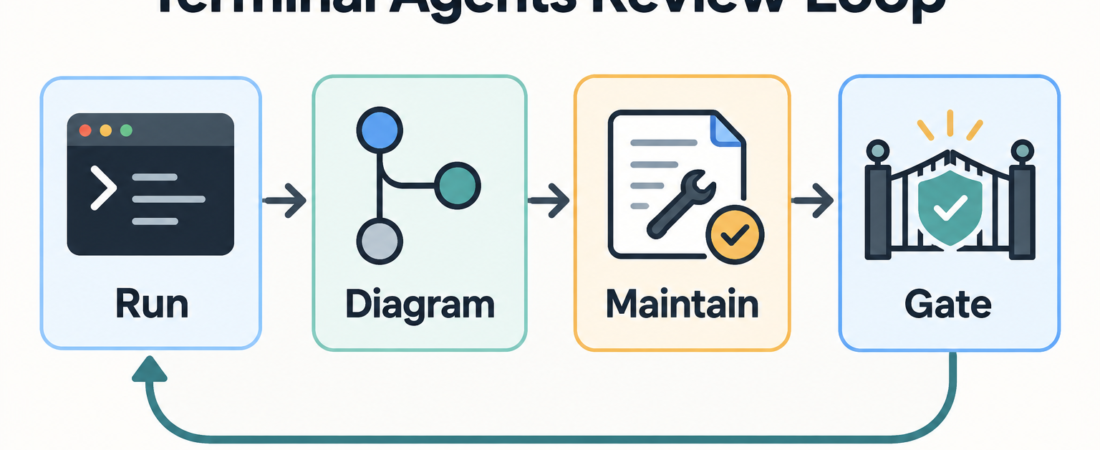
The useful pattern this week is not “let the agent do everything.” It is a small operations loop: run the agent in a constrained terminal setting, make the pull request easier to inspect, then feed lessons back into the skills that guide future sessions. That loop is practical for teams that already use coding agents but are starting to feel the review burden.
The three routes worth checking are Run CodeWhale Terminal Coding Agent Workflows, Render Pull Request Architecture Diagrams with PR Lens, and Keep Claude Code Skills Current from Real Sessions with Autoharness. Together, they cover the work surface, the review surface, and the maintenance surface.
Who this is for
This roundup is for engineering leads, platform-minded developers, and operators who are letting agents touch real code but still want normal software controls. It is especially relevant when agent sessions are happening in terminals, pull requests are becoming harder to review, or internal skills are drifting away from the way work is actually done.
It is less useful if your team is still experimenting with one-off prompts and has no shared workflow yet. In that case, start with a narrower rule: one repo, one class of task, one review owner, and a clear record of what the agent changed. The skills below become more useful once there is a repeatable workflow to tighten.
Starter workflow
Start with the terminal boundary. A terminal coding agent can be useful, but only if the session remains observable. Use the CodeWhale route when the work needs command-line context, local checks, and stepwise handoff instead of a black-box patch. The operator should know which directory is in scope, which commands are allowed, which checks matter, and what evidence should be handed back before review.
Next, make the pull request easier to reason about. Architecture changes often fail review because the diff is too granular to show the design move. PR Lens-style diagramming is useful when the reviewer needs a structural view: services touched, dependencies changed, boundaries crossed, and open questions. The diagram should not replace review. It should help reviewers find the right parts of the diff faster.
Finally, close the maintenance loop. If a session exposed a missing instruction, a repeated mistake, or a better local convention, update the relevant skill while the evidence is fresh. Autoharness-style maintenance is valuable because it treats skills as living operational guidance, not static prompt snippets. The strongest updates usually come from real failures: a command that should have been blocked, a test that should have been run earlier, or a handoff detail that was missing.
A small weekly cadence works well. Pick one agent-assisted change, inspect the terminal trail, review whether the PR was easy to understand, and decide whether a skill update is warranted. If nothing changed, do not force a documentation edit. If the same confusion appeared twice, write it down.
Recommended ASE skills
Run CodeWhale Terminal Coding Agent Workflows is the starting point when coding work needs a terminal-native agent flow. Use it for bounded implementation sessions where commands, files, checks, and handoff evidence should stay visible.
Render Pull Request Architecture Diagrams with PR Lens fits pull requests where architecture impact matters more than line-by-line mechanics. It helps turn a sprawling change into something a reviewer can scan before diving into the diff.
Keep Claude Code Skills Current from Real Sessions with Autoharness supports the maintenance side. Use it when real sessions reveal that a skill needs a sharper boundary, a better check, or a clearer recovery path.
What to watch
Two complementary routes support this loop. act Local GitHub Actions Runner provides local feedback on GitHub Actions workflows before pushing; review the workflow and its permissions before executing it, and retain remote CI as the final check.
HERO helps keep coding-agent changes proportionate. Pilot its scope instructions in a disposable repository, preserving existing security requirements and human approval boundaries.
Watch for hidden authority creep. A terminal agent that starts as a local helper can quietly become the place where deployment, secrets, or destructive commands are handled. Keep the allowed command set and review boundary explicit.
Watch for diagrams that look polished but do not answer a review question. A useful PR diagram names the changed boundary and the uncertain parts. A decorative diagram just adds another artifact for reviewers to ignore.
Watch for skill updates that overfit one bad session. The goal is not to memorialize every mistake. The goal is to capture repeatable instructions that would help the next operator avoid the same problem. If the lesson is too specific, keep it in a session note instead of the reusable skill.
FAQ
Should every agent-written pull request include a diagram?
No. Use diagrams when they reduce review effort: architecture moves, dependency changes, service boundaries, data flow, or ownership questions. Small text-only fixes usually do not need one.
How often should a team update coding-agent skills?
Update them when real work shows a repeatable gap. A weekly review is enough for many teams, but the trigger should be evidence, not a calendar ritual.
Can this workflow replace human review?
No. The point is to make human review more focused. Terminal evidence, PR diagrams, and maintained skills help reviewers see what happened and what needs judgment.
What is the first step for a team that has none of this?
Start with one constrained terminal-agent workflow and a written handoff standard. Add diagramming and skill maintenance once the team can see where review time is being lost.