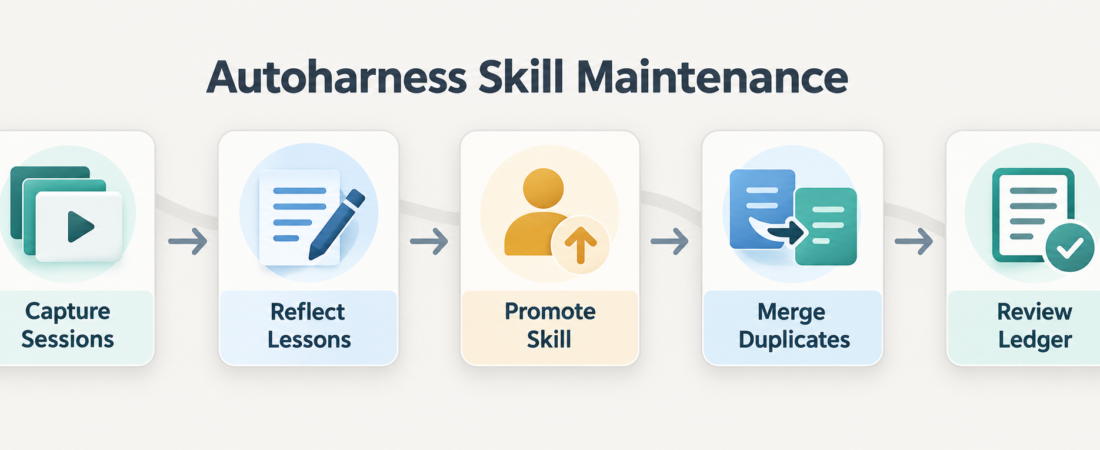
Skill Spotlight: Autoharness for Keeping Claude Code Skills Current
Claude Code skills are most valuable when they stay close to real work. The maintenance problem starts after a team has proved the idea: engineers learn better debugging paths, refine release checks, and discover which instructions make agents safer, but the skill library drifts unless someone keeps returning to it. Autoharness is worth watching because it treats that upkeep loop as the product. Its official project describes a self-learning skill layer for Claude Code that learns from real sessions, merges same-scenario lessons, updates skills in use, and touches only the skills it wrote itself.
real sessions
usable lessons
candidate skills
similar cases
ledger evidence
In Short
Use Autoharness when your team has moved past the first question of whether skills are useful and into the harder question of how they stay accurate. The project README says Autoharness watches real Claude Code sessions, can distill a lesson on demand with /learn, keeps a grouped index of the skills it wrote, records create and update decisions in per-skill ledgers, and avoids rewriting hand-authored or installed skills. That boundary matters. A learning loop that can patch every instruction file is risky; a learning loop that only maintains its own output is easier to review and roll back.
Who this is for
This is for platform owners, staff engineers, and agent operations teams that already use Claude Code skills across repeated coding, debugging, review, or release workflows. If your library is small and stable, a monthly manual pass may be enough. If your library now has recurring lessons, stale project rules, and several near-duplicate skills that all say almost the same thing, Autoharness gives that backlog a more disciplined shape.
The fit is strongest when skill changes need evidence. Autoharness is not just another prompt file generator. Its source describes a capture, reflection, promoter, index, lifecycle, curator, and ledger pipeline. That makes it useful for teams that want the skill layer to learn from actual sessions while still preserving a review trail for what changed and why.
Starter workflow
Start with one repository where repeated Claude Code sessions already happen. Install Autoharness from its official Claude Code plugin marketplace instructions, then leave the default behavior in place long enough to observe what it captures. When a session surfaces a lesson that should not be lost, use the explicit /learn path rather than waiting for the background cadence.
Review the generated skill before making it team policy. Check that the description has a clear trigger, that the body names a concrete procedure, and that the lesson does not conflict with an existing manual skill. If Autoharness proposes a merge, confirm that the combined skill is still specific enough to be recalled at the right moment. After one repository looks healthy, decide which lessons belong in project scope and which should graduate to a global layer.
Recommended ASE skills
Keep Claude Code skills current from real sessions with Autoharness is the primary entry point. Use it when the goal is to turn real Claude Code work into reviewable create, patch, merge, and cleanup decisions for self-authored skills.
Audit and maintain cross-agent skill libraries with Chops is the human review companion. Chops describes itself as a macOS app for discovering, organizing, editing, watching, and searching skills and agents across Claude Code, Cursor, Codex, Windsurf, Amp, and related layouts.
Build a self-updating agent memory graph with GBrain fits when the problem is continuity rather than instruction upkeep: project facts, decisions, people, timelines, and reusable context that agents should remember without turning every fact into a skill.
Search cross-agent Markdown memory and conversation history with memsearch helps teams find prior notes, lessons, and conversations before writing another rule. That search step is useful when deciding whether a proposed Autoharness lesson is new or just a repeat of something already captured.
Test Claude Code plugin and skill triggering with staged eval runs using cc-plugin-eval belongs after the maintenance loop starts to matter. Use staged checks to see whether important skills trigger under realistic prompts before trusting library changes broadly.
What to watch
Automated skill maintenance can create bad habits if nobody reviews the output. Watch for local workarounds becoming universal rules, broad descriptions that make recall noisy, and merged skills that become too general to be useful. The self-authored-only boundary lowers the blast radius, but it does not replace judgment.
Also keep three jobs separate. Autoharness maintains a skill layer from sessions. Chops gives people a way to inspect and organize skills across tools. GBrain and memsearch-style companions help with wider memory and retrieval. Those pieces can form one operating model, but they should not be treated as the same system. If a bad answer came from stale memory, changing the skill maintenance loop may not fix it.
FAQ
Does Autoharness replace hand-written skills?
No. The project says it touches only the skills it generated through the plugin. Hand-written and installed skills remain outside that maintenance boundary.
Should every team enable pruning right away?
No. Start by reviewing what Autoharness creates and patches. Cleanup is only useful when the recall surface and usage signals are trustworthy enough to act on.
Where does Chops fit?
Use Chops as the library inspection and editing layer, especially when skills live across several local agent tools and dotfile paths.
Is this mainly a benchmark strategy?
No. The practical value is operational: keeping the instructions agents actually use closer to the work that produced them. The ledger evidence may help later evaluation, but it is not the main reason to adopt the workflow.