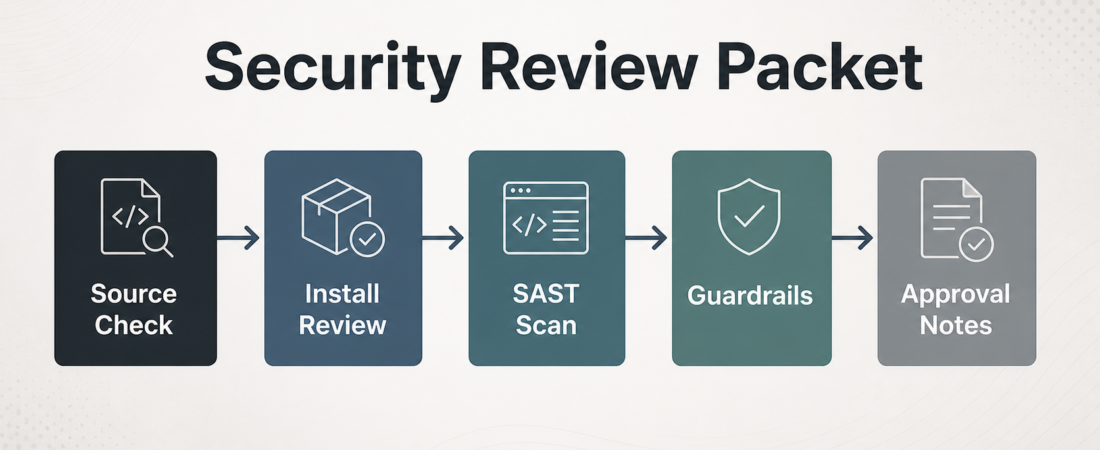
A Security Review Packet for New Agent Tooling
New agent tooling should not move from interesting demo to production access on instinct. A security review packet gives the team one small place to collect source evidence, install risks, static analysis results, guardrail decisions, and human approval notes before a skill, MCP server, CLI, or automation helper gets trusted work.
| Packet section | Evidence to capture | Decision owner |
|---|---|---|
| Source | Repo, release, license, maintainer signal, open security notes | Tooling owner |
| Install | Commands, scripts, network calls, credentials, local file access | Platform or security reviewer |
| Approval | Allowed use, denied use, rollback path, expiry date | Human approver |
In Short
Use a security review packet when an agent skill or tool could read private data, write code, call production systems, install dependencies, or influence a deployment. The packet does not need to be a heavyweight governance document. For most teams, 1 page with 5 sections is enough: source check, install-command review, static analysis, runtime guardrails, and approval notes.
This lines up with the practical direction in the OWASP GenAI Security Project: treat agent systems as software with permissions, trust boundaries, and failure modes. It also fits GitHub’s official guidance for supply chain security, where dependency source, provenance, and update behavior matter before code gets trusted.
Who this is for
This workflow is for platform teams, security reviewers, staff engineers, and small engineering groups that want agents to move faster without turning every new helper into an informal exception. It is especially useful when a tool is pulled from a public repository, asks for broad shell access, wraps package manager commands, or asks the agent to decide when to run checks.
It is not a substitute for a formal vendor review, penetration test, or incident response process. Use it as a first-pass adoption gate. The goal is to make the next decision clear: approve for a narrow pilot, reject, request changes, or allow only inside a sandbox.
Starter workflow
Start with the source record. Save the canonical repository or documentation URL, the exact version or commit you evaluated, the license, and any obvious maintenance signal. Avoid stale stars or download counts as proof of quality. The useful question is narrower: can someone find the source again, inspect what changed, and compare the installed version to the reviewed version?
Next, review the install path. Copy the commands exactly. Flag shell pipes, post-install scripts, binary downloads, package manager hooks, container privileges, and any request for cloud, GitHub, browser, database, or SSH credentials. A harmless-looking skill can still widen access if its setup step grants the agent a token with broad scope.
Then run static checks that match the tool. Semgrep rules are useful when the repository ships code or scripts. Supply chain checks are useful when the risk is hidden in transitive dependencies, generated lockfiles, or package metadata. Keep the raw findings and the short human interpretation together. A packet should say which findings block adoption and which are acceptable for a pilot.
After that, define runtime boundaries. List what the agent may read, what it may write, what commands are denied, and which actions require human confirmation. This is where destructive command blocking belongs. If the tool can touch infrastructure, databases, Kubernetes, Terraform, or Git history, approvals should be explicit and logged.
Finish with the decision. Record the approver, date, allowed scope, review expiry, rollback path, and a link to the test evidence. For a team of 4 people, this can live in an issue. For a team of 40, it may belong in a lightweight security intake tracker.
Recommended ASE skills
Use the required security checks first, then add one contract-review skill when the tooling exposes or calls APIs:
- Heisenberg Supply Chain Health Checker for dependency and provenance review before adoption.
- Semgrep Supply Chain Rule Pack Runner for targeted source and dependency rules.
- SAST Rule Compiler Semgrep when the team needs custom rules for local risk patterns.
- Agent Guardrails for Destructive Commands to block high-risk Terraform, database, Kubernetes, cloud, and Git operations.
- REST API Design Review when the new tool adds or depends on API calls with auth, versioning, or contract risk.
What to watch
Watch for review packets that collect evidence but never state a decision. A packet that says “scan passed” without allowed scope is not enough. The review should name the boundary: local-only, sandbox-only, read-only production, staged write access, or rejected.
Also watch for tools that hide risk in setup. The riskiest part may be the install script, browser profile access, environment variables, generated credentials, or a background daemon that keeps running after the agent finishes. The official Semgrep docs are a good reference for matching rules to code patterns, but the human reviewer still needs to decide whether the finding matters in this environment.
Finally, set an expiry date. Agent tooling changes quickly. A packet reviewed 6 months ago may describe a version, permission model, or dependency set that no longer exists.
FAQ
How long should the review packet be?
Keep the first version to 1 page or one issue template. If the tool needs production credentials, writes to infrastructure, or runs privileged commands, attach deeper evidence instead of stretching the main packet.
Does every skill need this?
No. A local formatting helper with no network access does not need the same review as a tool that can deploy code. Use the packet when data access, install behavior, production writes, or human approval boundaries matter.
What is the minimum approval record?
Record who approved it, what scope was approved, what version was reviewed, when the approval expires, and how to disable or roll back the tool. Without those 5 facts, the team will struggle to audit the decision later.