Skill Spotlight: WP Abilities API for Safer WordPress Agent Actions
WordPress is moving toward a clearer contract for site capabilities. The Abilities API, introduced for WordPress 6.9 according to the official Make Core dev note, gives plugins, themes, and core code a standard way to register actions with names, descriptions, schemas, callbacks, categories, and permission checks. That matters for agent work because a production agent should not have to infer what a WordPress site can do from scattered custom functions, admin screens, or undocumented AJAX handlers.
This spotlight is not a pitch to let agents change production content on their own. It is a way to narrow the surface area. If an agent can discover a registered ability, inspect its schemas, and respect its permission callback, the operator has a better review point than a prompt that says, “be careful with WordPress.”
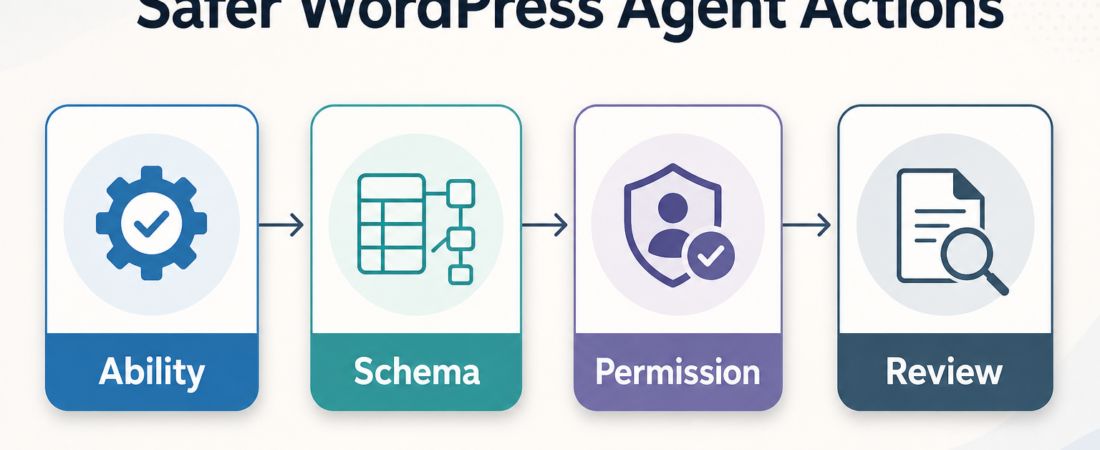
| Layer | Operator question | WordPress control |
|---|---|---|
| Ability | What exact action is exposed? | Stable ability name and category |
| Schema | What input and output are valid? | JSON Schema validation |
| Review | Where should a human approve? | Permission callback and runbook gate |
In Short
The WordPress Abilities API is useful because it turns site functionality into discoverable units with structured inputs, outputs, categories, callbacks, and permissions. The official handbook describes abilities as distinct pieces of functionality that can be registered and discovered, including by AI systems and automation tools. The REST API documentation also reinforces the broader WordPress pattern: routes expose specific endpoints, HTTP methods, arguments, and callbacks instead of vague access to the whole application.
For agent operators, the value is discipline. A skill can help a developer register an ability, expose it through REST only when intended, test the namespace, and decide where human review belongs before anything writes to production.
Who this is for
This is for WordPress plugin developers, agency engineers, and site operators connecting coding agents, admin assistants, or automation systems to real WordPress installations. It is especially relevant if your team already uses custom REST routes, WP-CLI runbooks, moderation helpers, or plugin-specific admin actions.
It is less useful for a brochure site with no custom automation surface. It is also not a shortcut around WordPress capability checks, nonce handling, code review, or release discipline. Treat the Abilities API as a contract layer that makes review easier, not as a blanket approval system.
Starter workflow
Start with one narrow, low-risk ability. A good candidate is informational: return site metadata, list plugin-owned records, or summarize a queue that an editor already has permission to view. The WordPress handbook notes that abilities can define input and output schemas, and the Make Core dev note lists REST endpoints under the wp-abilities/v1 namespace when REST exposure is enabled. Use that structure to keep the first pass boring.
- Name the ability. Use a stable namespace pattern such as
my-plugin/site-info. Do not name it after a temporary UI button. - Register the category first. Categories organize related abilities. In the ASE WordPress ability guidance, category registration happens before ability registration so the ability has a valid home.
- Define schemas. Keep input fields explicit and output fields predictable. Empty fields are better than guessed values when an agent is consuming the response.
- Add a permission callback. Any write action needs a clear permission boundary. Read-only abilities should still be marked and reviewed intentionally.
- Expose through REST only when needed. If a client or agent must discover the ability remotely, verify the
wp-abilities/v1route. - Test the failure path. Confirm what happens when the current user lacks permission, sends invalid input, or calls an ability that is not registered.
The shift is from “the agent can use WordPress” to “the agent can request this named ability with this schema under this permission model.” That is easier to test, document, and roll back.
Recommended ASE skills
Use these ASE skills in this order when you are building or reviewing this kind of WordPress agent surface:
- WP Abilities API for registering abilities, categories, metadata, REST exposure, and common debugging checks.
- Build and debug custom WordPress REST API endpoints with schema and permission guardrails when the ability sits beside custom REST routes or needs endpoint-level review.
- Run WordPress site operations safely with WP-CLI targeting and rollback guardrails when deployment, verification, cache purge, or rollback steps involve WP-CLI.
- Develop and harden WordPress plugins with lifecycle and security guardrails when the ability lives inside a plugin that needs activation, uninstall, sanitization, and release checks.
- Diagnose WordPress repo structure and route follow-up work safely when you need to classify whether the codebase is a plugin, theme, block project, mu-plugin, or core checkout before editing.
The first skill is the specialist. The next two protect API and operations boundaries. The last two keep implementation inside the right WordPress project shape.
What to watch
Version support is the first watch item. The official Abilities API handbook says it is available for WordPress 6.9 and above, so older sites need a compatibility plan. Do not assume production has the API just because development does.
REST exposure is the second. The Make Core dev note describes endpoints for categories, abilities, and execution under wp-abilities/v1 when enabled. That discoverability is useful, but it makes permission and schema review more important. If an ability changes content, options, users, files, or commerce records, require human approval.
Finally, watch naming drift. Stable ability IDs become an integration surface. Renaming an ability after agents or clients depend on it is closer to changing an API route than changing a label in the admin UI.
FAQ
Does the Abilities API replace the WordPress REST API?
No. The REST API remains the transport and route system for many WordPress integrations. The Abilities API gives developers a standard registry for site capabilities, and it can expose registered abilities through REST endpoints when configured.
Should every plugin action become an ability?
No. Start with actions that benefit from structured discovery and permission review. Internal helpers, experiments, and broad destructive actions are poor first candidates.
What is the safest first ability to expose to an agent?
Start read-only. A site-info lookup, queue summary, or validation check is easier to review than an action that writes posts, options, or users.
Where should human review happen?
Put review before execution for write actions and before deployment for registration changes. The agent can assemble the schema, route check, permission evidence, and test output; a human should still approve the production action.
Sources: WordPress Abilities API handbook, Abilities API in WordPress 6.9, and WordPress REST API routes and endpoints.