The Agent Skill Stack for a Small Team That Does Not Have Platform Engineering
Small teams usually do not need a platform engineering program before they try agent skills. They need a short stack that fits the work already on their desk: documents arriving from customers, support questions repeating themselves, release checks that get skipped, and basic reporting that still lives in spreadsheets.
The mistake is starting with the most ambitious automation first. A small team gets more value from skills that reduce review load, preserve evidence, and keep humans in the loop.
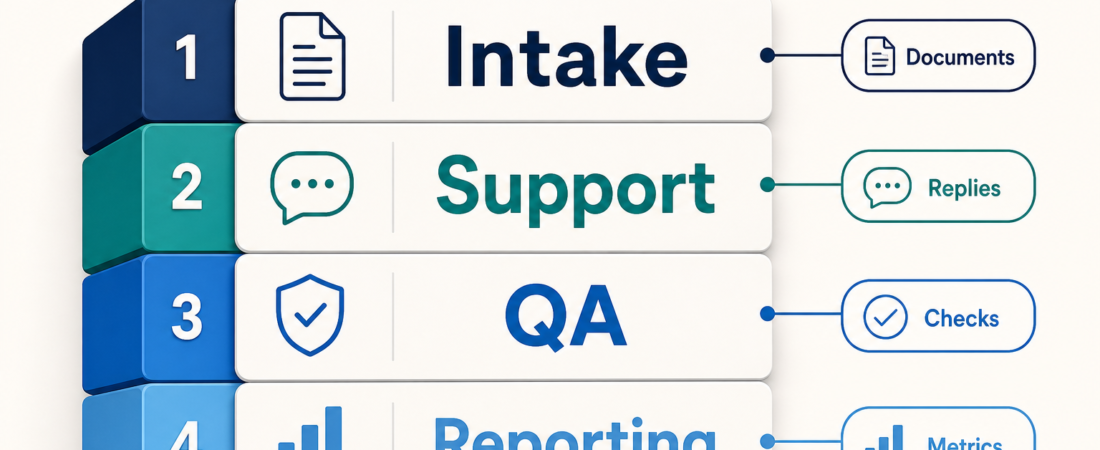
| Layer | Job | Good first outcome |
|---|---|---|
| Intake | Turn messy inputs into reviewable records | Every document or request has a source, summary, and owner |
| Support | Retrieve context before drafting replies | Agents cite the thread or doc they used |
| QA | Check the workflows customers actually touch | Repeatable browser checks before release |
| Reporting | Answer common operational questions | Small, auditable queries instead of mystery dashboards |
In Short
A practical small-team agent stack starts with four layers: intake, support, QA, and reporting. That is enough surface area to remove daily friction without handing an agent broad production control.
The first goal is better preparation, not autonomy. A useful stack helps the team collect cleaner inputs, draft with better context, verify simple flows, and answer routine questions from known data. If a task cannot be reviewed, replayed, or rolled back, it is too early.
Who this is for
This guide is for teams that have fewer people than problems: a founder-led SaaS company, a small agency, an internal tools group, a support-heavy startup, or a lean operations team.
It is also for teams that are agent-curious but skeptical. That skepticism is useful. Agent skills should not become a shadow system that only one person understands. The stack should be boring enough that a teammate can inspect what happened and decide whether the output is usable.
If you already have centralized platform tooling, policy engines, internal eval harnesses, and a staffed AI enablement team, this may feel too simple. For everyone else, simple is the point.
Starter workflow
Start with intake. Most small-team automation fails because the inputs are vague: PDFs in email, half-written tickets, customer notes in chat, screenshots without context, or spreadsheet rows with missing fields. A document intake skill such as Extract invoice fields from vendor PDFs into structured records shows the right pattern: source file in, structured fields out, human review before the record becomes official.
For broader document cleanup, Co-author structured docs with staged context gathering and reader testing can turn rough notes into something another teammate can evaluate. Ask for a review packet, not a final answer: source, proposed summary, open questions, and fields the agent could not confidently fill.
Next, add support context. Small teams lose hours answering the same questions while missing the detail that makes this customer different. Search Help Scout conversations and thread context before drafting support replies starts from retrieval. The agent can suggest language, but the owner still checks tone, facts, account status, and promises made.
Then add QA around the few flows that hurt when they break: signup, checkout, booking, upload, export, password reset, or whatever your product depends on. A browser skill such as Drive token-efficient browser testing from coding agents with Playwright CLI is a strong early choice because deterministic browser checks are easier to trust than a vague claim that the app “looks good.”
Only after that should reporting enter the stack. Reporting skills work best when the data source is bounded and the question repeats. DuckDB SQL Analytics Agent fits local CSVs, exports, and lightweight analysis because it keeps the task close to the data. Ask narrow questions: which invoices are missing approval, which tickets breached response time, which QA checks failed twice.
Finally, add a light safety layer. If your team ships through GitHub Actions, Audit GitHub Actions for privilege and supply-chain risks with zizmor gives the stack a guardrail before release automation grows teeth. If your team maintains APIs, API Documentation Indexer can keep docs discoverable before an agent answers developer questions from stale memory.
Recommended ASE skills
Use these as starting points, not a mandatory bundle:
- Extract invoice fields from vendor PDFs into structured records for structured finance or operations intake.
- Co-author structured docs with staged context gathering and reader testing for converting rough notes into reviewable documents.
- Search Help Scout conversations and thread context before drafting support replies for support teams that need source-backed replies.
- Drive token-efficient browser testing from coding agents with Playwright CLI for repeatable customer-flow checks.
- DuckDB SQL Analytics Agent for local, inspectable reporting from exports and CSVs.
- API Documentation Indexer for keeping API reference context easier to retrieve.
- Audit GitHub Actions for privilege and supply-chain risks with zizmor for release-path security checks.
You can browse more options from the ASE skill catalog or start by category at ASE categories.
What to watch
Watch for permission creep. A support skill does not need billing admin access. A reporting skill does not need permission to mutate production data. A browser QA skill should not quietly become a purchasing or account-management agent.
Watch for outputs that cannot cite their inputs. Small teams move fast, so the agent should leave a trail: source links, file names, run logs, assumptions, and unresolved questions. If the output is polished but unauditable, slow down.
Watch for too many skills too early. A stack with four well-owned skills beats a catalog dump with no operator. Assign each layer to a human owner who decides access, success criteria, and review triggers.
FAQ
Do we need an internal platform team before using agent skills?
No. You need clear boundaries, source-backed outputs, and a human review path. Platform engineering helps later when usage grows across teams and environments.
What should the first skill automate?
Choose a repeatable task with messy inputs but low blast radius. Document intake, support retrieval, and browser QA are better first candidates than production deployment.
How many skills should a small team start with?
Start with three to five. Cover intake, one customer-facing workflow, one verification check, and one reporting need. Add more only when the owner can explain the review path.
When is the stack ready for production use?
When every skill has an owner, access scope, expected output, failure mode, and rollback path. Until then, require human sign-off.