ASE Weekly Changelog: Skill Routes, Safer Defaults, and New Guides
This week’s ASE update is about routing, not volume. The useful work is helping operators choose a sensible first skill, understand the risk boundary, and avoid giving an agent more access than the workflow needs.
| Change | Operator action | Review point |
|---|---|---|
| More direct skill routes | Start from the job: document intake, support, QA, analytics, or store ops. | Confirm the chosen skill matches the system of record. |
| Safer default framing | Prefer read-only, draft-first, and evidence-first workflows. | Require human review before external changes. |
| New practical guides | Use checklists before adding skills to active teams. | Keep permissions, outputs, and rollback paths visible. |
In Short
- ASE’s practical direction this week is clearer routing: start from the work, then choose a skill.
- The safest first workflows are read-only lookup, reviewed drafts, document extraction, browser QA, and reporting.
- Stack-like workflows should include verification skills, not just generation or connector skills.
- New guides should help small teams move without pretending they have a platform engineering group behind every automation.
Who this is for
This update is for operators, founders, support leads, DevRel teams, finance ops owners, and agency teams who are trying to use agent skills without turning every workflow into an infrastructure project. It is also useful for skill creators who want to understand how ASE is tightening its editorial direction: practical routes, explicit boundaries, and evidence before action.
If you are new to the catalog, start with Browse Skills, then use the category and industry pages to narrow the choice. Teams with vertical workflows should also check Industry Skills, because a skill that looks generic in isolation may have a much clearer role inside finance, healthcare, support, ecommerce, or DevRel.
Starter workflow
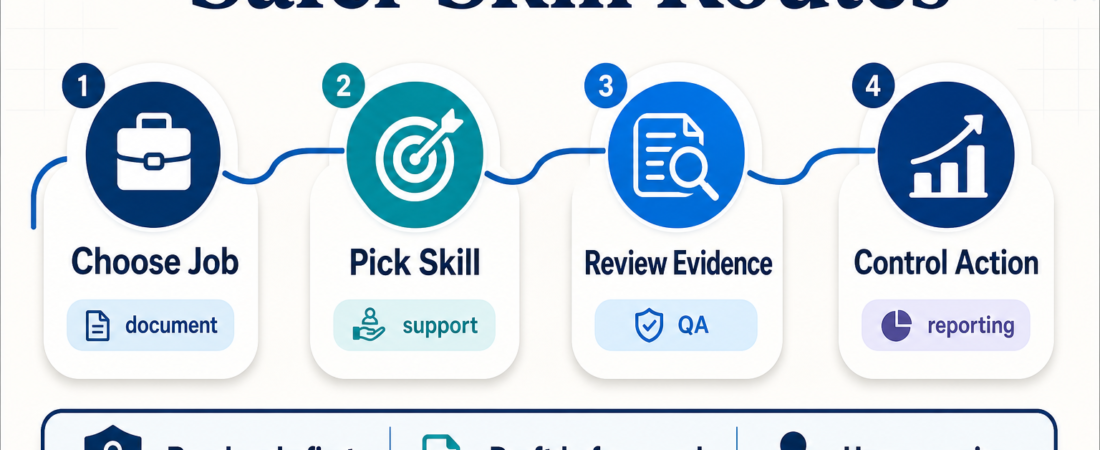
A good starter workflow has four steps. First, define the job in plain language: parse vendor PDFs, triage support tickets, check a release flow, review product analytics, or update ecommerce catalog evidence. Second, choose a skill that touches the smallest useful surface area. Third, make the output reviewable. Fourth, add a verification or escalation step before the agent changes customer-facing systems.
For document intake, that might mean starting with Zerox, LlamaCloud Services, or MarkItDown. Those skills fit different levels of structure and setup. A lightweight markdown conversion workflow is not the same as a managed parsing pipeline, and a scanned PDF needs different handling from a clean exported document.
For support and research, DocsGPT is the kind of skill that only works well when the source set is clean. The practical question is not “can an agent answer?” It is “can the agent cite the right source, show uncertainty, and route edge cases to a person?” That is why support routes should pair knowledge lookup with helpdesk context from skills such as Zendesk MCP, Freshdesk MCP, or Help Scout conversation search.
For release and QA work, browser automation should produce evidence, not just a pass/fail sentence. Teams can start with deterministic checks through Playwright MCP, then add higher-level browser task tools such as Stagehand, Skyvern, Nanobrowser, or visual parsing with OmniParser when selectors are not enough.
Recommended ASE skills
| Workflow | Good starting skill | Use it when |
|---|---|---|
| Document intake | Zerox | You need OCR-ready markdown from mixed document formats before review. |
| Managed parsing | LlamaCloud Services | You need a more structured document parsing pipeline with reviewable outputs. |
| Grounded answers | DocsGPT | You have a controlled source set and need citation-backed answers. |
| Browser QA | Playwright MCP | You need repeatable browser checks with screenshots, traces, or logs. |
| Release evaluation | Future AGI | You need traces, simulations, guardrails, or launch evidence before release. |
| Product analytics | PostHog | You need product-event context before deciding whether a workflow is working. |
| Feature rollout | LaunchDarkly rollout checks | You want exposure control and targeting evidence before broad release. |
For small teams, the pattern is simple: begin with low-risk visibility, then add controlled action. Read documents before writing systems. Draft replies before sending them. Check browser flows before deploying. Summarize analytics before changing rollout rules. This keeps the agent useful while preserving human control over irreversible steps.
What to watch
Watch for workflows that quietly expand permissions. A skill route that begins as “read a spreadsheet” can turn into “update customer records” if nobody writes down the boundary. Before using connector-heavy skills, decide whether the first version should be read-only, draft-only, or allowed to write to a staging surface only.
Also watch for weak evidence. A useful automation should leave an artifact: extracted fields, source links, screenshots, trace IDs, diffs, logs, or a reviewer checklist. If the output is only a confident paragraph, it is not ready for production use. The recent ASE guides are pushing toward evidence packets because they make review faster and safer.
Finally, avoid overbuilding the first stack. A small team without platform engineering does not need a full orchestration layer on day one. It needs one reliable route, one review point, and one fallback path. Add complexity after the workflow has proven that it saves time without hiding risk.
FAQ
What changed on ASE this week?
The practical direction tightened around skill routing, safer defaults, and operator guides. The emphasis is on helping readers choose a workflow path, not just browse a long catalog.
Which workflow should a small team try first?
Start with a reviewed workflow: document extraction, support draft preparation, browser QA, or reporting. Avoid workflows that send messages, move money, change production data, or update customer-facing pages until the evidence and review steps are stable.
Do stack posts need skill links?
Yes. If an article describes a stack, workflow, pipeline, playbook, or operating model, it should link to concrete ASE skills so readers can evaluate real options instead of reading a generic process essay.
How should operators evaluate a new skill?
Check the source, permissions, expected output, review path, and failure mode. A good skill should make its role in the workflow clear before it asks for sensitive access.