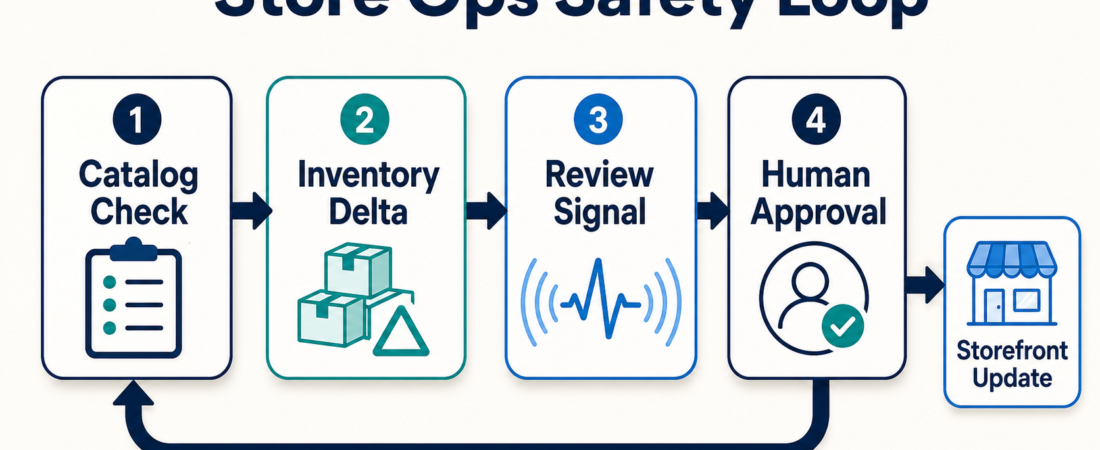
Ecommerce Ops Checklist: Catalog, Inventory, Reviews, and Storefront Safety
Ecommerce agent work gets risky when it jumps straight from “found an issue” to “changed the storefront.” Catalog edits, inventory updates, and review summaries can help a store team move faster, but they should not bypass systems that protect pricing, fulfillment, and customer trust.
The useful starting point is narrow: let agents gather evidence, compare records, and flag exceptions before a human or trusted system approves the storefront change.
| Ops area | Agent should prepare | Human checkpoint |
|---|---|---|
| Catalog | Duplicate SKUs, missing fields, inconsistent titles, stale product data | Approve price, availability, and customer-visible copy changes |
| Inventory | Delta report across channels, low-stock exceptions, sync failures | Confirm source of truth before publishing quantity updates |
| Reviews | Themes, defect signals, support escalation candidates, product feedback notes | Review sentiment summaries before merchandising or support actions |
| Storefront safety | Preflight checks, webhook evidence, rollback notes, test order evidence | Release only after payment, fulfillment, and UX checks pass |
In Short
Start ecommerce automation where the data is structured: products, orders, inventory, webhooks, and payment events. Use agents to inspect, reconcile, summarize, and prepare changes. Keep final publishing actions gated when changes affect price, availability, checkout, fulfillment, refunds, or customer-visible promises.
A safe first workflow has four parts: read from the source of truth, compare against another trusted record, produce a short exception list, and route the proposed action for review.
That review step is not ceremony. It is where store context enters the workflow: supplier delays, margin rules, seasonal campaigns, return policies, and customer support patterns.
Who this is for
This is for store operators, ecommerce engineers, marketplace teams, and retail ops leads with too many small checks: catalog cleanup, inventory sync review, review monitoring, webhook investigation, and release checks.
It is useful for teams running Shopify, WooCommerce, Saleor, Medusa, Stripe-backed marketplaces, or mixed commerce stacks where the admin UI is not the only place work happens.
Starter workflow
1. Pick the system of record before picking the skill. Decide whether products, orders, and inventory come from Shopify Admin, WooCommerce REST, Saleor, Medusa, an ERP, or a warehouse feed. Agents can compare systems, but they should not decide which system wins after the fact.
2. Separate catalog cleanup from catalog publishing. A catalog agent can find blank attributes, inconsistent labels, duplicate handles, missing fields, or category mismatches. Publishing fixes is a different permission level. Start with a proposed-change table: SKU, field, current value, proposed value, and evidence.
3. Treat inventory as a delta review. Inventory updates are operational facts. The useful output is a delta report: what changed, which channel disagrees, how stale the data is, and which rows need inspection.
4. Use review summaries as signals, not verdicts. Reviews can point to defects, packaging issues, confusing descriptions, and support gaps. Ask for recurring themes, sample quotes, affected SKUs, and a proposed owner.
5. Add a storefront safety check before release. Before any public change, ask for a short release packet: changed fields, affected products, payment or shipping dependencies, webhook evidence, test order result, rollback path, and final approver.
Recommended ASE skills
For API-first commerce backends, start with Saleor Open Source Headless Commerce GraphQL API or Medusa Commerce API Store Operations Automation Skill.
For Shopify teams, Build and Validate Shopify Apps With the Official Shopify AI Toolkit helps with app build and validation, while Run Shopify Admin Product, Order, Customer, and Inventory Workflows Through MCP fits supervised admin workflows.
For WordPress commerce teams, WooCommerce REST Inventory Sync is a practical starting point because inventory sync has clear inputs, outputs, and failure modes.
The broader Ecommerce & Retail Operations collection covers adjacent picks for payments, marketplace operations, subscription portals, and storefront agent interfaces.
What to watch
Do not let the agent edit customer-visible fields without review. Titles, prices, availability, return language, and promotional claims can create real customer harm when wrong.
Do not mix analytics with inventory truth. A product may be trending or heavily returned, but that does not mean the agent knows stock position, supplier constraints, or fulfillment rules.
Do not trust webhooks until signatures are checked. If an event is spoofed, duplicated, delayed, or parsed incorrectly, every downstream action gets shaky.
Do not hide uncertainty in a polished recommendation. Ecommerce teams need rows, IDs, timestamps, and links back to source records.
FAQ
Can agents update products directly?
Technically, yes, if credentials allow it. Operationally, start with proposed changes and approval gates.
Should review analysis change merchandising automatically?
No. Reviews are useful signals, but they can be noisy, seasonal, or unrelated to the product page.
What is the safest first workflow?
A catalog or inventory exception report that produces reviewable output without touching checkout, payment, fulfillment, or live product pages.
Where should teams draw the line?
Keep human approval on price, availability, shipping promises, return policy, checkout behavior, refunds, and customer-facing claims.