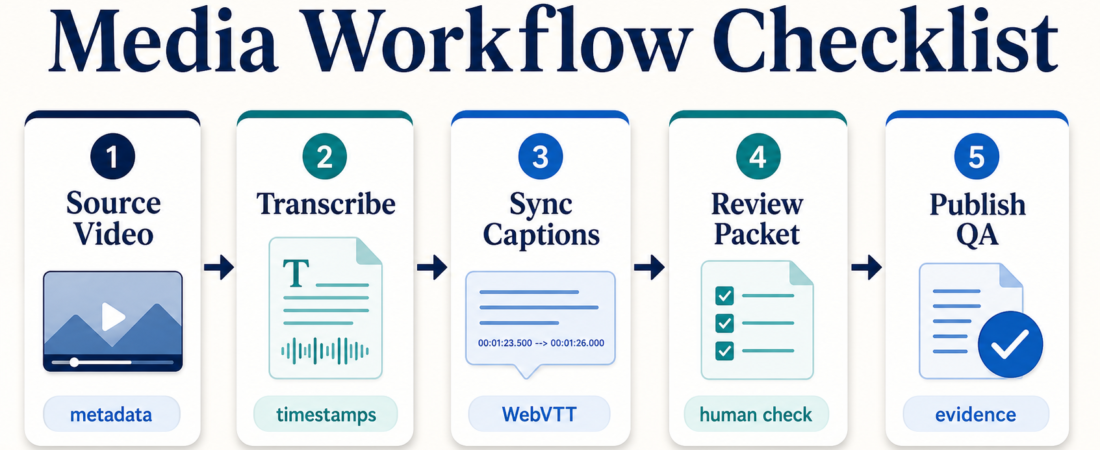
Media Workflow Checklist: From Source Video to Reviewable Transcript
A reliable media workflow is less about asking an agent to “summarize this video” and more about preserving evidence from the source file all the way to a human-reviewable transcript. Operators need timestamps, speaker boundaries, caption formats, edit notes, and a clean handoff before anything reaches a public channel.
This checklist is for teams using Agent Skill Exchange to build a practical path from raw video or audio to transcripts, captions, chapters, and publishing QA. It keeps the agent useful without pretending transcription is automatically final copy.
| Stage | Operator check | Evidence to keep |
|---|---|---|
| Source | Confirm file, channel, and rights | URL, filename, duration, metadata |
| Transcribe | Choose local, batch, or API transcription | Raw transcript, model/tool note |
| Align | Sync captions and speaker turns | SRT/WebVTT, timestamps, diarization notes |
| Review | Flag uncertain names, claims, and edits | Review packet with source references |
| Publish QA | Check captions, loudness, chapters, links | QA checklist and final assets |
In Short
A good media agent workflow should produce reviewable assets, not just a polished-looking transcript. Start with source metadata, generate a raw transcript, align captions, package uncertainties for review, then run publishing QA before the asset leaves the team.
The useful pattern is simple: let skills do the repetitive conversion and checking work, but make the human review point explicit. That matters for names, quotes, captions, speaker labels, claims, accessibility, and editorial judgment.
Who this is for
This is for podcast teams, video editors, content marketers, education teams, DevRel teams, and media operations leads who handle recurring audio or video assets. It also fits small teams that do not have a dedicated post-production engineer but still need consistent transcripts and captions.
It is not a replacement for editorial review, rights clearance, translation review, legal sign-off, or accessibility policy. A transcript can be technically complete and still be wrong in the places that matter: names, numbers, quote attribution, medical or financial claims, speaker identity, and context around a clip.
Starter workflow
1. Capture source evidence before extraction. Keep the source URL or filename, runtime, publication status, and any rights or privacy notes. Use a metadata-oriented skill such as MediaInfo Metadata Extractor when you need a quick read on container, duration, codecs, or track details before processing.
2. Pick the transcription path by constraint. For private files or local processing, start with a Whisper-based transcription path such as Whisper.cpp Local Transcription Engine or faster-whisper High-Performance Speech Transcription. For higher-volume production, a batch-oriented path such as OpenAI Whisper Batch Transcription Pipeline can be easier to operate consistently.
3. Add timestamps and speaker handling. If the transcript needs review against the media timeline, prefer word-level timestamps or diarization. WhisperX Speech Recognition with Word-Level Timestamps and Diarization is useful when the review packet needs speaker turns, searchable moments, or caption alignment evidence.
4. Convert transcript output into caption assets. Do not treat a transcript as captions until timing is checked. Use Whisper Subtitle Generator and ffsubsync Subtitle Synchronization Tool to produce and align caption files. If you publish WebVTT, check the format against the W3C WebVTT specification; small syntax errors can turn into broken captions in players.
5. Build the review packet before cleanup. Ask the agent to preserve uncertain words, low-confidence spans if available, names that need spelling checks, claims that need source review, and timestamps where a human should listen. This is where a transcript becomes operationally useful: the reviewer can jump directly to risky moments instead of rereading everything.
6. Run publish QA as its own stage. Before publishing, check loudness, captions, chapters, thumbnails, links, and final asset names. For recurring audio work, FFmpeg Audio Normalization Pipeline or Podcast RSS Feed Audio Normalizer can help keep output consistent. For long-form video, YouTube Chapter Generator from Transcripts can turn reviewed timestamps into navigation aids.
Recommended ASE skills
| Job | Skill | Use it when |
|---|---|---|
| Source inspection | MediaInfo Metadata Extractor | You need duration, codec, and track evidence before processing. |
| Local transcript | Whisper.cpp Local Transcription Engine | Privacy, repeatability, or offline processing matters. |
| Fast transcript | faster-whisper High-Performance Speech Transcription | You need faster transcription for repeated media jobs. |
| Timestamps and speakers | WhisperX Speech Recognition with Word-Level Timestamps and Diarization | The review packet needs speaker turns or word-level timing. |
| Caption sync | ffsubsync Subtitle Synchronization Tool | Caption timing needs correction against the actual audio. |
| Publishing QA | FFmpeg Audio Normalization Pipeline | You need consistent audio levels before release. |
What to watch
Do not erase uncertainty. If a name, product, citation, or quote is unclear, the agent should flag it with a timestamp. A clean transcript that hides uncertainty is worse than a rough transcript that makes review easy.
Keep transcript and caption jobs separate. Transcription answers “what was said.” Captions answer “what should appear on screen, when, and in what format.” They overlap, but the QA checks are different.
Respect rights and privacy. A workflow can make processing easier without making it appropriate to process every file. Private calls, customer recordings, unreleased footage, or third-party media may need consent, retention limits, or manual handling.
Make the final handoff boring. The best output is a folder or packet with source notes, raw transcript, reviewed transcript, caption files, uncertainty list, chapter suggestions, and final QA notes. That gives editors enough evidence to trust the workflow without trusting it blindly.
FAQ
Should I use local Whisper or an API transcription service?
Use local processing when privacy, reproducibility, or cost control matters. Use an API path when operations need managed scale, integrations, or less local setup. In either case, keep source metadata and review notes.
Can an agent publish captions without human review?
For low-risk internal drafts, maybe. For public media, accessibility, education, legal, healthcare, finance, or customer-facing work, review the captions before release.
What is the minimum useful review packet?
Source link or filename, transcript, timestamps, uncertain terms, speaker notes, caption file, and final QA checklist. Anything less makes the reviewer reconstruct evidence from scratch.
Where should teams start on ASE?
Start with the Media & Publishing Systems collection, then add transcription, caption sync, and QA skills only as the workflow needs them.