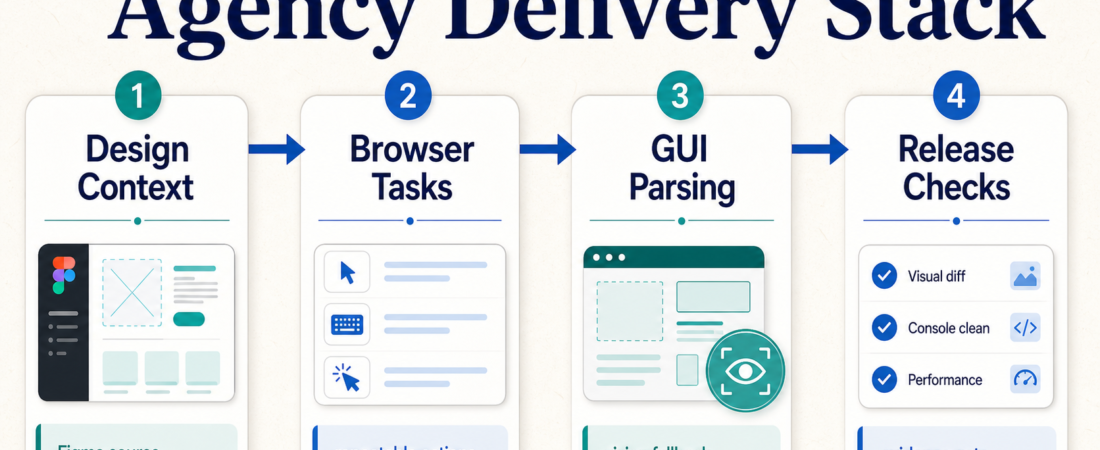
The AI Agency Delivery Stack: Browser Tasks, GUI Parsing, Figma Context, and Release Checks
AI agencies and forward deployed engineering teams do not need a giant agent platform before they can ship useful client work. They need a delivery stack with clear handoffs: source the design context, automate the repeatable browser work, use GUI parsing only where selectors fail, and run release checks before a client sees the result.
| Layer | Use it for | Review gate |
|---|---|---|
| Design context | Inspect layout, spacing, copy, and component intent from Figma before implementation. | Confirm the source frame, component state, and token assumptions. |
| Browser tasks | Run repeatable client workflow checks, demos, research passes, and QA scripts. | Keep screenshots, traces, logs, and changed data visible. |
| GUI parsing | Handle image-heavy or desktop-like interfaces where stable selectors are not enough. | Require human review when the parsed target is ambiguous. |
| Release checks | Evaluate traces, simulations, guardrails, and acceptance criteria before handoff. | Block launch when evidence is missing, flaky, or out of scope. |
In Short
The strongest agency stack is not “one agent does everything.” It is a staged workflow where each layer earns its place. Figma context helps the agent understand the intended UI. Browser automation handles repeatable web flows. GUI parsing gives a fallback for visual surfaces. Release checks decide whether the work is ready to show, ship, or send back for repair.
Use the AI Agency Operations & FDE Workflows collection as the starting point. It groups delivery-oriented skills around client audits, browser tasks, design-to-code context, workflow implementation, and release evidence.
Who this is for
This recipe is for AI agency founders, FDE teams, solutions engineers, and implementation leads who build client-facing workflows. It fits teams that already have a real client process to improve: onboarding checks, internal admin flows, product demos, QA passes, design-to-code work, or workflow handoff packets.
It is not a license to let an agent roam through client systems. The stack works best when credentials are scoped, the task is bounded, and every action leaves a review trail. If the workflow can change customer data, send messages, modify production settings, or trigger billing, keep approval outside the agent loop until the evidence is routine and boring.
Starter workflow
Start with the client artifact, not the tool. If the source of truth is a design file, use Figma context before the agent writes code or QA notes. The Figma layout context through MCP skill is useful when a coding agent needs access to frame structure, copy, spacing, and component intent. Check the official Figma developer docs and the skill’s setup notes before handing over a token.
Next, identify the browser work that should be deterministic. For client web apps, admin panels, and QA demos, prefer repeatable browser automation over vague “go check the site” prompts. Stagehand Browser Automation SDK, Playwright MCP browser and API automation, and Nanobrowser for local multi-agent browser tasks each fit different operating styles. Stagehand is useful when natural-language browser steps need code-backed execution. Playwright-style checks are better when selectors and assertions should be explicit. Nanobrowser fits supervised local browser work where the operator keeps control of the environment.
Use GUI parsing as a fallback, not the first move. OmniParser for vision-based GUI parsing can help when the interface is visual, canvas-heavy, remote, or not exposed through clean DOM selectors. The tradeoff is ambiguity: a parsed button or region is still an interpretation. Require screenshots and target confirmation before the agent clicks through a sensitive step. The OmniParser project docs are worth reading before treating vision output as operational truth.
Finally, put release evidence at the end of the workflow. Future AGI release checks can support traces, evaluations, simulations, and guardrails for agent workflows. That layer should answer a practical question: what would make this client delivery unacceptable today? If the answer is unclear, the release gate is not ready.
Recommended ASE skills
| Skill | Best fit | Operator note |
|---|---|---|
| Figma layout context through MCP | Design-to-code and UI implementation | Scope tokens and files carefully before sharing access. |
| Stagehand Browser Automation SDK | Browser task implementation | Use when natural-language steps need a code-backed browser layer. |
| Playwright MCP browser and API automation | Repeatable QA checks | Prefer for selectors, assertions, traces, and API checks. |
| Nanobrowser | Local supervised browser work | Good for human-observed browser sessions and task decomposition. |
| OmniParser | Vision fallback for GUI-heavy surfaces | Do not skip target confirmation on sensitive actions. |
| Future AGI | Release evaluation and guardrails | Make pass/fail evidence visible before client handoff. |
What to watch
Watch for access creep. A browser skill that starts as QA can quietly become an operations tool if it receives production credentials. Keep read-only accounts, sandbox tenants, or demo data wherever possible.
Watch for visual confidence. GUI parsing can make an agent appear more capable than it is. When the UI target is uncertain, ask for an annotated screenshot or a short human confirmation step.
Watch for handoff gaps. Agencies often fail at the last mile: the demo works, but the client cannot inspect what changed. Package the final output with links, screenshots, assumptions, known failures, and the release check result.
FAQ
Should an AI agency start with Figma, browser automation, or evaluation?
Start with the client source of truth. If the task is design-to-code, start with Figma context. If the task is workflow QA, start with browser automation. If the task is an agent release, define the evaluation gate before expanding the workflow.
When should GUI parsing be used instead of selectors?
Use GUI parsing when selectors are unavailable, unstable, or do not represent what the user actually sees. For normal web apps with accessible DOM structure, selectors and API checks are usually easier to review.
How many skills should be in the first agency stack?
Three or four is enough: one context source, one execution layer, one fallback layer if needed, and one release check. More tools usually mean more credential, debugging, and handoff work.
What makes this safe for client work?
Bounded credentials, visible artifacts, human approval points, and release evidence. The goal is not autonomous delivery; it is faster delivery that a client and operator can inspect.