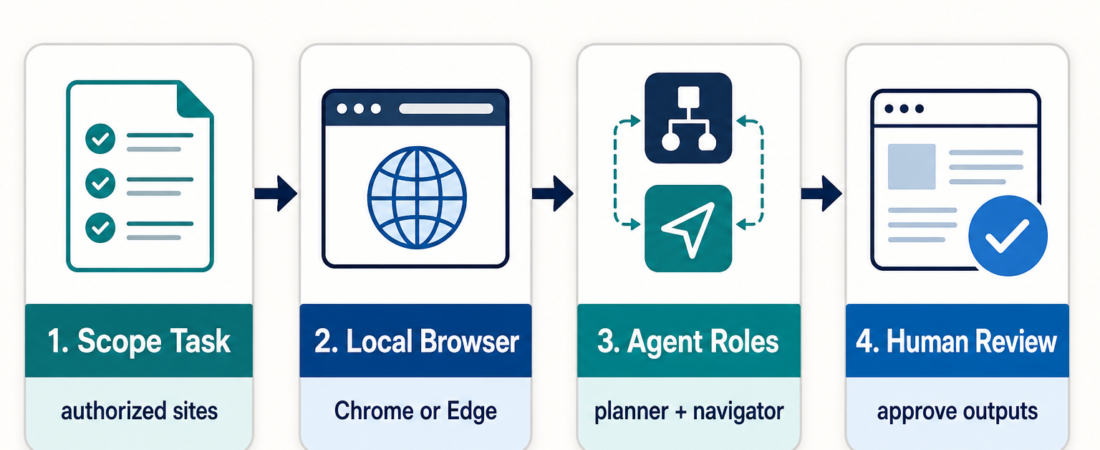
Skill Spotlight: Nanobrowser for Local Multi-Agent Browser Tasks
Nanobrowser is useful when an operator wants an AI browser agent to work inside a local Chrome or Edge session, with credentials staying in the user’s browser and the run visible enough to review. That makes it a good fit for scoped browser tasks such as agency QA checks, lead research, competitive page inspection, and repetitive web workflows where the operator still needs to approve the result before using it downstream.
In Short
- Use Nanobrowser when the task needs a local browser session, user-owned model keys, and visible browser actions.
- Do not use browser automation just because a site is in a browser. If an API, export, or deterministic test can do the job, start there.
- The strongest Nanobrowser tasks are narrow: inspect pages, collect structured facts, compare flows, or repeat a known web operation.
- Keep review in the loop for logged-in accounts, client work, pricing research, form submissions, and any workflow that changes data.
| Use Nanobrowser when… | Avoid or pause when… |
|---|---|
| The work must happen in the operator’s Chrome or Edge session. | The same data is available through a stable API, CSV export, or database query. |
| The operator needs to watch navigation and inspect intermediate states. | The workflow submits payments, changes account settings, or sends messages without review. |
| The task can be expressed as a short, bounded browser job. | The instruction is vague, open-ended, or depends on judgment the agent cannot verify. |
| Planner and navigator roles can divide reasoning from page interaction. | The page is hostile to automation, legally restricted, or outside the user’s authorization. |
Who this is for
This spotlight is for operators who already use browser work as part of delivery: AI agencies checking client sites, growth teams collecting public research, support teams reproducing customer paths, and technical operators validating forms, docs, dashboards, or signup flows. If the work is mostly clicking, reading, comparing, and reporting, Nanobrowser can be a useful local browser-agent option.
The important word is local. The Nanobrowser project describes itself as an open-source AI web automation tool that runs in your browser. It supports Chrome and Edge, lets operators configure their own LLM provider keys, and uses a multi-agent setup with roles such as planner and navigator. That combination changes the operating model: the agent is not a remote black-box browser. It is working where the operator can see the browser state and decide whether the output is acceptable.
Decision path
Start by asking whether browser automation is even the right layer. For site health checks, a skill such as Playwright CLI browser testing or the Playwright MCP server may produce stronger evidence because selectors, traces, and API checks are easier to repeat. If the workflow needs a hosted browser session, shared infrastructure, or remote automation APIs, compare Nanobrowser with Browserbase MCP Server and Browserbase Session Automation API and SDK.
If the task is closer to “open my browser, use my current account context, inspect this site, and produce a reviewable result,” Nanobrowser deserves a closer look. It is especially relevant when the operator wants to assign different models to planning and navigation, keep provider choice flexible, and use the browser side panel to monitor a run. The right task prompt should include the site, the allowed actions, the output format, and the stopping condition.
Starter workflow
- Define the job in one sentence. Example: “Inspect these five public landing pages and return pricing-page availability, signup friction, and broken-link notes.”
- State the boundary. Tell the agent whether it may log in, whether it may submit forms, and which pages or accounts are authorized.
- Choose model roles deliberately. Use a stronger model for planning when the task has branching decisions, and a cheaper or faster model for navigation when the page actions are straightforward.
- Require structured output. Ask for a table, bullets with source URLs, or a pass/fail note with observed evidence.
- Review before reuse. Treat the result as an operator packet, not an autonomous decision. Check the pages visited, the evidence captured, and any uncertain claims.
For agency QA, a good Nanobrowser task might be: “Open the client staging site, check the homepage, pricing page, contact form, and blog index. Do not submit the form. Report broken navigation, visual anomalies, missing metadata, and screenshots or page URLs for each issue.” That is much better than “test the site,” which leaves too many choices implicit.
Recommended ASE skills
| Skill | Use it for | Operator note |
|---|---|---|
| Nanobrowser | Local Chrome or Edge browser-agent tasks with visible state. | Best when the operator owns the session and reviews the run. |
| Stagehand Browser Automation SDK | Developer-controlled browser automation with AI-assisted page actions. | Better when the team wants code-level integration. |
| Skyvern AI Browser Workflow Automation | LLM and computer-vision browser workflows across changing pages. | Useful when selectors alone are brittle. |
| Playwright MCP Server | Repeatable browser and API checks with stronger test evidence. | Prefer for release checks and regression gates. |
| Browserbase MCP Server | Hosted browser sessions exposed through MCP. | Consider when local browser state is not the goal. |
| Escalating Scrape Strategy | Deciding when simple fetch, parsing, or browser automation is warranted. | Start here when the task may not need a full browser. |
What to watch
Browser agents are easy to over-trust because the output looks like completed work. Keep the bar higher. For research tasks, require source URLs and mark uncertain findings. For QA tasks, preserve evidence: pages visited, failure conditions, screenshots where available, and exact steps to reproduce. For logged-in workflows, specify what the agent may not do. A local browser session does not remove the need for permission boundaries.
Nanobrowser also has practical limits. Its own documentation lists Chrome and Edge as the supported browsers, with other browsers not officially supported. Local model use can be attractive for privacy and cost control, but smaller local models may need clearer prompts and more retries. That is not a flaw; it is a planning constraint operators should account for before using the result in client or production work.
Where Nanobrowser fits in the browser automation stack
Think of Nanobrowser as a local operator tool, not a replacement for test suites. It is strongest when the workflow benefits from human-visible browser state and flexible model assignment. It is weaker when the team needs stable CI evidence, precise selectors, or audit-grade repeatability. For those cases, the ASE browser automation collection around Playwright, Stagehand, Skyvern, and Browserbase gives operators a healthier routing map than choosing one browser agent for everything.
That is the practical lesson: local browser agents are useful when they are scoped, observable, and reviewed. Nanobrowser gives operators an interesting way to run that pattern in their own browser. The responsibility is to keep the task bounded enough that the output can be checked.
FAQ
Is Nanobrowser a replacement for Playwright?
No. Nanobrowser is better framed as a local browser-agent workflow. Playwright-style skills are usually better for repeatable regression checks, CI gates, and evidence-heavy release verification.
Should an agency use Nanobrowser for client QA?
It can help with first-pass browser review, competitive research, and manual-flow reduction. Do not let it submit changes or make client-facing claims without human review.
What makes a good Nanobrowser prompt?
A good prompt names the site, allowed actions, forbidden actions, output format, and stopping condition. Short, bounded tasks are more reliable than broad instructions like “research this company.”
Where should operators browse related skills?
Start with the Industry Collections, the Playwright browser automation spotlight, and the broader verification-style comparison if the task is release or QA oriented.