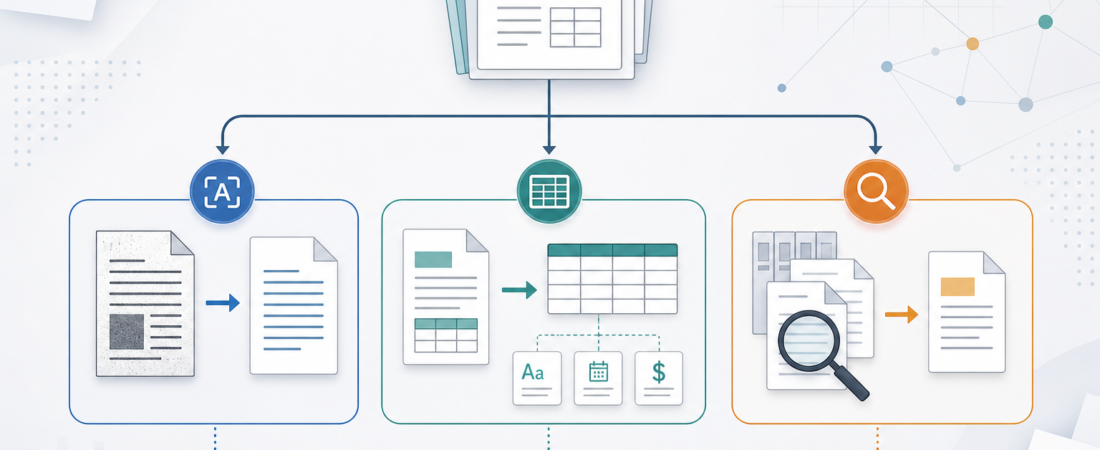
OCR vs Structured Extraction vs Archive Search: Choosing the Right Document Skill
Most document automation projects fail at the first decision: treating every file like the same kind of problem. A scanned intake form, a vendor invoice, a 400-page PDF, and a folder of old contracts may all be “documents,” but they do not need the same skill. Some need raw text recovery. Some need field-level extraction. Some need search across an archive before anyone knows which page matters.
| Document job | Best first skill | Output to review |
|---|---|---|
| Scanned pages or images | OCR | Searchable text with page evidence |
| Invoices, forms, tables, filings | Structured extraction | Rows, fields, schema checks, exceptions |
| Large document collections | Archive search | Relevant documents, pages, snippets, source links |
The practical answer is to route the work by the shape of the evidence you need at the end. If the team needs readable text from a scan, start with OCR. If the team needs values in a downstream system, start with structured extraction. If the team needs to find the right source before summarizing or deciding, start with archive search. The best agent workflows often combine all three, but the order matters because each step changes what the next skill can trust.
Use OCR when the document is not text yet
OCR is the right starting point when the bottleneck is visibility. Scans, photos, faxed forms, image-only PDFs, and old packets from shared drives may look readable to a person but contain little or no selectable text for an agent. In that case, asking an agent to summarize the file first is premature. The skill should convert pixels into text and preserve enough page context for a reviewer to check the result.
For this lane, ASE has several useful starting points. Tesseract OCR Engine for Image-to-Text Workflows fits lightweight image-to-text recovery. OCRmyPDF Searchable PDF OCR Pipeline is a better fit when the desired output is still a PDF, but now with a text layer that search, copy, and downstream tools can use. For harder layouts, Surya Document OCR with Layout Analysis and Table Recognition and PaddleOCR Multilingual Document OCR and Structured Data Toolkit are worth considering because layout and language coverage can matter as much as character recognition.
The review standard for OCR should be blunt: can a human trace the recovered text back to the page, and are low-confidence regions visible enough to inspect? OCR output should not quietly become a decision. It should become usable evidence. That is especially important in healthcare intake, legal archives, finance packets, and real estate paperwork where the cost of a missed digit or misread name is not abstract.
Use structured extraction when the team needs fields, not prose
Structured extraction is a different job. The goal is not “read this document” but “produce specific values in a shape the team can validate.” An invoice workflow may need vendor name, invoice number, subtotal, tax, due date, payment terms, and line items. A filing workflow may need issuer names, dates, accession numbers, risk factors, or segment-level values. A support or compliance workflow may need entities, signatures, clauses, checkboxes, and exception notes.
This is where schema discipline matters. A good extraction skill defines the expected output, records missing values explicitly, and separates source-backed facts from inferred commentary. Docling Document Parsing and Conversion Toolkit and Unstructured Document ETL Toolkit are useful for turning messy PDFs and mixed-format files into machine-friendly chunks. pdfplumber Python PDF Text and Table Extraction Library is a strong fit when tables and coordinates are central. For schema-shaped outputs, LangExtract LLM-Powered Structured Text Extraction, Instructor Structured Data Extraction from LLMs, and Extract invoice fields from vendor PDFs into structured records show the direction: return reviewable data, not a confident paragraph.
The trap is over-extraction. Teams often ask for every possible field because the agent can produce something that looks complete. That creates fragile automation. A better first version extracts the small set of fields that drive a real action and flags everything else for review. The workflow should also keep the original page reference, table region, or snippet beside each value. Without that source trail, structured extraction becomes a new manual audit problem.
Use archive search when the first problem is finding the right source
Archive search is the right lane when the team has too many documents, not too little text. The question might be “find the renewal clause,” “which customer packets mention this address,” “what past invoice explains this variance,” or “which PDF contains the signed version.” In these cases, extracting every document first may be wasteful. The workflow should narrow the evidence set, return likely matches, and let the agent or reviewer inspect only the relevant pages.
ASE includes skills that support this pattern from different angles. Paperless-ngx Document OCR and Archive Management System is useful when documents need to become an organized, searchable archive. Search large PDFs and read only the relevant pages before answering captures the core review habit: do not feed the whole document to the model when only five pages matter. Search PDFs, Office files, ebooks, and archives with one query before manual review covers broader mixed-file collections. For web and knowledge archives, Linkwarden Collaborative Bookmark Archive and Preservation Platform can support preservation-oriented workflows where the source itself may change later.
The quality gate for archive search is not whether the answer sounds plausible. It is whether the returned documents, pages, snippets, and timestamps are enough for a person to verify the path. Search-first workflows should show misses and ambiguity too. If two contracts look similar, or if the archive contains duplicate revisions, the agent should surface that uncertainty instead of picking one silently.
A practical routing model
Start with the document’s current state. If it is image-only or low-quality, run OCR first and review the text layer. If it already contains usable text but the team needs values, move to structured extraction. If the file set is large or the right source is unknown, search before extracting. This routing keeps the agent from doing expensive or risky work too early.
For example, a finance ops team handling vendor packets might use OCR for scanned attachments, structured extraction for invoice fields, and archive search to compare a new charge against past contracts. A legal ops team might search the archive for the governing agreement, OCR old exhibits, then extract clause summaries into a review packet. A healthcare documentation team might OCR intake forms and use extraction only for administrative fields, keeping clinical interpretation outside the automation boundary. A real estate operations team might search transaction folders, recover text from scanned disclosures, and extract checklist fields for coordinator review.
This is also why document skills should be evaluated as a chain, not as isolated demos. OCR accuracy matters, but it is only useful if downstream extraction receives page-linked text. Extraction accuracy matters, but it is only useful if the schema matches a real review or system update. Archive search matters, but it is only useful if the retrieved source can be trusted and revisited. The workflow earns confidence by preserving evidence at each boundary.
What to avoid
Avoid using OCR as a magic cleanup step for every PDF. Born-digital PDFs often already have text, and OCR can introduce new errors if it is run unnecessarily. Avoid asking a structured extraction skill for a broad summary when the real output should be typed fields. Avoid archive search that returns an answer without citations, because the useful artifact is the path to the source, not just the final sentence.
Also avoid treating document automation as autonomous decision-making. The safest and most useful agent workflows prepare evidence, route exceptions, and reduce repetitive review. They do not approve invoices, interpret legal rights, provide medical conclusions, or make financial recommendations on their own. In regulated and high-stakes environments, that boundary is not a disclaimer; it is part of the product design.
The bottom line
Choose OCR when the agent cannot reliably see the text. Choose structured extraction when the team needs validated fields. Choose archive search when the team must find the right source before doing anything else. Then combine them deliberately: recover text, extract only what matters, search with citations, and keep humans in the loop where judgment or risk enters the workflow.
That routing mindset is what turns document automation from a pile of clever demos into an operational system. The right skill is not the one with the broadest promise. It is the one that produces the next reviewable artifact your team actually needs.